
Best 1080p Webcams in 2026: 15 Picks Compared on Specs
Based on the specifications we compared, the NexiGo N960E offers the strongest combination of features at 1080p. It combines a 1080p sensor that runs at 60 frames per second with autofocus, a built-in microphone, and a privacy cover, covering the needs of most buyers. This guide compares 15 top 1080p webcams across these specifications, all selected from a pool of 61 1080p webcams using only the sellers' stated specifications.
15 picks from 155 webcams that match this guide with a price we can quote today. Every price below is live and carries the moment it was read.
The picks at a glance
Which one should you buy?
- For streamers and gamers: Look for a webcam that can hit 60 fps at 1080p, has autofocus, and works with streaming software. The NexiGo N960E or AVerMedia Live Streamer Cam 313 are good matches. See pick 1
- For remote work and video calls: Prioritize a built-in microphone with noise cancellation and a privacy cover. The Lenovo FHD and HP 320 FHD are solid picks for everyday meetings. See pick 6
- For professional presentations: If you need to track a speaker or move the camera remotely, choose a PTZ model like the OBSBOT Tiny SE or the PTZOptics Move SE. See pick 3
- For simple, straightforward use: If you just need a dependable 1080p webcam for occasional calls, a budget model like the AUSDOM AF640 or Macally HD offers plug-and-play convenience. See pick 14
The 15 picks
1 Best overall

NexiGo N960E 1080P 60FPS Webcam with Light
- Resolution
- 1080p
- Frame rate
- 60 fps or more
- Autofocus
- Yes
- Built-in microphone
- Yes
- Privacy cover
- Yes
$69.99 price as of 2026-10-01 05:38 UTC (Details)
The NexiGo N960E is the most complete package in this list. It offers 1080p at 60 fps, autofocus, a built-in microphone, a privacy cover, and bundled software, all in one unit. No other pick combines these features at this level.
Pros
- 1080p at 60 fps for smooth motion
- Autofocus keeps you sharp
- Built-in microphone and privacy cover
- Software included for fine-tuning
Cons
- Field of view not stated by seller
- No PTZ or tracking features
Good fit if
- Streamers who want 60 fps without spending on a DSLR
- Users who want a single webcam for calls and content
Skip if
- You need a wide-angle lens for group shots
- You require pan-tilt-zoom control
Verdict: The NexiGo N960E delivers the highest combination of useful features at 1080p.
2 Best bundle with microphone

Logitech C922x Pro Webcam + Blue Yeti Nano
- Resolution
- 1080p
- Frame rate
- 30 fps
$219.98 price as of 2026-10-01 05:36 UTC (Details)
The Logitech C922x is a proven streaming webcam, and this listing bundles it with a Blue Yeti Nano microphone. It captures 1080p at 30 fps or 720p at 60 fps, giving streamers a flexible pairing right out of the box.
Pros
- Trusted brand with wide software support
- Includes a Blue Yeti Nano mic for better audio
- Dual frame rate options: 1080p/30 or 720p/60
- Adjustable tripod included
Cons
- Only 30 fps at 1080p, not 60
- No autofocus listed in the seller’s specs
Good fit if
- Streamers who need a dedicated microphone
- Creators who value brand reliability and ecosystem
Skip if
- You want 1080p at 60 fps
- You already own a separate USB microphone
Verdict: A solid choice for streamers who prefer a proven camera and a quality mic in one purchase.
3 Best AI tracking PTZ

OBSBOT Tiny SE 1080P PTZ Webcam AI-Tracking
- Resolution
- 1080p
- AI tracking
- Yes
$91.00 price as of 2026-10-01 05:38 UTC (Details)
The OBSBOT Tiny SE brings AI-powered tracking and PTZ control to a 1080p webcam, an uncommon mix at this level. It includes a mini tripod and can follow a presenter, making it great for solo creators and educators.
Pros
- AI auto-tracking keeps you in frame
- Pan-tilt-zoom without external software
- Compact design with mini tripod
- Plugs in over USB
Cons
- No built-in microphone listed by seller
- No stated frame rate beyond 1080p
Good fit if
- Presenters who move around during talks
- Streamers who want hands-free framing
Skip if
- You need a built-in mic
- You prefer a fixed camera that doesn't move
Verdict: The OBSBOT Tiny SE is the most approachable way to get PTZ and tracking at 1080p.
4 Best professional PTZ

PTZOptics Move SE 30x 1080p Full HD PTZ Auto-Tracking Pan Tilt Zoom
- Resolution
- 1080p
- AI tracking
- Yes
$1,499.00 price as of 2026-10-01 05:39 UTC (Details)
The PTZOptics Move SE is a full-featured PTZ camera with 30x optical zoom and auto-tracking, aimed at production environments. It offers 1080p output and is a step up from consumer webcams for multi-camera setups.
Pros
- 30x optical zoom for detailed close-ups
- Auto-tracking follows speakers
- PTZ control via system
- 1080p output
Cons
- High price compared to other picks
- No built-in microphone listed
- No autofocus specified by seller
Good fit if
- Conference rooms and lecture halls
- Production teams needing a professional PTZ camera
Skip if
- You need a simple desktop webcam
- Your budget is limited to consumer models
Verdict: The PTZOptics Move SE is the most capable PTZ camera in this list, with 30x zoom and tracking.
5 Best for streaming

AVerMedia Live Streamer Cam 313
- Resolution
- 1080p
- Built-in microphone
- Yes
- Privacy cover
- Yes
$57.19 price as of 2026-10-01 05:26 UTC (Details)
The AVerMedia Live Streamer Cam 313 is designed for streamers with dual microphones, a privacy shutter, and a 360-degree swivel. It provides 1080p video and works with OBS and other streaming tools out of the box.
Pros
- Dual microphones for clear audio
- Privacy shutter included
- 360-degree swivel for flexible positioning
- Plug-and-play with streaming software
Cons
- Frame rate not stated by seller
- No autofocus feature listed
Good fit if
- Streamers who want a dedicated camera with a mic
- Users who value a physical privacy shutter
Skip if
- You need 60 fps at 1080p
- You plan to use an external microphone
Verdict: A reliable streaming camera with solid audio built in, ideal for starting a live channel.
6 Best for video calls

Lenovo FHD Webcam
- Resolution
- 1080p
- Frame rate
- 30 fps
- Built-in microphone
- Yes
- Privacy cover
- Yes
$45.99 price as of 2026-10-01 05:35 UTC (Details)
The Lenovo FHD webcam targets work-from-home users with dual noise-cancelling microphones and AI noise cancellation. It runs at 1080p/30 fps and includes a privacy cover, making it a strong everyday meeting camera.
Pros
- Dual noise-cancelling microphones
- AI noise cancellation for clearer calls
- Privacy cover included
- 1080p resolution
Cons
- Only 30 fps, not 60
- No autofocus listed
Good fit if
- Remote workers who spend hours in video meetings
- Users in noisy home offices
Skip if
- You need smooth 60 fps motion
- You prefer a webcam without a cover
Verdict: The Lenovo FHD is the best choice for video calls thanks to its noise-cancelling audio and privacy cover.
7 Best for Chromebook

HP 320 FHD Webcam
- Resolution
- 1080p
- Built-in microphone
- Yes
- Privacy cover
- Yes
$28.99 price as of 2026-10-01 05:33 UTC (Details)
The HP 320 FHD webcam is listed as compatible with Chromebook, and it also works with Windows and macOS. It provides a microphone and privacy cover, and its simple USB-A connection makes it easy to set up.
Pros
- Explicitly supports Chromebook
- Built-in microphone and privacy cover
- 1080p resolution
- Plug-and-play USB-A
Cons
- No autofocus feature stated
- Frame rate not listed by seller
Good fit if
- Chromebook users who need a separate webcam
- Users who want a fuss-free USB-A connection
Skip if
- You need 60 fps capture
- You require autofocus for close-ups
Verdict: A dependable webcam for Chromebook users, with a microphone and privacy cover included.
8 Best for privacy focused users

Amcrest 1080P Webcam with Microphone & Privacy Cover
- Resolution
- 1080p
- Built-in microphone
- Yes
- Privacy cover
- Yes
$25.99 price as of 2026-10-01 05:24 UTC (Details)
The Amcrest 1080P webcam emphasizes privacy with a built-in microphone and a physical privacy cover. It’s a straightforward, low-fuss option for people who want a secure camera for desktop or laptop use.
Pros
- Physical privacy cover
- Built-in microphone
- 1080p resolution
- Simple USB connection
Cons
- No autofocus listed
- Frame rate not specified by seller
Good fit if
- Users who often worry about webcam security
- People who want a basic, reliable webcam without extra features
Skip if
- You need 60 fps or autofocus
- You want advanced software features
Verdict: A no-nonsense webcam with a privacy cover that will appeal to security-conscious buyers.
9 Best for business meetings

Poly Studio P5 Professional Webcam
- Resolution
- 1080p
- Privacy cover
- Yes
$14.99 price as of 2026-10-01 05:39 UTC (Details)
The Poly Studio P5 is a professional webcam from a brand known for conferencing gear. It offers 1080p video and a privacy cover, and it’s designed to work with Teams and other business platforms.
Pros
- Professional conferencing brand
- 1080p resolution
- Privacy cover built in
- Compact design
Cons
- No microphone listed in the seller’s specs
- No autofocus stated
Good fit if
- Business users who want a camera from a trusted conferencing brand
- People who already have a separate USB microphone
Skip if
- You need a built-in mic
- You expect autofocus for dynamic situations
Verdict: A professional-leaning webcam that delivers clean 1080p video for meetings, if you have an external mic.
10 Best for meetings on a budget

Acer A610 1080p Webcam for PC
- Resolution
- 1080p
- Built-in microphone
- Yes
$26.99 price as of 2026-10-01 05:23 UTC (Details) Typical price: $29.99, 10% off
The Acer A610 is an affordable webcam with a built-in microphone, making it a no-frills option for daily meetings. It provides 1080p video and works with major video calling platforms.
Pros
- Built-in microphone
- 1080p resolution
- Simple plug-and-play setup
- Known brand
Cons
- No privacy cover
- No autofocus or frame rate specified
Good fit if
- Users who want a basic meeting webcam
- Anyone on a tight budget for occasional calls
Skip if
- You need a privacy cover
- You want a webcam for streaming or content
Verdict: A solid, no-frills meeting webcam from a reliable PC maker.
11 Best with ring light

Angetube Streaming Webcam with Microphone
- Resolution
- 1080p
- Built-in microphone
- Yes
$59.85 price as of 2026-10-01 05:24 UTC (Details)
The Angetube webcam includes a built-in ring light, which helps with illumination in darker rooms. It has a microphone and 1080p output, making it a good option for streamers and video callers who need extra light.
Pros
- Integrated ring light for better lighting
- Built-in microphone
- 1080p video
- USB connection
Cons
- No autofocus listed
- No privacy cover
Good fit if
- Streamers who need extra face lighting
- Users in dimly lit rooms
Skip if
- You already have a light source
- You prefer manual focus control
Verdict: A useful webcam with a built-in ring light, at the cost of some advanced features.
12 Best with RGB lighting

NBPOWER 1080P 60FPS Streaming Camera Webcam
- Resolution
- 1080p
- Frame rate
- 60 fps or more
- Autofocus
- Yes
- Built-in microphone
- Yes
$29.99 price as of 2026-10-01 05:38 UTC (Details)
The NBPOWER webcam adds RGB fill lighting to a 60 fps 1080p camera, with autofocus and a microphone. It’s a flashy but functional pick for streamers who want to color their background.
Pros
- 1080p at 60 fps
- Autofocus included
- RGB fill light for aesthetics
- Built-in microphone
Cons
- No privacy cover
- No PTZ or tracking
Good fit if
- Streamers who want a modern RGB look
- Users who want 60 fps without spending on a separate light
Skip if
- You need a privacy cover
- You prefer a more subtle design
Verdict: A feature-packed webcam that stands out with RGB lighting and smooth 60 fps video.
13 Best 3-in-1 webcam

EMEET C980 PRO 3-in-1 1080P Webcam with Microphone and Speaker
- Resolution
- 1080p
- Built-in microphone
- Yes
$63.99 price as of 2026-10-01 05:29 UTC (Details)
The EMEET C980 Pro combines a 1080p camera, a microphone, and a speaker in one device, saving desk space. It offers a 60° to 98° field of view and is ideal for small conference rooms.
Pros
- All-in-one: camera, mic, speaker
- Adjustable field of view (60° to 98°)
- 1080p resolution
- Ready for business conferencing
Cons
- No privacy cover
- No autofocus or frame rate specified
Good fit if
- Small offices that need a compact conferencing solution
- Users who don’t want separate peripherals
Skip if
- You already have a good speaker and mic
- You need a webcam with a privacy shutter
Verdict: The EMEET C980 Pro is a clever 3-in-1 that simplifies the video call setup.
14 Best plug-and-play with privacy cover

AUSDOM AF640 1080P Webcam with Microphone
- Resolution
- 1080p
- Built-in microphone
- Yes
- Privacy cover
- Yes
$9.99 price as of 2026-10-01 05:26 UTC (Details) Typical price: $13.99, 29% off
The AUSDOM AF640 is a basic, affordable webcam with a microphone and a physical privacy cover. It’s plug-and-play, works with major platforms, and doesn’t require extra software.
Pros
- Privacy cover included
- Built-in microphone
- 1080p video
- Simple USB plug-and-play
Cons
- No autofocus
- No frame rate listed by seller
Good fit if
- Users who want a cheap, secure webcam
- People who dislike installing extra drivers
Skip if
- You need autofocus for product close-ups
- You want 60 fps for smooth video
Verdict: A reliable budget webcam with a privacy cover, perfect for everyday calls.
15 Best wide-angle webcam
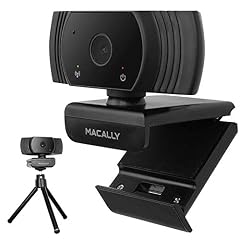
Macally 1080P Webcam with Microphone
- Resolution
- 1080p
- Frame rate
- 30 fps
- Built-in microphone
- Yes
$9.99 price as of 2026-10-01 05:36 UTC (Details)
The Macally webcam offers a 120° field of view, the widest among our picks, along with a microphone and 30 fps video. It’s great for group calls or capturing a larger environment.
Pros
- 120° wide-angle lens
- Built-in microphone
- 1080p at 30 fps
- Works with common video apps
Cons
- No privacy cover
- No autofocus
Good fit if
- Group video calls with multiple people
- Streamers who want to show their whole setup
Skip if
- You need a narrow shot to avoid background
- You require autofocus for movement
Verdict: The Macally gives you the widest view in this list, making it a good pick for group scenarios.
Side by side
| # | Webcam | Resolution | Frame rate | Autofocus | Built-in microphone | Privacy cover | AI tracking |
|---|---|---|---|---|---|---|---|
| 1 | NexiGo N960E 1080P 60FPS Webcam with Light | 1080p | 60 fps or more | Yes | Yes | Yes | not stated |
| 2 | Logitech C922x Pro Webcam + Blue Yeti Nano | 1080p | 30 fps | not stated | not stated | not stated | not stated |
| 3 | OBSBOT Tiny SE 1080P PTZ Webcam AI-Tracking | 1080p | not stated | not stated | not stated | not stated | Yes |
| 4 | PTZOptics Move SE 30x 1080p Full HD PTZ Auto-Tracking Pan Tilt Zoom | 1080p | not stated | not stated | not stated | not stated | Yes |
| 5 | AVerMedia Live Streamer Cam 313 | 1080p | not stated | not stated | Yes | Yes | not stated |
| 6 | Lenovo FHD Webcam | 1080p | 30 fps | not stated | Yes | Yes | not stated |
| 7 | HP 320 FHD Webcam | 1080p | not stated | not stated | Yes | Yes | not stated |
| 8 | Amcrest 1080P Webcam with Microphone & Privacy Cover | 1080p | not stated | not stated | Yes | Yes | not stated |
| 9 | Poly Studio P5 Professional Webcam | 1080p | not stated | not stated | not stated | Yes | not stated |
| 10 | Acer A610 1080p Webcam for PC | 1080p | not stated | not stated | Yes | not stated | not stated |
| 11 | Angetube Streaming Webcam with Microphone | 1080p | not stated | not stated | Yes | not stated | not stated |
| 12 | NBPOWER 1080P 60FPS Streaming Camera Webcam | 1080p | 60 fps or more | Yes | Yes | not stated | not stated |
| 13 | EMEET C980 PRO 3-in-1 1080P Webcam with Microphone and Speaker | 1080p | not stated | not stated | Yes | not stated | not stated |
| 14 | AUSDOM AF640 1080P Webcam with Microphone | 1080p | not stated | not stated | Yes | Yes | not stated |
| 15 | Macally 1080P Webcam with Microphone | 1080p | 30 fps | not stated | Yes | not stated | not stated |
How we picked
We started with a catalog of 61 webcams that list 1080p resolution. We shortlisted 15 that cover a range of use cases: streaming, video calling, PTZ production, and simple setups. We looked for features such as 60 frames per second capture, autofocus, built-in microphones, privacy covers, and tracking capabilities. Prices shown on this page are live from the store listing and update over time. No unit was tested by us; all specifications come from the sellers' listings and the makers' own published information.
How to choose
Resolution: what 1080p really means
All the webcams here output 1080p, which stands for 1920x1080 pixels. That’s four times the detail of 720p and is the standard for video calls and most streaming platforms. A 1080p camera will look sharp on modern monitors and streamed video, but other factors like sensor size and lens quality also affect the final image. For most uses, 1080p is the sweet spot; 4K webcams exist but often cost more and can be overkill for conference software that caps at 1080p.
Frame rate: 30 fps vs 60 fps
Frame rate dictates how many still images the camera captures per second. A 30 fps webcam is fine for static talking-head video, but 60 fps produces smoother motion and is valuable for gaming streams, presentations where you move, or any video with fast movement. In this guide, the NexiGo N960E and the NBPOWER both support 1080p at 60 fps. If you don’t need that smoothness, a 30 fps model like the Lenovo FHD or the Macally is lighter on bandwidth.
Autofocus and fixed focus
Autofocus adjusts the lens to keep you sharp as you move closer or farther from the camera. It’s helpful for streamers who lean in, or for product demos. Fixed-focus webcams have a set focal length and give a sharp image at a typical distance, but they blur if you get very close. In our picks, the NexiGo N960E, NBPOWER, and the Logitech bundle include autofocus (the Logitech’s is listed on the product page). If you seldom change distance, fixed focus is usually enough.
Microphones and audio quality
Many webcams include a built-in microphone, but they vary in quality. Dual microphones with noise cancellation, as seen on the Lenovo FHD, can improve clarity in a busy room. Some models like the EMEET C980 Pro even add a speaker. If you already own a separate USB microphone, you may not need a webcam mic, but for simple calls an integrated one is convenient. The Logitech bundle pairs the webcam with a Blue Yeti Nano for dedicated audio.
Privacy: covers and Windows permissions
A physical privacy cover is the simplest way to block the lens when you’re not using the camera, and many picks here (NexiGo, Lenovo, HP, Amcrest, Poly, AUSDOM) include one. On Windows, you can also control camera permissions per app and at the device level through Settings > Privacy & security > Camera. Desktop apps need the “Let desktop apps access your camera” toggle enabled. This dual layer of control gives you peace of mind.
PTZ and auto-tracking
PTZ (pan-tilt-zoom) webcams can move the lens remotely, and some add AI auto-tracking to follow you as you move. This is a premium feature, common in conference rooms and professional streams. The OBSBOT Tiny SE and PTZOptics Move SE both offer PTZ and tracking, though at different price points. If you give presentations or move around, PTZ makes you the producer and keeps you framed. For static solo videos, a fixed camera is lighter and cheaper.
Questions
What is the difference between 1080p and 4K webcams?
A 1080p webcam captures 1920x1080 pixels, while a 4K webcam captures 3840x2160, four times the resolution. 4K offers more detail but requires more bandwidth and often costs more. Most video calling software downsamples to 1080p or lower anyway, so for meetings a good 1080p camera is usually sufficient. 4K is useful for content creation where you might crop or zoom in post-production.
Do I need a 60 fps webcam?
Not always. If you primarily make video calls or record a static talking-head, 30 fps is smooth enough. But if you stream games, move around, or do fast-paced demonstrations, 60 fps reduces motion blur and looks more professional. In this list, the NexiGo N960E and the NBPOWER deliver 1080p at 60 fps. Check your streaming platform’s bitrate limits, as 60 fps consumes more bandwidth.
Why does autofocus matter in a webcam?
Autofocus keeps you in focus as you change distance from the camera. For example, if you lean forward to show a document, autofocus will adjust the lens to keep it sharp. Fixed-focus webcams have a fixed focal range, so they may blur objects closer than a certain distance. If you sit relatively still, fixed focus is fine, but autofocus adds flexibility for presenters and streamers.
Can I use a 1080p webcam with a Mac?
Yes, almost all webcams with a USB connection (USB-A or USB-C) work with macOS. The system treats them as standard UVC devices, which macOS supports natively. If the webcam has a USB-A connector, you may need a USB-C adapter. Also, macOS allows you to use an iPhone as a webcam with the Continuity Camera feature, but that’s separate from these external webcams.
Do I need a privacy cover if I have software permissions?
A physical privacy cover is more reliable than software alone. Software permissions (like those in Windows) prevent apps from using the camera without your consent, but a cover physically blocks the lens, giving you visual assurance. Many webcams include a cover, and if yours doesn’t, you can buy a separate sliding cover. For maximum privacy, a cover is the best option.
Recent updates
- : First published.