
Best Webcams Under $100: 14 Picks Compared on Specs
The EMEET PIXY is our top pick under $100: a 4K AI-powered PTZ camera with auto tracking and a dual-lens design, the most feature-dense webcam in this budget range. We chose it from 283 listings under $100, cutting to 62 distinct models and then to 14 based on stated specifications: resolution, frame rate, autofocus, tracking, microphone, and privacy features. Prices are live from the store page and may change; we do not test units.
14 picks from 283 webcams that match this guide with a price we can quote today. Every price below is live and carries the moment it was read.
The picks at a glance
Which one should you buy?
- For remote meetings: If your workday is full of video calls, look for a webcam with a noise-cancelling microphone and a privacy cover. The Acer 4K Webcam and Lenovo FHD Webcam both offer dual mics and a physical shutter. See pick 6
- For streaming and gaming: Streamers need smooth motion and a clean background. The NexiGo N660P Pro offers 1080p60 output and autofocus, while the Razer Kiyo V2 X delivers 1440p at 60 fps for sharper gameplay shots. See pick 4
- For content creators who want 4K: If you shoot 4K videos for YouTube or TikTok, the OBSBOT Meet 2 pairs a 1/2-inch sensor with AI framing and autofocus, all under $100. See pick 3
- For budget shoppers who still want 4K: If you want 4K resolution without spending near the limit, the AOC 4K Webcam delivers 4K capture with PDAF autofocus and 1080p60 output for much less than the top picks. See pick 14
The 14 picks
1 Best overall
EMEET PIXY Dual-Camera AI-Powered PTZ Camera 4K
- Resolution
- 4K
- AI tracking
- Yes
$99.99 price as of 2026-10-01 05:29 UTC (Details)
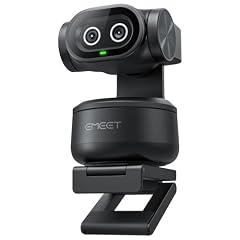
The EMEET PIXY is the only webcam in this list with a dual-camera array, enabling AI-powered PTZ gestures without a motor. It captures 4K video and includes auto tracking, giving you a hands-free experience that rivals more expensive units. It lacks a built-in microphone, but its feature set is unmatched in this budget.
Pros
- 4K resolution, the highest in this pick list
- AI auto tracking with dual-camera PTZ, no motor noise
- USB plug-and-play, no manual focus needed
- Ships with a magnetic mount for easy placement
Cons
- No microphone listed by the seller
- Dual camera setup may take up more desk space
- Tracking quality not independently measured
Good fit if
- Remote workers who want AI tracking without a motor
- Content creators who need 4K and will use a separate mic
Skip if
- You need a built-in microphone for simple calls
- You want a traditional webcam with a single lens and a low profile
Verdict: A unique dual-camera design with 4K and AI tracking, ideal for those who want premium features under $100.
2 Best PTZ with microphone

MT-VIKI 4K AI PTZ Webcam
- Resolution
- 4K
- Frame rate
- 60 fps or more
- Built-in microphone
- Yes
- AI tracking
- Yes
$99.00 price as of 2026-10-01 05:37 UTC (Details)
The MT-VIKI 4K combines a pan-tilt motor, AI auto tracking, and a built-in microphone in one package. It records at 4K with 60 fps support, and its 92-degree field of view captures a wider room than most here. The 330-degree pan and 180-degree tilt gives it the most physical movement in this list.
Pros
- 4K resolution and 1080p60 output for smooth motion
- 330° pan and 180° tilt, the widest movement range in this list
- Built-in microphone, something the EMEET PIXY lacks
- TOF sensor aids tracking accuracy (maker specifies)
Cons
- Larger footprint due to motorized base
- 60 fps only at 1080p, not at 4K
- No privacy cover stated by the seller
Good fit if
- Presenters who move around and need auto tracking
- Users who want a microphone and PTZ in one device
Skip if
- You rarely move and just need a simple fixed webcam
- You prefer a compact clip-on design over a motorized unit
Verdict: A feature-dense PTZ webcam with a microphone and wide pan range, perfect for room-scale video calls and streams.
3 Best AI framing

OBSBOT Meet 2-4K Webcam for PC with 1/2" Sensor
- Resolution
- 4K
- Autofocus
- Yes
- AI tracking
- Yes
$99.00 price as of 2026-10-01 05:38 UTC (Details) Typical price: $129.00, 23% off
The OBSBOT Meet 2 uses a 1/2-inch sensor, larger than most competitors at this price, to capture 4K with better light sensitivity. Its AI framing automatically keeps you centered, and autofocus ensures sharp close-ups. It lacks a built-in microphone, but image quality is a top priority.
Pros
- 1/2-inch sensor, larger than typical 1/2.5-inch or 1/3-inch units
- 4K resolution with AI framing that follows your face
- Autofocus for consistent sharpness without manual adjustment
- Compact design, easy to clip onto a monitor
Cons
- No microphone listed by the seller
- AI framing may crop the image compared to fixed FOV
- Sensor size is better for low light, but not independently tested
Good fit if
- Content creators who want 4K with a large sensor under $100
- Presenters who want automatic framing during solo streams
Skip if
- You need a built-in microphone for quick calls
- You prefer a fixed wide field of view without AI cropping
Verdict: A 4K webcam with a large sensor and smart AI framing, ideal for creators who prioritize video quality.
4 Best for streaming

NexiGo N660P Pro 4K Webcam with Distortion-Free Lens
- Resolution
- 4K
- Frame rate
- 60 fps or more
- Autofocus
- Yes
- Built-in microphone
- Yes
- Privacy cover
- Yes
$79.99 price as of 2026-10-01 05:38 UTC (Details)
The NexiGo N660P Pro is built for streamers: it offers 1080p60 output for smooth motion, a distortion-free lens to keep straight edges straight, and a built-in microphone with 3DNR for noise reduction. Autofocus and a privacy cover round out the package.
Pros
- 1080p60 output for fluid gameplay and motion
- Distortion-free lens reduces barrel effect (maker claim)
- Built-in microphone with 3DNR noise reduction
- Autofocus and a physical privacy cover
Cons
- 4K capture but 60 fps only at 1080p, not 4K
- Microphone quality not specified in detail
- Design may not suit every desk setup
Good fit if
- Streamers who need smooth 60 fps for action games
- Users who want a mic and privacy cover in one webcam
Skip if
- You need true 4K60 recording (not available under $100)
- You want a compact sensor with a fixed wide angle
Verdict: A streamer-focused webcam with 1080p60, a clean lens, and a built-in mic, all for under $80.
5 Best 1440p for gaming

Razer Kiyo V2 X Webcam for Streaming and Meetings
- Resolution
- 2K (1440p)
- Frame rate
- 60 fps or more
$74.99 price as of 2026-10-01 05:39 UTC (Details)
The Razer Kiyo V2 X stands out for its 1440p resolution at 60 fps, a step above 1080p and ideal for gaming where you want crisp detail without the bandwidth cost of 4K. It has a white finish that blends into many setups and works with Razer Synapse for settings. No microphone is included, which keeps the design clean.
Pros
- 1440p resolution at 60 fps, sharper than most 1080p webcams
- 60 fps output for smooth motion in gaming
- Compact design with a universal mount
- Works with Razer Synapse for image adjustments (maker software)
Cons
- No built-in microphone
- No privacy cover stated by the seller
- Field of view not specified in the catalogue
Good fit if
- Gamers who want high-resolution 60 fps without 4K bandwidth
- Users who already have a separate microphone
Skip if
- You need a mic in the webcam
- You want 4K resolution, not 1440p
Verdict: A 1440p60 webcam from a trusted gaming brand, perfect for sharp gaming visuals with a separate mic.
6 Best for meetings

Acer 4K Webcam for PC/Mac with All-Metal Unibody Sculpted
- Resolution
- 4K
- Autofocus
- Yes
- Built-in microphone
- Yes
- Privacy cover
- Yes
$69.99 price as of 2026-10-01 05:23 UTC (Details)
The Acer 4K Webcam is designed for professional calls: it packs a Sony 1/2-inch sensor, PDAF autofocus for quick focus changes, two noise reduction microphones, and a privacy cover. The all-metal unibody adds a premium feel that stands out in this price range.
Pros
- Sony 1/2-inch sensor for better low-light performance (maker spec)
- PDAF autofocus for fast, accurate focusing
- Dual noise-reduction microphones
- Physical privacy cover
Cons
- 4K capture but no 60 fps output; likely 30 fps
- Metal body may be heavier than plastic alternatives
- Microphone quality not independently measured
Good fit if
- Remote workers who need a reliable mic and privacy shutter
- Users who want a high-quality sensor from a major brand
Skip if
- You want 60 fps for streaming or gaming
- You prefer a lighter, more compact plastic webcam
Verdict: A professional 4K webcam with a large Sony sensor, dual mics, and a privacy cover, ideal for daily meetings.
7 Best low-light correction

Anker PowerConf C200 2K Webcam for PC/Laptop/Mac
- Resolution
- 2K (1440p)
$69.99 price as of 2026-10-01 05:24 UTC (Details)
The Anker PowerConf C200 captures 2K resolution and highlights low-light correction, a feature that helps in dim home offices. It lacks a built-in microphone, but its image processing is designed to keep faces visible without extra lighting. It's a solid choice for users who often join calls in uneven light.
Pros
- 2K resolution (1440p), sharper than 1080p
- Low-light correction (maker feature) for dim environments
- Plug-and-play USB connection
- App-supported for fine-tuning (Anker software)
Cons
- No microphone listed by the seller
- No privacy cover stated
- 2K not 4K, for users who want maximum detail
Good fit if
- Home office users with limited lighting
- Those who already have a separate microphone
Skip if
- You need a built-in mic
- You want 4K resolution in this price range
Verdict: A 2K webcam with strong low-light correction, best for people who need clear video in less-than-ideal lighting.
8 Best with ring light

Angetube Streaming Webcam with Microphone
- Resolution
- 1080p
- Built-in microphone
- Yes
$59.85 price as of 2026-10-01 05:24 UTC (Details)
The Angetube webcam includes a built-in ring light, a rare feature at this price, alongside a 1080p sensor and an integrated microphone. It's a self-contained solution for streamers or vloggers who need even illumination without a separate light.
Pros
- Built-in ring light for flattering illumination
- Built-in microphone, saves desk space
- 1080p resolution, plenty for social streaming
- Plug-and-play USB connection
Cons
- Ring light may be limited in brightness
- 1080p only, no 2K or 4K
- No autofocus listed by the seller
Good fit if
- New streamers who want an all-in-one solution
- Users who want to avoid buying a separate lamp
Skip if
- You need 4K or autofocus
- You have professional lighting already and want a bare camera
Verdict: A compact 1080p webcam with a ring light and mic, ideal for entry-level streaming and video calls.
9 Best AI tracking with microphone
NearStream 4K Webcam for PC with AI Auto Framing and Noise-Canceling Mic
- Resolution
- 4K
- Built-in microphone
- Yes
- AI tracking
- Yes
$59.00 price as of 2026-10-01 05:38 UTC (Details)
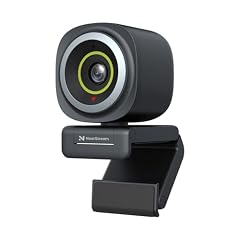
The NearStream 4K webcam combines 4K resolution, AI auto framing, and a noise-canceling microphone in one unit. It is one of the few webcams in this list to offer both tracking and a built-in mic, making it a strong choice for those who want to be always centered without extra gear.
Pros
- 4K resolution for high-detail video
- AI auto framing keeps you centered during movement
- Noise-canceling microphone built in
- No external mic or lighting accessories needed
Cons
- AI framing may crop the image
- No privacy cover stated by the seller
- Microphone quality not independently measured
Good fit if
- Users who move during calls and want auto tracking
- Streamers who need a mic and 4K under $60
Skip if
- You prefer a fixed, uncropped field of view
- You want a physical privacy shutter
Verdict: A 4K webcam with AI tracking and a mic, an all-in-one for budget-conscious creators.
10 Best privacy shutter

AVerMedia Live Streamer Cam 313
- Resolution
- 1080p
- Built-in microphone
- Yes
- Privacy cover
- Yes
$57.19 price as of 2026-10-01 05:26 UTC (Details)
The AVerMedia Live Streamer Cam 313 focuses on privacy with a built-in shutter and dual microphones for clear audio. It captures 1080p and swivels 360 degrees, making it easy to point at yourself or a document. It's a dependable choice for streamers and home workers who want a simple, secure webcam.
Pros
- Physical privacy shutter, always-on when personality
- Dual microphones for better voice pickup
- 360-degree swivel for flexible angles
- 1080p resolution, standard for streaming
Cons
- 1080p only, no 2K or 4K
- No autofocus listed by the seller
- Swivel design may be bulky on some monitors
Good fit if
- Privacy-conscious users who want a physical shutter
- Streamers who need a simple 1080p cam with a mic
Skip if
- You need 4K or autofocus
- You prefer a fixed wide-angle lens without a swivel
Verdict: A reliable 1080p webcam with dual mics and a privacy shutter, perfect for secure video chats.
11 Best compact 4K
DEPSTECH 4K Webcam Ultra HD 1/2.55'' Sony Sensor Autofocus Webcam
- Resolution
- 4K
- Autofocus
- Yes
$51.99 price as of 2026-10-01 05:28 UTC (Details)
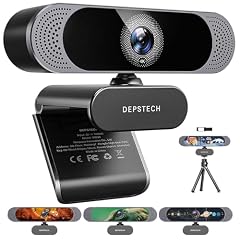
The DEPSTECH 4K Webcam packs 4K resolution and autofocus into a small, portable body with a Sony sensor. Its 80-degree field of view is standard for one-person framing, and the compact size makes it easy to travel with. There's no microphone, so you'll need a separate one.
Pros
- 4K resolution with a Sony 1/2.55-inch sensor
- Autofocus for sharp video without manual fiddling
- Compact design, easy to pack
- 80° FOV, good for solo calls
Cons
- No built-in microphone
- No 60 fps output (likely 30 fps at 4K)
- Sensor smaller than the Acer's 1/2-inch unit
Good fit if
- Travelers who need a small 4K webcam
- Users who already have a dedicated mic
Skip if
- You want a built-in mic
- You need 60 fps for gaming
Verdict: A tiny 4K webcam with autofocus and a Sony sensor, great for portability without sacrificing resolution.
12 Best for home office

Lenovo FHD Webcam
- Resolution
- 1080p
- Frame rate
- 30 fps
- Built-in microphone
- Yes
- Privacy cover
- Yes
$45.99 price as of 2026-10-01 05:35 UTC (Details)
Lenovo's FHD webcam is built for meetings: it delivers 1080p at 30 fps, dual noise-cancelling microphones, AI noise cancellation, and a privacy cover. The included AI noise reduction helps block keyboard and background sounds, making it ideal for home office calls.
Pros
- Dual noise-cancelling microphones with AI noise cancellation
- 1080p resolution at 30 fps, standard for video calls
- Integrated privacy cover
- Trusted Lenovo brand with business support
Cons
- 30 fps only, not 60
- 1080p resolution, not higher
- Lacks autofocus (fixed-focus lens)
Good fit if
- Home workers who focus on call quality
- Users who want a privacy shutter from a major brand
Skip if
- You need 4K or 60 fps
- You prefer a webcam with autofocus
Verdict: A reliable 1080p webcam with superior microphone technology for serious remote workers.
13 Best QHD for business
Dell 2K QHD Webcam WB3023
- Resolution
- 2K (1440p)
- Built-in microphone
- Yes
$48.48 price as of 2026-10-01 05:28 UTC (Details) Typical price: $57.99, 16% off
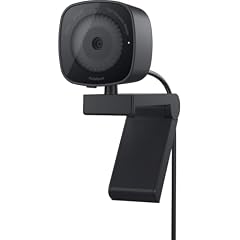
The Dell WB3023 offers 2K QHD resolution with a Sony sensor and a noise reduction microphone. It's a step up in clarity from 1080p, and Dell's reputation for business hardware adds confidence. The microphone is a bonus for calls, though it's a single mic rather than dual.
Pros
- 2K (1440p) resolution, sharper than 1080p
- Sony sensor for better image quality (maker spec)
- Built-in noise reduction microphone
- Business-grade build from Dell
Cons
- Single microphone, not dual
- No privacy cover stated
- 30 fps likely, no 60 fps option
Good fit if
- Professionals who want a higher-res webcam for video calls
- Users who value a well-known enterprise brand
Skip if
- You need 4K or 60 fps
- You want a built-in privacy shutter
Verdict: A crisp 2K webcam with a Sony sensor and mic, a strong choice for business users who want more detail.
14 Best budget 4K with 60fps

AOC 4K Webcam for PC with PDAF
- Resolution
- 4K
- Frame rate
- 60 fps or more
- Autofocus
- Yes
$35.99 price as of 2026-10-01 05:24 UTC (Details)
The AOC 4K Webcam brings 4K capture and PDAF autofocus to an entry-level price, with 1080p60 output for smooth motion. It uses a Sony sensor, a mark of quality at this tier, and its 4K capability is rare under $40. It has no built-in microphone, but for those who want 4K on a tight budget, it's a standout.
Pros
- 4K resolution with PDAF autofocus
- 1080p60 output for fluid streams
- Sony sensor, unusual at this price
- Very low cost for 4K features
Cons
- No microphone listed by the seller
- No privacy cover
- 4K capture but no 4K60 output
Good fit if
- Budget-conscious streamers who want 4K on a used monitor setup
- Users who will use a separate microphone
Skip if
- You need a built-in mic
- You want a privacy shutter
Verdict: A 4K webcam with 1080p60 and PDAF at an incredible price, the best entry into 4K video under $40.
Side by side
| # | Webcam | Resolution | Frame rate | Autofocus | Built-in microphone | Privacy cover | AI tracking |
|---|---|---|---|---|---|---|---|
| 1 | EMEET PIXY Dual-Camera AI-Powered PTZ Camera 4K | 4K | not stated | not stated | not stated | not stated | Yes |
| 2 | MT-VIKI 4K AI PTZ Webcam | 4K | 60 fps or more | not stated | Yes | not stated | Yes |
| 3 | OBSBOT Meet 2-4K Webcam for PC with 1/2" Sensor | 4K | not stated | Yes | not stated | not stated | Yes |
| 4 | NexiGo N660P Pro 4K Webcam with Distortion-Free Lens | 4K | 60 fps or more | Yes | Yes | Yes | not stated |
| 5 | Razer Kiyo V2 X Webcam for Streaming and Meetings | 2K (1440p) | 60 fps or more | not stated | not stated | not stated | not stated |
| 6 | Acer 4K Webcam for PC/Mac with All-Metal Unibody Sculpted | 4K | not stated | Yes | Yes | Yes | not stated |
| 7 | Anker PowerConf C200 2K Webcam for PC/Laptop/Mac | 2K (1440p) | not stated | not stated | not stated | not stated | not stated |
| 8 | Angetube Streaming Webcam with Microphone | 1080p | not stated | not stated | Yes | not stated | not stated |
| 9 | NearStream 4K Webcam for PC with AI Auto Framing and Noise-Canceling Mic | 4K | not stated | not stated | Yes | not stated | Yes |
| 10 | AVerMedia Live Streamer Cam 313 | 1080p | not stated | not stated | Yes | Yes | not stated |
| 11 | DEPSTECH 4K Webcam Ultra HD 1/2.55'' Sony Sensor Autofocus Webcam | 4K | not stated | Yes | not stated | not stated | not stated |
| 12 | Lenovo FHD Webcam | 1080p | 30 fps | not stated | Yes | Yes | not stated |
| 13 | Dell 2K QHD Webcam WB3023 | 2K (1440p) | not stated | not stated | Yes | not stated | not stated |
| 14 | AOC 4K Webcam for PC with PDAF | 4K | 60 fps or more | Yes | not stated | not stated | not stated |
How we picked
We started with every webcam listed under $100 in our catalogue, 283 listings after removing duplicates, which condensed to 62 distinct products. We shortlisted models with clear resolution claims (1080p or higher), a stated sensor type where available, and at least one extra feature beyond basic video: autofocus, tracking, a microphone, a privacy cover, or a ring light. We then compared 14 finalists on the specs each seller publishes, such as resolution, frame rate, autofocus, tracking, microphone count, and privacy cover. We did not handle or test any unit. All prices on this page are read live from the store at the time you view it; our analysis never depends on a specific price point.
How to choose
Resolution: 1080p, 2K, or 4K?
Resolution determines how sharp your video appears. 1080p (Full HD) is the baseline for most calls and streams, and many webcams in this list offer it at 30 fps or 60 fps. 2K (1440p) offers a sharper image than 1080p, making text and fine details crisper, ideal for presentations or product reviews. 4K provides even more detail, but note that most webcams in this price range capture 4K at 30 fps and often output 1080p at 60 fps. If you plan to share a screen or show small text, a 2K or 4K model is a good investment. If you mostly make video calls, 1080p is sufficient and saves bandwidth.
Autofocus: fixed lens vs. PDAF
A fixed-focus lens keeps everything beyond a few feet in focus, which is fine for a person sitting at a desk. Autofocus, especially phase-detection autofocus (PDAF), allows the camera to adjust focus continuously, useful if you move closer to the camera to show a document or lean in. On the other hand, PDAF is faster than contrast-detect AF and typically uses a more complex sensor. Brands like Acer, AOC, and DEPSTECH specify PDAF in their listings. If you frequently present objects to the camera, an autofocus model keeps your subject sharp without manual intervention.
Microphones: built-in, dual, or external
Most webcams include a microphone, but quality varies. Single mics pick up background noise, while dual mics or those with noise cancellation improve voice clarity. The Lenovo FHD webcam and the Acer 4K both advertise dual noise-reduction microphones. If you plan to use a dedicated USB or XLR mic for streaming or professional calls, you can skip the built-in mic and get a webcam like the EMEET PIXY or Razer Kiyo V2 X, which omit it to keep the design clean. For casual calls, a built-in mic is convenient and saves desk space.
Privacy: cover or shutter
A physical privacy cover or shutter blocks the lens when you're not using the webcam, protecting you from unauthorized access. Many models, including the Acer 4K, the AVerMedia Live Streamer Cam 313, and the Lenovo FHD webcam include a physical shutter. Some models, like the NexiGo N660P Pro and the Acer, have a physical privacy cover. If you're concerned about security, choose a model with a built-in cover; otherwise, you can buy a separate lens cap or simply unplug the webcam.
Field of view: standard vs. wide angle
Field of view (FOV) determines how much you capture. A typical 80-degree FOV is fine for one person. A 90-degree or wider angle lets you show a bit of your desk or a second person, but it can also distort the edges. The AOC 4K and the MT-VIKI both offer 92-degree FOV, while the DEPSTECH uses 80 degrees. If you want to present a whiteboard or include a colleague in frame, a wider FOV helps; for solo videos, a standard angle reduces background clutter.
Connection: USB-A and USB-C
Most webcams use USB-A, but some include a USB-C adapter or cable, as seen in the AEICIK webcam. Check your laptop's ports; many modern ultrabooks only have USB-C. The USB Video Class (UVC) driver, built into Windows and macOS, supports plug-and-play for most webcams, so you rarely need to install software. USB 3.0 offers more bandwidth for 4K at 60 fps, but for 1080p or 4K at 30 fps, USB 2.0 is usually enough. Always verify that the cable or adapter matches your device, and consider a USB-C to USB-A converter if needed.
Questions
Do I need a 4K webcam for video calls?
For standard video calls, 1080p is perfectly adequate, and most platforms (Zoom, Teams) compress video to 720p or lower. 4K is useful if you record videos for YouTube, want to crop into the image without losing detail, or use the camera for presentations with fine text. Under $100, a 4K webcam typically captures at 30 fps, so if you need 60 fps for gaming, look for 1080p60 models.
Are webcams with a privacy cover better than without?
A built-in privacy cover offers physical security: when closed, no software can access the lens. It's a simple way to protect your privacy. If a webcam doesn't have one, you can buy a separate lens cap or rely on unplugging the device. Some operating systems, like Windows, also let you disable camera access via privacy settings, but a physical cover is the most direct method.
What does 'UVC' mean, and why does it matter?
UVC (USB Video Class) is a standard that lets webcams work with built-in drivers on Windows and macOS. According to Microsoft, a UVC-compliant device needs no vendor-specific driver; it's recognized automatically. This means you can plug in a webcam and it likely works immediately, without installing CD software. All webcams in this list are UVC-compatible, so setup is straightforward.
Can I use a webcam with a laptop that only has USB-C?
Yes, but you may need a USB-C to USB-A adapter or a webcam that ships with a USB-C cable. Some models, like the AEICIK webcam, include a USB-C adapter in the box. The USB Type-C standard supports plug-and-play for peripherals, so a simple adapter should work. Always verify the cable length and adapter compatibility before purchase.
How many webcams under $100 actually offer AI tracking?
Few models in this price range include AI tracking. We identified three: the EMEET PIXY, the MT-VIKI, and the NearStream. All use AI to keep you centered or follow movement. This feature is valuable for presenters or streamers who move, but it may crop the image. If you stay still, a fixed webcam with autofocus may be more reliable.
Do I need a webcam with a wide field of view for group calls?
For a small group of 2-3 people, a 90-degree or wider FOV helps get everyone in frame. The MT-VIKI has a 92-degree angle, for example. However, wider FOV can cause barrel distortion and make you smaller in the frame. For solo calls, an 80-degree FOV is standard and avoids distortion. If you need a wider view, consider a PTZ webcam like the EMEET or MT-VIKI to adjust.
Recent updates
- : First published.