
Best 4K Webcams in 2026: 15 Picks Compared on Specs
The Razer Kiyo Pro Ultra takes our top pick with its 1/1.2-inch sensor, the largest in this list, and a built-in privacy shutter. For presenters who move, the OBSBOT Tiny 2 offers the best AI tracking. We compared 15 4K webcams from a pool of 60, using specifications from the catalog and maker sites.
14 picks from 135 webcams that match this guide with a price we can quote today. Every price below is live and carries the moment it was read.
The picks at a glance
Which one should you buy?
- For streamers who want high frame rate: If you record fast action or need smooth motion, look for 4K60 support like the Elgato Facecam 4K or the OBSBOT Tiny 2. See pick 4
- For presenters who move around: AI tracking keeps you in frame without manual adjustment. The OBSBOT Tiny 2 and the Insta360 Link 2 Pro excel here. See pick 2
- For conference rooms and meetings: A certified camera like the Dell WB7022 or an all-in-one system like the Logitech Rally Bar ensures reliable performance in Teams. See pick 5
- For budget buyers: The Acer 4K Webcam and NexiGo N660P Pro offer solid 4K image quality with mics and privacy covers without breaking the bank. See pick 6
The 14 picks
1 Best overall

Razer Kiyo Pro Ultra 4K Webcam
- Resolution
- 4K
- Built-in microphone
- Yes
- Privacy cover
- Yes
$399.99 price as of 2026-10-01 05:39 UTC (Details)
The Razer Kiyo Pro Ultra uses a 1/1.2-inch Sony STARVIS 2 sensor, the largest of any pick here, giving it a clear low-light advantage. It also includes a built-in mic and a privacy shutter, making it a complete package for most users.
Pros
- Largest sensor in this list (1/1.2-inch)
- Built-in microphone
- Privacy shutter included
- Face tracking autofocus
Cons
- 4K output is capped at 30 fps (not 60)
- No PTZ movement
- Autofocus not stated by the seller
Good fit if
- Streamers and creators who want top image quality
- Users in low-light environments
Skip if
- You need 4K60 for fast action
- You want a camera with pan and tilt
Verdict: The Razer Kiyo Pro Ultra is the best all-around 4K webcam for image quality, but it is not for those seeking 4K60.
2 Best AI tracking

OBSBOT Tiny 2 Webcam 4K Voice Control PTZ
- Resolution
- 4K
- Frame rate
- 60 fps or more
- Autofocus
- Yes
- AI tracking
- Yes
$229.00 price as of 2026-10-01 05:38 UTC (Details)
The OBSBOT Tiny 2 uses a 1/1.5-inch sensor and AI-powered tracking that follows you and adjusts zoom automatically. Voice control and gesture control make it ideal for solo presenters.
Pros
- AI tracking with auto-zoom
- Voice control and gesture recognition
- Shoots 4K at 60 fps
- All-pixel autofocus
Cons
- No built-in microphone
- No physical privacy shutter
- Requires OBSBOT software for full features
Good fit if
- Presenters who move during talks
- Streamers who want hands-free control
Skip if
- You need a microphone in the camera
- You prefer a simple plug-and-play webcam
Verdict: The OBSBOT Tiny 2 is the best choice for moving presenters, but plan for an external mic.
3 Best PTZ for creators

Insta360 Link 2 Pro
- Resolution
- 4K
- Built-in microphone
- Yes
- AI tracking
- Yes
$249.99 price as of 2026-10-01 05:34 UTC (Details)
The Insta360 Link 2 Pro combines PTZ with AI tracking and HDR, plus directional noise-canceling mics. It offers a flexible framing for creators who switch between desk and presentation angles.
Pros
- PTZ control with AI tracking
- HDR support
- Built-in noise-canceling microphone
- 4K resolution
Cons
- Frame rate not stated by the seller
- No physical privacy shutter
- Autofocus not listed
Good fit if
- Content creators who need auto-framing
- Users who want a webcam with a microphone
Skip if
- You require a privacy cover
- You need to verify 4K60 performance
Verdict: The Insta360 Link 2 Pro is a versatile PTZ webcam with good audio, but check the frame rate for your needs.
4 Best for 4K60 streaming

Elgato Facecam 4K
- Resolution
- 4K
- Frame rate
- 60 fps or more
$169.99 price as of 2026-10-01 05:29 UTC (Details)
The Elgato Facecam 4K shoots native 4K at 60 fps, the highest frame rate among the consumer webcams in this list. Its DSLR-like control in the Camera Hub app makes it a favorite for streamers.
Pros
- Native 4K60 output
- Manual and autofocus control
- Works with major streaming software
- Memory function saves settings
Cons
- No built-in microphone
- No privacy shutter
- Autofocus not listed in the pool
Good fit if
- Streamers who have a separate microphone
- Users who want high frame rates
Skip if
- You need a camera with a mic
- You want a physical privacy shutter
Verdict: The Elgato Facecam 4K is the go-to for 4K60 streaming, but it's a bare camera without audio.
5 Best for Teams meetings

Dell 4K UHD Webcam WB7022
- Resolution
- 4K
$104.99 price as of 2026-10-01 05:28 UTC (Details) Typical price: $118.64, 12% off
The Dell WB7022 is certified for Microsoft Teams, ensuring it meets strict performance and quality standards. It uses a Sony sensor and supports UVC, so it's a reliable choice for corporate users.
Pros
- Microsoft Teams certification
- Sony sensor
- UVC compliant for plug-and-play
- 4K resolution
Cons
- No built-in microphone
- No privacy cover
- No PTZ movement
Good fit if
- Corporate users in Teams meetings
- IT managers needing certified hardware
Skip if
- You need a microphone in the camera
- You want a camera with pan and tilt
Verdict: The Dell WB7022 is a dependable Teams camera, but bring your own mic.
6 Best for home office

Acer 4K Webcam for PC/Mac with All-Metal Unibody Sculpted
- Resolution
- 4K
- Autofocus
- Yes
- Built-in microphone
- Yes
- Privacy cover
- Yes
$69.99 price as of 2026-10-01 05:23 UTC (Details)
The Acer 4K Webcam packs a Sony 1/2-inch sensor, PDAF autofocus, and dual noise-reduction mics, making it a strong contender. It includes a privacy cover and works with USB Type-C, making it a well-rounded everyday webcam.
Pros
- Sony 1/2-inch sensor
- PDAF autofocus
- Dual noise-canceling mics
- Privacy cover included
Cons
- Frame rate not stated (likely 30 fps)
- No PTZ movement
- No stated low-light performance
Good fit if
- Budget-conscious users who want a good sensor
- Home office and conferencing
Skip if
- You need 4K60
- You want a camera with tracking
Verdict: The Acer 4K Webcam is a strong pick with a large sensor and dual mics.
7 Best for starter streamers

NexiGo N660P Pro 4K Webcam with Distortion-Free Lens
- Resolution
- 4K
- Frame rate
- 60 fps or more
- Autofocus
- Yes
- Built-in microphone
- Yes
- Privacy cover
- Yes
$79.99 price as of 2026-10-01 05:38 UTC (Details)
The NexiGo N660P Pro offers 4K resolution with a distortion-free lens, 1080p60 mode, autofocus, and a privacy cover. It includes a built-in mic, making it a solid choice for streamers who want a complete package.
Pros
- 4K resolution with 1080p60 option
- Autofocus
- Built-in microphone
- Privacy cover
Cons
- Maximum 4K frame rate not stated
- No AI tracking
- Sensor size not listed
Good fit if
- Streamers who want a dedicated camera at low cost
- Users who need a mic and privacy cover
Skip if
- You need high-end low-light performance
- You require PTZ movement
Verdict: The NexiGo N660P Pro is a well-rounded 4K webcam with a microphone and privacy cover, ideal for those starting out.
8 Best with wireless mic
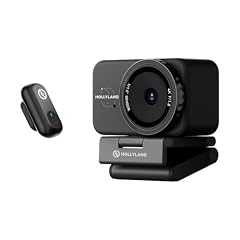
Hollyland Lyra 4K Webcam with 1/1.5" Sensor
- Resolution
- 4K
- Autofocus
- Yes
- Privacy cover
- Yes
- AI tracking
- Yes
$159.00 price as of 2026-10-01 05:32 UTC (Details)
The Hollyland Lyra 4K Webcam features a 1/1.5-inch sensor, 50MP PDAF autofocus, and AI tracking. It supports direct wireless microphone connectivity, making it easy to pair with a lav mic for clear audio.
Pros
- 1/1.5-inch sensor
- PDAF autofocus
- AI tracking and auto-framing
- Wireless mic support
Cons
- Microphone not built-in (needs external)
- No privacy shutter
- Frame rate not stated
Good fit if
- Content creators who already own a wireless mic
- Users who want tracking and good sensor
Skip if
- You need a camera with a built-in mic
- You want a physical privacy cover
Verdict: The Hollyland Lyra is a great choice for creators with a wireless mic setup.
9 Best for conference rooms
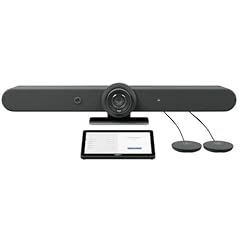
Logitech Rally Bar Room Kit
- Resolution
- 4K
- Built-in microphone
- Yes
$5,549.00 price as of 2026-10-01 05:36 UTC (Details)
The Logitech Rally Bar is an all-in-one video conferencing system with a 4K PTZ camera and beamforming microphones, designed for medium to large rooms. It provides a comprehensive solution for huddle rooms and meeting spaces.
Pros
- 4K PTZ camera with pan and tilt
- Beamforming microphones included
- Designed for medium to large rooms
- UVC support for easy integration
Cons
- Price is high, suited for business budgets
- Requires professional installation
- Not for desktop use
Good fit if
- Businesses outfitting conference rooms
- Organizations using Teams or Zoom Rooms
Skip if
- You need a personal webcam
- You are on a tight budget
Verdict: The Logitech Rally Bar is the best all-in-one for professional meeting spaces.
10 Best professional PTZ

Panasonic PTZ Camera
- Resolution
- 4K
- Frame rate
- 60 fps or more
$6,795.99 price as of 2026-10-01 05:38 UTC (Details)
The Panasonic AW-UE100 is a professional 4K PTZ camera with 24x optical zoom and NDI support, delivering high-quality video for broadcasting and live events. It supports 4K60p and has a wide shooting range.
Pros
- 24x optical zoom
- 4K60p support
- NDI support for networked video
- Professional-grade build
Cons
- Very high price
- No built-in microphone
- Requires external switcher for multi-cam
Good fit if
- Broadcasters and live event producers
- Multi-camera production setups
Skip if
- You need a standard webcam for desk use
- You have a limited budget
Verdict: The Panasonic AW-UE100 is the top choice for professional PTZ needs.
11 Best for small conference rooms

4K AI-Powered Conference Webcam with Microphones Speakers
- Resolution
- 4K
- Built-in microphone
- Yes
$149.99 price as of 2026-10-01 05:23 UTC (Details)
This 4K AI-powered conference webcam from WYRESTORM includes microphones and speakers, and is Zoom certified. It's designed to provide an all-in-one solution for small huddle rooms.
Pros
- Built-in microphones and speakers
- Zoom certified
- AI-powered framing
- Plug-and-play over USB
Cons
- No PTZ movement
- Brand less established
- Autofocus not stated
Good fit if
- Small meeting rooms
- Teams and Zoom users needing audio
Skip if
- You prefer a top-tier brand
- You need pan and tilt
Verdict: This WYRESTORM conference webcam is a versatile all-in-one for small rooms.
12 Best for dual-camera PTZ
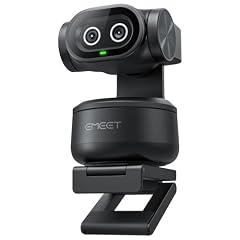
EMEET PIXY Dual-Camera AI-Powered PTZ Camera 4K
- Resolution
- 4K
- AI tracking
- Yes
$99.99 price as of 2026-10-01 05:29 UTC (Details)
The EMEET PIXY is a dual-camera AI-powered PTZ webcam with 4K resolution and AI tracking, with PTZ movement. It's an affordable way to get tracking and PTZ features.
Pros
- AI tracking
- PTZ movement
- Dual cameras for wide view
- 4K resolution
Cons
- Frame rate not stated
- No built-in microphone
- No privacy shutter
Good fit if
- Budget users who want tracking
- Streamers who move around
Skip if
- You need a mic in the camera
- You want a proven premium brand
Verdict: The EMEET PIXY offers PTZ and tracking, but audio is not included.
13 Best for wide-angle tracking

MT-VIKI 4K AI PTZ Webcam
- Resolution
- 4K
- Frame rate
- 60 fps or more
- Built-in microphone
- Yes
- AI tracking
- Yes
$99.00 price as of 2026-10-01 05:37 UTC (Details)
The MT-VIKI 4K AI PTZ webcam includes auto tracking, gesture control, a built-in microphone, and a 330-degree pan range. It supports 1080p60 and offers a wide angle, making it a feature-rich option.
Pros
- AI tracking and gesture control
- Built-in microphone
- Wide 92-degree angle
- Built-in privacy cover (implicitly via PTZ)
Cons
- 4K resolution at 30 fps only
- Autofocus not stated
- Less known brand
Good fit if
- Budget users who want tracking and mic
- Home office and solo streaming
Skip if
- You need 4K60
- You want a premium camera
Verdict: The MT-VIKI packs tracking, a mic, and PTZ into a compact design.
14 Best for desk mounting

Uyissykia 4K Center Screen Webcam with Microphone
- Resolution
- 4K
- Autofocus
- Yes
- Built-in microphone
- Yes
$149.99 price as of 2026-10-01 05:42 UTC (Details)
The Uyissykia 4K Center Screen Webcam is designed to sit in front of your monitor, with autofocus and a built-in microphone. It includes a USB Type-C and Type-A adapter for easy connectivity.
Pros
- Center-screen design for eye-level contact
- Autofocus
- Built-in microphone
- Includes USB-C and USB-A adapters
Cons
- No PTZ
- No privacy cover
- Frame rate not stated
Good fit if
- Users who want eye-level camera positioning
- Simplicity and plug-and-play
Skip if
- You need tracking
- You want a camera with a privacy shutter
Verdict: The Uyissykia is a simple webcam for desk users who want a front-facing shot.
Side by side
| # | Webcam | Resolution | Frame rate | Autofocus | Built-in microphone | Privacy cover | AI tracking |
|---|---|---|---|---|---|---|---|
| 1 | Razer Kiyo Pro Ultra 4K Webcam | 4K | not stated | not stated | Yes | Yes | not stated |
| 2 | OBSBOT Tiny 2 Webcam 4K Voice Control PTZ | 4K | 60 fps or more | Yes | not stated | not stated | Yes |
| 3 | Insta360 Link 2 Pro | 4K | not stated | not stated | Yes | not stated | Yes |
| 4 | Elgato Facecam 4K | 4K | 60 fps or more | not stated | not stated | not stated | not stated |
| 5 | Dell 4K UHD Webcam WB7022 | 4K | not stated | not stated | not stated | not stated | not stated |
| 6 | Acer 4K Webcam for PC/Mac with All-Metal Unibody Sculpted | 4K | not stated | Yes | Yes | Yes | not stated |
| 7 | NexiGo N660P Pro 4K Webcam with Distortion-Free Lens | 4K | 60 fps or more | Yes | Yes | Yes | not stated |
| 8 | Hollyland Lyra 4K Webcam with 1/1.5" Sensor | 4K | not stated | Yes | not stated | Yes | Yes |
| 9 | Logitech Rally Bar Room Kit | 4K | not stated | not stated | Yes | not stated | not stated |
| 10 | Panasonic PTZ Camera | 4K | 60 fps or more | not stated | not stated | not stated | not stated |
| 11 | 4K AI-Powered Conference Webcam with Microphones Speakers | 4K | not stated | not stated | Yes | not stated | not stated |
| 12 | EMEET PIXY Dual-Camera AI-Powered PTZ Camera 4K | 4K | not stated | not stated | not stated | not stated | Yes |
| 13 | MT-VIKI 4K AI PTZ Webcam | 4K | 60 fps or more | not stated | Yes | not stated | Yes |
| 14 | Uyissykia 4K Center Screen Webcam with Microphone | 4K | not stated | Yes | Yes | not stated | not stated |
How we picked
We started with 60 4K webcams in the catalog, folded near-duplicates, and selected 15 that represent a range of use cases: streaming, conferencing, and professional production. We shortlisted based on brand reputation, feature set (autofocus, tracking, frame rate, privacy cover, microphone), and connectivity. We did not test any of these cameras; all specifications come from the marketplace listing or the maker's published information. Prices are live from the listing and can change. We verified compatibility standards like UVC and Teams certification from official sources.
How to choose
Understand the sensor size
The sensor is the most important component for image quality. Larger sensors (e.g., 1/1.2-inch) generally capture more light and produce better low-light performance. In this list, the Razer Kiyo Pro Ultra has the largest sensor (1/1.2-inch), while many budget models use 1/2.55-inch or similar. For most users, a 1/2-inch or larger is sufficient for good indoor lighting.
Resolution and frame rate: 4K30 vs 4K60
Many 4K webcams output 4K at 30 fps, which is smooth for typical video calls and streaming. If you capture fast action, such as gaming or moving presentations, a webcam that supports 4K60 (like the Elgato Facecam 4K or OBSBOT Tiny 2) will look more fluid. Note that not all apps support 4K60; check that your streaming software can handle it. Also consider that 4K60 requires a high-performance USB connection (USB 3.0) and can be more demanding on your computer.
Autofocus and AI tracking
Autofocus (AF) helps keep you sharp when you move closer or farther from the camera. Basic AF uses contrast detection, while phase-detection (PDAF) is faster and more reliable. AI tracking goes further: the camera can follow you as you move around the room, and some can auto-zoom or frame the shot. For presenters who pace, look for the 'tracking' spec. The OBSBOT Tiny 2 and Insta360 Link 2 Pro are examples of cameras with advanced tracking.
Built-in microphone and audio features
If you don't plan to use a separate microphone, choose a webcam with a good built-in mic. Some models feature dual mics or noise-canceling technology to reduce background hum. However, a built-in mic is rarely as good as a dedicated USB or XLR mic for serious streaming and podcasting. If you value high-quality audio, plan to pair the camera with an external microphone.
Privacy and mounting flexibility
A physical privacy shutter lets you cover the lens when not in use, an important feature for security-conscious users. Some cameras have a built-in shutter or attachable cover. Also consider the mount: typical options include a clip for monitors, a tripod thread, or a specialized center-screen mount. Cameras with PTZ (pan-tilt-zoom) can adjust the framing without moving the camera manually, which is convenient if you like to change shots.
Connectivity and standards
Most webcams use USB, but some professional cameras offer HDMI, SDI, or IP outputs for broadcast setups. The USB Video Class (UVC) standard means the camera works with any OS via a standard driver, as outlined by Microsoft's UVC documentation. Also check for certification with your video conferencing platform (e.g., Microsoft Teams certification) if you rely on enterprise meetings. USB Type-C is now common, but ensure your device has the right port or an adapter.
Questions
What does 4K resolution mean for a webcam?
4K means the camera captures video at 3840 x 2160 pixels, which is four times the detail of 1080p. It provides sharper images, especially when cropping or viewing on large monitors. However, not all streaming platforms transmit 4K, so your live audience may see 1080p. For recording, 4K gives you flexibility in post-production.
Do I need a 4K webcam for video calls?
For standard video calls, 1080p is often sufficient because streaming services compress video and many viewers watch on small screens. A 4K webcam becomes useful if you record videos, stream at high quality, or need to crop into the image without losing detail. It also often comes with better sensors and lenses than lower-res webcams.
Can my computer handle a 4K webcam?
4K video processing requires more CPU and GPU resources than 1080p. Most modern laptops and desktops can handle 4K30, but 4K60 may need a higher-end processor. Check your system's capability and the webcam's requirements. Also, ensure you have a USB 3.0 or USB-C connection for high bandwidth.
Are there any hidden costs with 4K webcams?
Not usually, but if you want to take full advantage of 4K, you may need a fast computer, good lighting, and a reliable streaming software. Some webcams offer optional software with advanced features, which may require a subscription or a one-time payment. Professional PTZ cameras often have higher price tags due to optical zoom and broadcast outputs.
Recent updates
- : One pick removed: a multi-camera broadcast kit, no longer listed.
- : First published.
Sources
- USB Video Class Driver Overview - Microsoft Learn
- USB Type-C - USB-IF
- Teams Rooms certified systems and peripherals - Microsoft Learn
- Manage app permissions for a camera in Windows - Microsoft Support
- Use your iPhone as a webcam on Mac - Apple Support
- Facecam Pro - Elgato
- Razer Kiyo Pro Ultra - Razer
- OBSBOT Tiny 2 - OBSBOT