
Best Webcams Under $25 in 2026: 15 Picks Compared on Specs
The Amcrest 1080P Webcam is the best overall pick in this budget list: it specifies 1080p video, a built-in microphone, and a privacy cover, the three features most buyers need from a budget camera. The rest of the list compares 15 webcams on their listed specs, from 4K and 2K sensors to autofocus, USB-C adapters, and tripod mounts. Prices are live from the catalog, so the page updates whenever listings change.
15 picks from 113 webcams that match this guide with a price we can quote today. Every price below is live and carries the moment it was read.
The picks at a glance
Which one should you buy?
- For video meetings from home: Pick the EMEET C950 for full HD with a built-in microphone and a physical privacy cover, all in one compact package. See pick 6
- For 4K capture on a budget: The VAKUNICE 4K webcam adds autofocus and a privacy cover to its 4K resolution, making it the most complete 4K package in this list. See pick 2
- For separate-mic setups: If you already use a separate microphone, the Logitech Brio 100 gives you a 1080p camera from a mainstream accessory maker without the built-in mic you would not use. See pick 7
- For USB-C-only laptops: The Dobuhont 4K webcam includes a USB-C adapter in its listing, along with 4K, a microphone, and a privacy cover. See pick 10
The 15 picks
1 Best overall

Amcrest 1080P Webcam with Microphone for Desktop
- Resolution
- 1080p
- Built-in microphone
- Yes
- Privacy cover
- Yes
$24.99 price as of 2026-10-01 05:24 UTC (Details)
This pick has the three basics covered: 1080p, a built-in microphone, and a privacy cover. In a price band where some webcams drop one of those, the Amcrest keeps the setup simple out of the box.
Pros
- 1080p resolution
- Built-in microphone
- Privacy cover
- Seller lists 1080p, microphone, and privacy cover together
Cons
- No autofocus listed
- No stated frame rate
- No stated field of view
Good fit if
- Buyers who want 1080p, a mic, and a privacy cover in one package
- Desktops and laptops where a basic USB webcam stays on a monitor
Skip if
- Streamers who want a 4K or autofocus camera
- People who need a stated field of view or frame rate
Verdict: The Amcrest is the most complete no-frills 1080p package in this list on paper.
2 Best 4K

VAKUNICE 4K Webcam for PC with Dual Microphones
- Resolution
- 4K
- Frame rate
- 30 fps
- Autofocus
- Yes
- Built-in microphone
- Yes
- Privacy cover
- Yes
$17.99 price as of 2026-10-01 05:42 UTC (Details)
Most 4K webcams at this price stop at 4K plus a microphone. The VAKUNICE adds autofocus and a privacy cover to the same spec sheet, which makes it the fullest 4K option in the pool.
Pros
- 4K resolution
- 30 fps listed
- Autofocus
- Built-in microphone and privacy cover listed
Cons
- No field of view stated
- No 60 fps mode listed
- 4K feature set may be more than a casual meeting user needs
Good fit if
- People who want 4K and autofocus in one budget webcam
- Users who want a privacy cover on a 4K webcam
Skip if
- Anyone who needs 60 fps video, which none of the listed picks specify
- Users who want a dedicated camera with a stated field of view
Verdict: The VAKUNICE is the most feature-complete 4K webcam in this guide on stated specs.
3 Best 2K

UGREEN 2K Webcam for PC Ultra HD 1080P Computer Webcam with Microphone
- Resolution
- 2K (1440p)
- Built-in microphone
- Yes
$22.99 price as of 2026-10-01 05:42 UTC (Details)
Between 1080p and 4K, the UGREEN sits at 2K (1440p) with a built-in microphone. It gives you more vertical detail than a standard 1080p webcam while keeping the feature set simple.
Pros
- 2K (1440p) resolution
- Built-in microphone
- A middle tier between 1080p and 4K for buyers who want extra detail
Cons
- No autofocus listed
- No privacy cover listed
- No stated frame rate or lens angle
Good fit if
- Buyers who want more than 1080p without jumping to 4K
- People who already have a privacy cover or do not need one
Skip if
- Users who need autofocus or a stated wide angle
- Anyone who prefers a physical privacy cover
Verdict: The UGREEN is the recommended mid-resolution pick for buyers who want a microphone and a 2K sensor.
4 Best 2K with autofocus

2K Webcam for PC
- Resolution
- 2K (1440p)
- Autofocus
- Yes
- Built-in microphone
- Yes
$16.99 price as of 2026-10-01 05:23 UTC (Details)
The XOCLON combines the same 2K resolution tier as the UGREEN with autofocus and a built-in microphone. If you want sharper video without moving to 4K, this is the autofocus option.
Pros
- 2K (1440p) resolution
- Autofocus
- Built-in microphone
Cons
- No privacy cover listed
- No stated frame rate
- No field of view in the structured spec fields
Good fit if
- Buyers who want autofocus at 2K instead of 1080p
- Users who do not require a physical privacy cover
Skip if
- People who want a privacy cover
- Those who want a stated field of view or frame rate
Verdict: The XOCLON is the 2K pick for buyers who prioritize autofocus.
5 Best autofocus 1080p

Gritto 1080P HD Webcam with Auto Focus & Microphone
- Resolution
- 1080p
- Frame rate
- 30 fps
- Autofocus
- Yes
- Built-in microphone
- Yes
$19.99 price as of 2026-10-01 05:31 UTC (Details)
Full HD with autofocus is uncommon in this price band, and the Gritto lists it with a built-in microphone and 30 fps. That makes it the natural choice for desk setups where focus changes as you move.
Pros
- 1080p resolution
- Autofocus
- Built-in microphone
- 30 fps listed
Cons
- No privacy cover listed
- No field of view stated
- No 4K or 2K resolution option
Good fit if
- People who move while on calls and want autofocus
- Users who want a stated 30 fps mode
Skip if
- Users who want a physical privacy cover
- Those who do not want to rely on a separate lens cover or camera-off position
Verdict: The Gritto is the 1080p autofocus pick with the clearest frame-rate spec in this list.
6 Best for meetings

EMEET C950 1080P Webcam
- Resolution
- 1080p
- Built-in microphone
- Yes
- Privacy cover
- Yes
$17.99 price as of 2026-10-01 05:29 UTC (Details)
The EMEET C950 has the meeting checklist: 1080p, a built-in microphone, and a physical privacy cover. It is a straightforward catalog match for conference-style calling.
Pros
- 1080p resolution
- Built-in microphone
- Physical privacy cover
- USB webcam form factor in the listing name
Cons
- No autofocus listed
- No stated frame rate
- No stated field of view
Good fit if
- Remote workers and students who need video plus a mic on calls
- Users who want a sliding cover to block the lens when not in use
Skip if
- Streamers who want 4K
- Buyers who need autofocus on a moving desk setup
Verdict: The EMEET C950 is the most meeting-oriented 1080p pick in this guide on paper.
7 Best mainstream-brand 1080p

Logitech 960001580 Brio 100 1080p Full HD Webcam
- Resolution
- 1080p
$21.99 price as of 2026-10-01 05:35 UTC (Details)
Logitech is a major webcam maker, and the Brio 100 is its 1080p model in this price list. The listing has few extras, but it covers the resolution requirement cleanly.
Pros
- 1080p resolution
- Mainstream webcam maker
- Simple model for setups that do not need extra features
Cons
- Built-in microphone not stated by the seller
- No privacy cover listed
- No autofocus, frame rate, or angle listed
Good fit if
- Users who already own a separate microphone
- People who want a well-known brand at a basic spec level
Skip if
- Buyers who need a built-in mic
- Anyone who wants a physical privacy cover
Verdict: The Brio 100 is the mainstream-brand fallback when you only need 1080p video.
8 Best 1080p with privacy cover

HZQDLN 1080P Webcam with Microphone USB Privacy Cover Tripod 110° for PC
- Resolution
- 1080p
- Built-in microphone
- Yes
- Privacy cover
- Yes
$21.84 price as of 2026-10-01 05:33 UTC (Details) Typical price: $22.99, 5% off
One of several 1080p webcams here with a microphone and privacy cover, the HZQDLN is a plain work-from-home pick. Its listing also names a tripod and wide-angle lens, though those details sit outside the structured specs.
Pros
- 1080p resolution
- Built-in microphone
- Privacy cover
- Listed as a work-from-home webcam in the catalogue
Cons
- No autofocus listed
- No stated frame rate
- No structured field-of-view spec
Good fit if
- Work-from-home users who want 1080p, mic, and privacy
- People who want a second desk-ready option alongside the Amcrest and EMEET
Skip if
- Users who need autofocus
- Anyone who wants a 4K or 2K sensor
Verdict: The HZQDLN is another complete 1080p privacy package for desks.
9 Best entry-level autofocus

Angetube 1080P Webcam with Microphone
- Resolution
- 1080p
- Autofocus
- Yes
- Built-in microphone
- Yes
$14.99 price as of 2026-10-01 05:24 UTC (Details)
If the Gritto is more than you need, the Angetube keeps autofocus and a microphone while sticking to 1080p. It is a simpler listing with no privacy cover, so it fits setups that can leave the camera uncovered.
Pros
- 1080p resolution
- Autofocus
- Built-in microphone
- Simple feature set in the listing
Cons
- No privacy cover listed
- No stated frame rate
- No stated field of view
Good fit if
- People who want autofocus at 1080p without carrying extra options
- Desk setups where the webcam sits at a fixed distance
Skip if
- Anyone who wants 4K or 2K
- Users who require a physical privacy cover
Verdict: The Angetube is the straightforward autofocus 1080p pick in this guide.
10 Best 4K with USB-C adapter

4K Webcam with USB C Adapter Privacy Cover Microphone for PC Mac Laptop
- Resolution
- 4K
- Built-in microphone
- Yes
- Privacy cover
- Yes
$19.99 price as of 2026-10-01 05:23 UTC (Details)
For a USB-C-only laptop, a webcam that includes a USB-C adapter saves an extra purchase. The Dobuhont lists 4K, a built-in microphone, and a privacy cover along with that adapter.
Pros
- 4K resolution
- Built-in microphone
- Privacy cover
- USB-C adapter appears in the product name
Cons
- No autofocus listed
- No stated frame rate
- No field of view listed
Good fit if
- People with USB-C laptops who want 4K
- Users who want a privacy cover plus a microphone
Skip if
- Streamers who need autofocus
- Those who do not want to rely on an adapter for USB-A connections
Verdict: The Dobuhont is the 4K pick for USB-C-first setups on the spec sheet.
11 Best straightforward 1080p
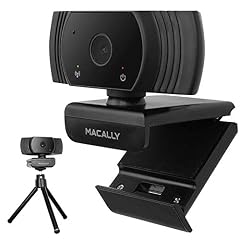
Macally 1080P Webcam with Microphone
- Resolution
- 1080p
- Frame rate
- 30 fps
- Built-in microphone
- Yes
$9.99 price as of 2026-10-01 05:36 UTC (Details)
The Macally packs 1080p, a microphone, and a 30 fps spec into a listing without extra parts. It is a clean fallback for buyers who want the basics.
Pros
- 1080p resolution
- Built-in microphone
- 30 fps listed
Cons
- No autofocus listed
- No privacy cover listed
- No field of view stated
Good fit if
- Users who want a basic video and audio spec sheet
- Desk setups where a simple USB camera is enough
Skip if
- Buyers who want a privacy cover
- People who want 4K or autofocus
Verdict: The Macally is the plain 1080p and microphone option in this lineup.
12 Best 1080p privacy package

AUSDOM AF640 1080P Webcam with Microphone
- Resolution
- 1080p
- Built-in microphone
- Yes
- Privacy cover
- Yes
$9.99 price as of 2026-10-01 05:26 UTC (Details) Typical price: $13.99, 29% off
This AUSDOM covers the same three basics as the Amcrest and EMEET: 1080p, microphone, and privacy cover. It gives buyers another choice among the privacy-first webcams in this pool.
Pros
- 1080p resolution
- Built-in microphone
- Privacy cover
Cons
- No autofocus listed
- No stated frame rate
- No structured field-of-view spec
Good fit if
- Buyers who want a 1080p privacy-plus-mic package
- Work-from-home users who cover the lens between calls
Skip if
- People who prefer 4K or 2K
- Users who need autofocus
Verdict: The AUSDOM is another complete 1080p privacy package in this guide.
13 Best compact privacy pick
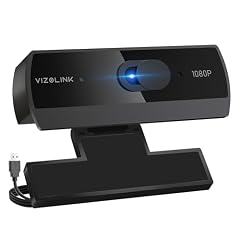
VIZOLINK 1080P Webcam with Built-in Microphone
- Resolution
- 1080p
- Built-in microphone
- Yes
- Privacy cover
- Yes
$9.99 price as of 2026-10-01 05:42 UTC (Details)
The VIZOLINK is another 1080p microphone and privacy-cover webcam, listed as a plug-and-play model for work calls. It adds a second compact option for the same feature set.
Pros
- 1080p resolution
- Built-in microphone
- Privacy cover
Cons
- No autofocus listed
- No stated frame rate
- No stated field of view
Good fit if
- Users who want a privacy cover and mic on a simple USB camera
- Work setups where the camera stays in place
Skip if
- People who need autofocus
- Anyone who wants a 4K or 2K sensor
Verdict: The VIZOLINK is a straightforward 1080p privacy pick.
14 Best 4K with autofocus

WINSAFE 4K Webcam
- Resolution
- 4K
- Autofocus
- Yes
- Built-in microphone
- Yes
$18.04 price as of 2026-10-01 05:42 UTC (Details) Typical price: $18.99, 5% off
The WINSAFE lists 4K and autofocus without a privacy cover, which makes it the 4K answer for buyers who care more about focus than lens coverage. Two microphones are named in the product name, though the structured specs record a single microphone entry.
Pros
- 4K resolution
- Autofocus
- Built-in microphone
Cons
- No privacy cover listed
- No stated frame rate
- No field of view in the structured specs
Good fit if
- 4K buyers who already have a lens cover or camera-off habit
- Users who want autofocus without extra privacy hardware
Skip if
- People who want a physical privacy cover
- Anyone who needs a stated frame rate
Verdict: The WINSAFE is the autofocus-first 4K pick in this guide.
15 Best for separate-mic setups

Poly Studio P5 Professional Webcam
- Resolution
- 1080p
- Privacy cover
- Yes
$14.99 price as of 2026-10-01 05:39 UTC (Details)
The Poly Studio P5 comes from a conference-hardware brand and lists 1080p plus a privacy cover. The structured specs do not mention a built-in microphone, so it fits users who already have a dedicated mic.
Pros
- 1080p resolution
- Privacy cover
- Conference-hardware brand in the listing name
Cons
- Built-in microphone not stated by the seller
- No autofocus listed
- No stated frame rate
Good fit if
- Teams or Zoom users with a separate USB microphone
- People who want the lens covered when a call ends
Skip if
- Buyers who expect the camera to include a mic
- Users who want autofocus or a 2K image
Verdict: The Poly Studio P5 is the no-microphone 1080p choice for desk setups that already have audio covered.
Side by side
| # | Webcam | Resolution | Frame rate | Autofocus | Built-in microphone | Privacy cover | AI tracking |
|---|---|---|---|---|---|---|---|
| 1 | Amcrest 1080P Webcam with Microphone for Desktop | 1080p | not stated | not stated | Yes | Yes | not stated |
| 2 | VAKUNICE 4K Webcam for PC with Dual Microphones | 4K | 30 fps | Yes | Yes | Yes | not stated |
| 3 | UGREEN 2K Webcam for PC Ultra HD 1080P Computer Webcam with Microphone | 2K (1440p) | not stated | not stated | Yes | not stated | not stated |
| 4 | 2K Webcam for PC | 2K (1440p) | not stated | Yes | Yes | not stated | not stated |
| 5 | Gritto 1080P HD Webcam with Auto Focus & Microphone | 1080p | 30 fps | Yes | Yes | not stated | not stated |
| 6 | EMEET C950 1080P Webcam | 1080p | not stated | not stated | Yes | Yes | not stated |
| 7 | Logitech 960001580 Brio 100 1080p Full HD Webcam | 1080p | not stated | not stated | not stated | not stated | not stated |
| 8 | HZQDLN 1080P Webcam with Microphone USB Privacy Cover Tripod 110° for PC | 1080p | not stated | not stated | Yes | Yes | not stated |
| 9 | Angetube 1080P Webcam with Microphone | 1080p | not stated | Yes | Yes | not stated | not stated |
| 10 | 4K Webcam with USB C Adapter Privacy Cover Microphone for PC Mac Laptop | 4K | not stated | not stated | Yes | Yes | not stated |
| 11 | Macally 1080P Webcam with Microphone | 1080p | 30 fps | not stated | Yes | not stated | not stated |
| 12 | AUSDOM AF640 1080P Webcam with Microphone | 1080p | not stated | not stated | Yes | Yes | not stated |
| 13 | VIZOLINK 1080P Webcam with Built-in Microphone | 1080p | not stated | not stated | Yes | Yes | not stated |
| 14 | WINSAFE 4K Webcam | 4K | not stated | Yes | Yes | not stated | not stated |
| 15 | Poly Studio P5 Professional Webcam | 1080p | not stated | not stated | not stated | Yes | not stated |
How we picked
The pool for this guide is 60 webcams whose listed price falls within this budget range. From those, we kept 15 that had clear, useful specifications and that together cover the range buyers ask about: 1080p, 2K, and 4K sensors, built-in microphones, autofocus, privacy covers, USB-C adapters, and tripod mounts. Entries with no resolution or microphone data were left out unless they were the only example of a needed feature. Every spec written below comes from the product listing data; prices are read live from the store and displayed next to each pick. This site did not run its own evaluations; the guide is based on stated specifications. The feature notes and awards are checkable against the catalog data.
How to choose
Resolution: 1080p, 2K, or 4K
At this price, most webcams list 1080p, which is enough for video calls and streaming at standard widescreen sizes. A handful list 2K (1440p) or 4K, usually at 30 fps. If your main apps are video meetings, 1080p is the safe floor. If you want extra detail for cropping or recording, a 2K or 4K pick gives you more pixels on the spec sheet, but it often skips other conveniences like a privacy cover or autofocus.
Microphones: built-in versus separate
Most picks in this pool list a built-in microphone, which is convenient for an all-in-one desk setup. A few webcams do not mention a microphone in the structured specs; those are better for people who already use a separate USB or headset mic. If the mic is important, check the pick's con notes before buying.
Privacy covers and physical controls
A privacy cover is a sliding or clip-on shield that blocks the lens when the camera is off. Many budget webcams list one, and some listings pair it with a built-in microphone and tripod. If you leave your webcam mounted, a privacy cover is the simplest way to stop the lens from seeing the room.
Autofocus and frame rate
Autofocus appears on a subset of these webcams and helps when you move closer to or farther from the camera. Frame rate is less often stated in this price band; the picks that do list it usually say 30 fps. For typical calls, 30 fps is a common ceiling; for game capture or 60 fps output, none of the specs here claim it.
Plug and play and USB-C
Most USB webcams use the USB Video Class (UVC) driver in Windows, which means the system can treat them as standard cameras without a separate driver. When a desktop app needs camera access, check Windows camera permissions to let it through. For USB-C-only laptops, look for a listing that includes a USB-C adapter.
What budget webcams will not give you
At this price, you should not expect the large sensors, HDR, or advanced processing of high-end cameras. The picks here are chosen for clear, stated specs: resolution, microphone, autofocus, privacy, and connectivity. If you need true 60 fps, uncompressed 4K, or software control, you will need to spend more than this guide's range.
Questions
Do webcams under $25 work with Zoom, Microsoft Teams, and Google Meet?
Most desktop apps detect a standard UVC webcam as a camera device, so you pick it in the app's camera menu. On Windows, camera access is controlled in Settings, under Privacy and security, Camera. Teams Rooms hardware certification is separate from the ordinary webcams you plug into a personal PC.
Is 4K in this price range worth choosing?
Several webcams in this pool list 4K resolution, but they rarely list the sensor size, lens, or processing you need to judge real-world detail. If you mostly make calls, 1080p is a reliable target. If you want a 4K spec sheet and can accept 30 fps, the 4K picks here are the only ones that state that resolution.
What should I do if my laptop only has USB-C ports?
Some webcams in this guide list a USB-C adapter in the product name, which lets you plug into a modern port directly. Others have a USB-A connector and need an adapter you supply. USB-C is a connector standard; check the webcam listing to see whether an adapter is included.
Is autofocus important in a budget webcam?
Autofocus helps when you move toward or away from the camera, such as leaning in to show something. Fixed-focus cameras are common under $25, and they can be fine at a normal desk distance. The picks with autofocus state it in their specs; the others do not.
What if a pick has no stated microphone?
A few webcams in this list do not list a built-in microphone in the structured specs. Those are better for people who already have a separate microphone or a headset. If you need the camera to carry audio, choose one that explicitly lists a microphone.
Recent updates
- : First published.