
Best Privacy Cover Webcams in 2026: 14 Picks Compared on Specs
The Razer Kiyo Pro Ultra leads this list because it combines a 1/1.2-inch sensor with 4K resolution and a built-in shutter, making it the strongest all-rounder for those who want DSLR-like quality and a physical privacy cover. Every webcam here has a privacy cover, and we compared each model's stated specifications to find the best fit for streaming, work calls, and content creation. No unit was tested; picks are based on published specs and maker information.
14 picks from 88 webcams that match this guide with a price we can quote today. Every price below is live and carries the moment it was read.
The picks at a glance
Which one should you buy?
- For remote workers and meeting-heavy users: You need a reliable 1080p webcam with clear audio and a shutter you can close at the end of the day. The Logitech C920S or Lenovo FHD cover all the essentials. See pick 6
- For streamers and gamers: You want at least 1080p at 60 frames per second or 4K, plus a lens cover to keep your setup private when you step away. The NexiGo N960E or JOYUSING Flip600R fit that bill. See pick 7
- For content creators and 4K enthusiasts: You care about image quality and flexibility, with autofocus and a large sensor. The Razer Kiyo Pro Ultra is the top pick, but the Acer 4K is a compact alternative. See pick 1
The 14 picks
1 Best overall

Razer Kiyo Pro Ultra 4K Webcam
- Resolution
- 4K
- Built-in microphone
- Yes
- Privacy cover
- Yes
$399.99 price as of 2026-10-01 05:39 UTC (Details)
This is the only pick with a 1/1.2-inch Sony Starvis 2 sensor, which the maker says captures 3.9 times more light than typical webcams. It records 4K at 30 fps or 1080p at 60 fps, includes a built-in microphone, and has a physical shutter that twists over the lens. Among the 4K models here, it offers the most advanced imaging hardware.
Pros
- 1/1.2-inch sensor, the largest in this list
- Built-in microphone and physical shutter
- 4K at 30 fps or 1080p at 60 fps
- Uncompressed video output at 4K/24 fps or 1080p/60 fps per the maker
Cons
- No autofocus specification in the seller's listing
- More expensive than the other picks here
Good fit if
- Content creators who want a webcam with a large sensor
- Users who need 4K quality and a physical shutter for privacy
Skip if
- You need automatic focus and tracking
- You want a budget-friendly option for occasional meetings
Verdict: The Razer Kiyo Pro Ultra is the most capable privacy-cover webcam on this list when image quality is your priority.
2 Best for video calls

Logitech MX Brio Ultra HD 4K Webcam with Noise Reducing Microphones
- Resolution
- 4K
- Built-in microphone
- Yes
- Privacy cover
- Yes
$198.99 price as of 2026-10-01 05:36 UTC (Details)
Logitech's MX Brio offers 4K resolution, noise-reducing microphones, and an AI-enhanced image engine, all in a compact body with a privacy protector. It sits between the high-end Razer and the more budget 4K models, making it a solid choice for professionals who join video calls all day and want a future-proof camera.
Pros
- 4K resolution with AI-enhanced image quality
- Noise-reducing microphones
- Privacy protector built in
- Works with most video conferencing apps
Cons
- Autofocus not stated by the seller
- No frame rate specification beyond 4K
Good fit if
- Remote workers and consultants with heavy meeting schedules
- Users who want a recognizable brand with wide software compatibility
Skip if
- You need 60 fps for smooth motion
- You want a physical shutter that fully covers the lens (this uses a privacy protector)
Verdict: The Logitech MX Brio is the best all-around 4K camera for everyday professional use and privacy.
3 Best 4K hybrid for streaming and work

NexiGo N660P Pro 4K Webcam with Distortion-Free Lens
- Resolution
- 4K
- Frame rate
- 60 fps or more
- Autofocus
- Yes
- Built-in microphone
- Yes
- Privacy cover
- Yes
$79.99 price as of 2026-10-01 05:38 UTC (Details)
This NexiGo camera records 4K video and also supports 1080p at 60 fps, a combination rarely seen at this level. It includes autofocus, a distortion-free lens, a built-in microphone, and a privacy cover. It is a flexible option for streamers who want to capture high resolution for close-ups but smooth 60 fps for action.
Pros
- 4K resolution and 1080p at 60 fps
- Autofocus with distortion-free lens
- Built-in microphone and 3DNR noise reduction
- Privacy cover included
Cons
- Microphone quality not detailed beyond 'built-in'
- No face tracking or AI features
Good fit if
- Streamers who switch between 4K and 60 fps
- Users who want a mid-priced 4K camera with autofocus
Skip if
- You need a very large sensor for low-light performance
- You want a camera with built-in ring light
Verdict: The NexiGo N660P Pro is the most versatile 4K pick here, offering both high resolution and high frame rate.
4 Best compact 4K

Acer 4K Webcam for PC/Mac with All-Metal Unibody Sculpted
- Resolution
- 4K
- Autofocus
- Yes
- Built-in microphone
- Yes
- Privacy cover
- Yes
$69.99 price as of 2026-10-01 05:23 UTC (Details)
Acer's 4K webcam uses a Sony 1/2-inch sensor and PDAF autofocus, two features that usually appear on more expensive models. It has an all-metal unibody, two noise-reduction microphones, and a privacy cover. It is the most affordable 4K model from a major computer maker in this list.
Pros
- Sony 1/2-inch sensor with PDAF autofocus
- All-metal unibody construction
- Two noise-reduction microphones
- Privacy cover included
Cons
- No frame rate specification beyond 4K
- Field of view not stated by the seller
Good fit if
- Users who want a durable, compact 4K camera for travel or a small desk
- Those who need fast autofocus for moving presentations
Skip if
- You need 1080p at 60 fps for smooth motion
- You want a camera with an external tripod included
Verdict: The Acer 4K is a well-rounded, affordable 4K option with autofocus and a premium build.
5 Best for noise-cancelling microphones

Lenovo FHD Webcam
- Resolution
- 1080p
- Frame rate
- 30 fps
- Built-in microphone
- Yes
- Privacy cover
- Yes
$45.99 price as of 2026-10-01 05:35 UTC (Details)
Lenovo's 1080p webcam includes dual noise-cancelling microphones and AI noise cancellation, making it particularly strong for conference calls in noisy environments. It runs at 30 fps, has a privacy cover, and is backed by a major laptop maker, so driver support is likely consistent.
Pros
- Dual noise-cancelling microphones
- AI noise cancellation
- 1080p resolution at 30 fps
- Privacy cover and known brand
Cons
- No autofocus stated by the seller
- Only 30 fps, not ideal for fast motion
Good fit if
- Professionals who take calls from home offices with background noise
- Users who prefer a webcam from a traditional computer maker
Skip if
- You need 60 fps for streaming
- You want 4K resolution
Verdict: The Lenovo FHD is a dependable 1080p webcam that prioritizes clear voice pickup and simple privacy.
6 Best classic 1080p

Logitech Webcam C920S HD Pro with Privacy Shutter
- Resolution
- 1080p
- Built-in microphone
- Yes
- Privacy cover
- Yes
$68.44 price as of 2026-10-01 05:36 UTC (Details)
The Logitech C920S is a modern version of the legendary C920, adding a physical privacy shutter to the same 1080p sensor and dual microphone setup. It is a proven design used in countless offices, and its glass lens produces sharp video. It is a safe, reliable choice.
Pros
- Proven 1080p performance with glass lens
- Dual microphones with stereo audio
- Physical privacy shutter
- Works with Windows, macOS, and ChromeOS
Cons
- No autofocus stated by the seller
- Only 30 fps maximum
Good fit if
- Users who want a no-fuss webcam that 'just works'
- Businesses that need a uniform camera for meeting rooms
Skip if
- You need 4K or 60 fps
- You want a modern USB-C connection
Verdict: The Logitech C920S remains one of the most dependable 1080p webcams with a privacy cover you can buy.
7 Best 1080p60 for streamers

NexiGo N960E 1080P 60FPS Webcam with Light
- Resolution
- 1080p
- Frame rate
- 60 fps or more
- Autofocus
- Yes
- Built-in microphone
- Yes
- Privacy cover
- Yes
$69.99 price as of 2026-10-01 05:38 UTC (Details)
The NexiGo N960E is one of the few 1080p webcams here that hit 60 frames per second, making it ideal for fast-moving streaming or video capture. It includes autofocus, a built-in light, a physical privacy cover, and companion software for adjusting exposure and color.
Pros
- 1080p at 60 fps
- Autofocus and built-in light
- Software included for fine-tuning image
- Privacy cover
Cons
- Built-in light may increase glare on glasses
- Software is an extra download, not bundled in the box
Good fit if
- Streamers who want smooth 60 fps without paying for 4K
- Users who want a physical light to improve low-light shots
Skip if
- You need 4K resolution
- You prefer a webcam without companion software
Verdict: The NexiGo N960E is the go-to pick for streamers who need 60 fps and a built-in light at a mid-range price.
8 Best for 360-degree swivel

AVerMedia Live Streamer Cam 313
- Resolution
- 1080p
- Built-in microphone
- Yes
- Privacy cover
- Yes
$57.19 price as of 2026-10-01 05:26 UTC (Details)
AVerMedia's Live Streamer Cam 313 features a 360-degree swivel mount, letting you point the camera at yourself, your desk, or a whiteboard without moving the clamp. It records 1080p at 30 fps, has dual microphones, and includes a physical shutter. The swivel makes it more flexible than fixed designs.
Pros
- 360-degree swivel for flexible framing
- Dual microphones
- 1080p resolution with privacy shutter
- From a maker known for streaming accessories
Cons
- No autofocus stated by the seller
- Only 30 fps
Good fit if
- Teachers and presenters who need to show physical objects
- Users who want a webcam with a tripod-free swivel
Skip if
- You need 4K or 60 fps
- You want a built-in light
Verdict: The AVerMedia Live Streamer Cam 313 is the most adaptable 1080p webcam on this list thanks to its 360-degree swivel.
9 Best for Chromebook and desktop users

HP 320 FHD Webcam
- Resolution
- 1080p
- Built-in microphone
- Yes
- Privacy cover
- Yes
$28.99 price as of 2026-10-01 05:33 UTC (Details)
The HP 320 is a straightforward USB-A webcam with 1080p resolution, a built-in microphone, and a privacy cover. It is designed to work with desktops, laptops, and ChromeOS, and its simple plug-and-play nature makes it a good choice for schools or offices where IT support is limited.
Pros
- USB-A connector, compatible with most desktops
- 1080p with built-in microphone
- Privacy cover
- Plug-and-play with common operating systems
Cons
- No autofocus stated by the seller
- No frame rate specified
Good fit if
- ChromeOS users who need a no-install camera
- IT admins looking for a dependable budget webcam
Skip if
- You need 4K or 60 fps
- You want USB-C connectivity
Verdict: The HP 320 is a reliable, straightforward 1080p webcam for everyday computing and school use.
10 Best with tripod included

JOYUSING Flip600R 4K Webcam for PC
- Resolution
- 4K
- Autofocus
- Yes
- Built-in microphone
- Yes
- Privacy cover
- Yes
$39.99 price as of 2026-10-01 05:34 UTC (Details)
The JOYUSING Flip600R pairs a 4K sensor with PDAF autofocus and noise-cancelling microphones, and it comes with a tripod in the box. The tripod gives you an easy way to position the camera above or beside your monitor, and the 79-degree field of view fits one to two people in the frame.
Pros
- 4K resolution with PDAF autofocus
- Noise-cancelling microphones
- Tripod included
- 79-degree field of view
Cons
- Frame rate not stated for 4K
- Tripod may be too short for standing setups
Good fit if
- Users who want an out-of-the-box tripod for flexible placement
- Content creators who need autofocus and 4K for product shots
Skip if
- You need a very wide field of view for large groups
- You prefer a clamp-only design
Verdict: The JOYUSING Flip600R is a complete 4K package with autofocus and a tripod for about the same price as some 1080p models.
11 Best with ring light
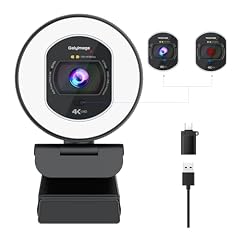
Galyimage 4K Full HD Webcam with Ring Light
- Resolution
- 4K
- Frame rate
- 30 fps
- Autofocus
- Yes
- Built-in microphone
- Yes
- Privacy cover
- Yes
$36.99 price as of 2026-10-01 05:30 UTC (Details)
The Galyimage 4K webcam includes a built-in ring light, TOF autofocus, and a noise-cancelling microphone. The ring light helps even out lighting in dim rooms, while TOF autofocus locks onto your face quickly. It records 4K at 30 fps or 1080p at 30 fps and has a privacy cover.
Pros
- Built-in ring light for low-light clarity
- TOF autofocus
- Noise-cancelling microphone
- 4K at 30 fps
Cons
- Ring light may produce hotspots on glasses
- Only 30 fps maximum
Good fit if
- Streamers who often record in dark rooms
- Users who want autofocus and a light without buying extra gear
Skip if
- You need 60 fps for action
- You want a webcam without lighting features
Verdict: The Galyimage 4K is a well-equipped webcam for content creators who need both autofocus and a fill light.
12 Best dual-microphone 4K

N newline 4K Webcam for PC with Dual Microphones
- Resolution
- 4K
- Autofocus
- Yes
- Built-in microphone
- Yes
- Privacy cover
- Yes
$35.99 price as of 2026-10-01 05:37 UTC (Details)
This N newline webcam records 4K at 30 fps, has dual microphones, and supports autofocus. It also features auto light correction and a privacy cover. The dual mics give it an edge over single-mic 4K competitors in this price range.
Pros
- Dual microphones
- Autofocus
- 4K at 30 fps
- Auto light correction and privacy cover
Cons
- No frame rate for 1080p mode
- Less well-known brand
Good fit if
- Users who want 4K on a budget with two microphones
- People who need autofocus for talking head videos
Skip if
- You need 60 fps
- You prefer a major brand for support
Verdict: The N newline 4K is a strong budget 4K option with dual mics and autofocus.
13 Best for conference calls

EMEET C950 1080P Webcam
- Resolution
- 1080p
- Built-in microphone
- Yes
- Privacy cover
- Yes
$17.99 price as of 2026-10-01 05:29 UTC (Details)
The EMEET C950 is a compact 1080p webcam with a built-in microphone and a physical privacy cover. It uses a simple USB connection, works with most video conferencing platforms, and the privacy shutter is easy to close after calls. It is a low-friction choice for meeting rooms and hot desks.
Pros
- 1080p resolution with built-in microphone
- Physical privacy cover
- Plug-and-play USB connection
- Compact design
Cons
- No autofocus stated by the seller
- No frame rate specified
Good fit if
- Business users who need a simple, reliable webcam for meetings
- Users who want a small camera that fits in a laptop bag
Skip if
- You need 4K or 60 fps
- You want a camera with an external tripod mount
Verdict: The EMEET C950 is an ideal no-nonsense webcam for daily professional calls with a privacy cover.
14 Best for Windows Hello

NexiGo HelloCam
- Resolution
- 1080p
- Built-in microphone
- Yes
- Privacy cover
- Yes
$55.99 price as of 2026-10-01 05:38 UTC (Details)
The NexiGo HelloCam is unique on this list because it supports Windows Hello facial recognition, allowing you to sign in securely with your face. It also has an automatic electronic shutter that blocks the lens when the camera is not in use, and a 1080p sensor with a microphone. If you want biometric login and privacy, this is the one.
Pros
- Windows Hello support for passwordless sign-in
- Automatic electronic shutter
- 1080p resolution with microphone
- Privacy feature is automatic, no manual cover needed
Cons
- Electronic shutter is not a physical cover
- Requires a compatible Windows device with Hello support
Good fit if
- Windows users who want a secure and convenient login
- People who often forget to close a physical shutter
Skip if
- You use a Mac or non-Windows device
- You prefer a manual physical cover
Verdict: The NexiGo HelloCam is the best choice for Windows users who want integrated facial recognition and automatic privacy.
Side by side
| # | Webcam | Resolution | Frame rate | Autofocus | Built-in microphone | Privacy cover | AI tracking |
|---|---|---|---|---|---|---|---|
| 1 | Razer Kiyo Pro Ultra 4K Webcam | 4K | not stated | not stated | Yes | Yes | not stated |
| 2 | Logitech MX Brio Ultra HD 4K Webcam with Noise Reducing Microphones | 4K | not stated | not stated | Yes | Yes | not stated |
| 3 | NexiGo N660P Pro 4K Webcam with Distortion-Free Lens | 4K | 60 fps or more | Yes | Yes | Yes | not stated |
| 4 | Acer 4K Webcam for PC/Mac with All-Metal Unibody Sculpted | 4K | not stated | Yes | Yes | Yes | not stated |
| 5 | Lenovo FHD Webcam | 1080p | 30 fps | not stated | Yes | Yes | not stated |
| 6 | Logitech Webcam C920S HD Pro with Privacy Shutter | 1080p | not stated | not stated | Yes | Yes | not stated |
| 7 | NexiGo N960E 1080P 60FPS Webcam with Light | 1080p | 60 fps or more | Yes | Yes | Yes | not stated |
| 8 | AVerMedia Live Streamer Cam 313 | 1080p | not stated | not stated | Yes | Yes | not stated |
| 9 | HP 320 FHD Webcam | 1080p | not stated | not stated | Yes | Yes | not stated |
| 10 | JOYUSING Flip600R 4K Webcam for PC | 4K | not stated | Yes | Yes | Yes | not stated |
| 11 | Galyimage 4K Full HD Webcam with Ring Light | 4K | 30 fps | Yes | Yes | Yes | not stated |
| 12 | N newline 4K Webcam for PC with Dual Microphones | 4K | not stated | Yes | Yes | Yes | not stated |
| 13 | EMEET C950 1080P Webcam | 1080p | not stated | not stated | Yes | Yes | not stated |
| 14 | NexiGo HelloCam | 1080p | not stated | not stated | Yes | Yes | not stated |
How we picked
We started with a catalogue of 60 webcams that list a privacy cover, all with live prices from the retail listing. We shortlisted by requiring a physical privacy shutter or cover, then ranked by resolution (4K vs 1080p), autofocus support, microphone quality as indicated by the number of mics and noise-suppression claims, and frame rate for streamers. We favored established makers such as Razer, Logitech, HP, Lenovo, AVerMedia, and NexiGo, and avoided near-duplicate models. We did not test any unit; we read each product's specifications and the maker's public product pages, and the store listing provides the current price and availability.
How to choose
Physical privacy cover or electronic shutter?
A physical privacy cover is a sliding or rotating piece of plastic that you move over the lens. It requires a manual action but works even if the camera is unplugged. An electronic shutter, like the one on the NexiGo HelloCam, automatically blocks the lens when the camera is inactive, but it relies on a software state. If you want a guaranteed physical barrier, choose a webcam with a manual shutter; if you want automatic protection, go with an electronic one.
Resolution: 1080p or 4K?
4K webcams capture more detail, which helps if you plan to crop or zoom digitally. However, 4K files use more bandwidth and processing power. Many video conferencing apps, like Zoom or Teams, only transmit at 720p or 1080p, so 4K is mostly useful for local recording or streaming. For most work calls, a sharp 1080p camera is sufficient. If you create content or want to future-proof, a 4K model like the Razer Kiyo Pro Ultra or Acer 4K is a better investment.
Autofocus and field of view
Autofocus keeps you sharp when you lean in or move around. The Razer Kiyo Pro Ultra uses face tracking, while the Acer uses PDAF, a method borrowed from DSLR cameras. Field of view is also important: a narrow 60-degree view suits one person, while a 90-degree or wider angle lets you include a whiteboard or multiple people. Check the maker's specs for the exact field of view; for example, the JOYUSING lists 79 degrees.
Microphone quality and noise cancellation
A built-in mic is convenient, but not all mics are equal. Look for dual microphones or explicit noise-cancellation technology. The Lenovo FHD and Acer 4K have dual noise-reducing mics, and the Logitech MX Brio lists noise-reducing microphones. If you have loud roommates or take calls in a coffee shop, a webcam with noise cancellation will dramatically improve your call quality.
Questions
Why should I buy a webcam with a privacy cover?
A privacy cover gives you a physical way to block the lens when the camera is not in use. This prevents accidental sharing, protects against malware that could activate the camera, and offers peace of mind if you are concerned about surveillance. Slides or shutters are simple to use and do not affect video quality when open.
Does a privacy cover affect image quality?
No, when the cover is fully open, it does not interfere with the lens. The glass or plastic cover sits in front of the lens while closed, but when you slide it away, the camera sees the full image. Some covers are made of thin plastic and could cause a slight distortion if not aligned, but most are designed to be out of the frame when open.
What is the difference between a physical shutter and an electronic shutter?
A physical shutter is a mechanical piece that you move over the lens. It works even if the computer is off. An electronic shutter, like on the NexiGo HelloCam, uses software to disable the camera and may also rotate a plastic cover automatically. A physical shutter is more reliable, but an electronic one can be convenient because it activates without your input.
Can I use a privacy-cover webcam with macOS or ChromeOS?
Yes. Most webcams act as standard USB cameras and use the UVC driver, so they work on Windows, macOS, ChromeOS, and Linux without installing extra drivers. For example, the HP 320 specifically mentions Chromebook compatibility. Always check the product's compatibility list before buying.
Recent updates
- : First published.