
Best Webcams Under $50 in 2026: 15 Picks Compared on Specs
The EMEET C960 is the top webcam in this budget tier for most people: it pairs 4K resolution with phase-detection autofocus and two omni-directional microphones, a combination that is rare at this price. To choose the rest of this list, we compared 60 webcams from the budget catalog using only the sellers' listed specifications, the makers' published information, and standards documents; nobody at this site has used these cameras, and the prices shown update live with the page clock.
15 picks from 217 webcams that match this guide with a price we can quote today. Every price below is live and carries the moment it was read.
The picks at a glance
Which one should you buy?
- For 4K on a tight budget: Choose the EMEET C960 if you want 4K resolution, autofocus, and a built-in microphone from the budget tier. See pick 1
- For remote work and long meetings: The Lenovo FHD Webcam pairs dual noise-cancelling microphones with AI noise cancellation and a privacy cover, which covers the daily meeting routine. See pick 3
- For streamers who want smooth motion: The AOC 4K lists a Sony sensor, PDAF autofocus, and 1080p output at 60 fps, a combination aimed at people who move on camera. See pick 7
- For simple Chromebook and laptop setups: The HP 320 FHD is a straightforward USB-A 1080p webcam with a microphone and privacy cover, and the listing calls out Chromebook support. See pick 6
The 15 picks
1 Best overall

EMEET C960 4K Webcam for PC
- Resolution
- 4K
- Autofocus
- Yes
- Built-in microphone
- Yes
$49.99 price as of 2026-10-01 05:29 UTC (Details)
This is the only pick in this budget group that lists 4K, PDAF autofocus, and dual omni-directional microphones together. The 73° field of view is a middle ground between a tight solo frame and a wide group view, so it suits the most common desks. It earns the overall award because it covers the three specs most buyers ask for first.
Pros
- 4K resolution listed
- PDAF autofocus listed
- Dual omni-directional microphones listed
- 73° field of view suits one person or a small desk
Cons
- Frame rate at 4K not stated by the seller
- No privacy cover listed
- Field of view narrower than the 90° and 110° cams in the pool
Good fit if
- Buyers who want 4K, autofocus, and a mic in one camera
- Solo calls and small desk setups
Skip if
- You need 60 fps for fast-moving streams
- You want a physical privacy cover
Verdict: The EMEET C960 is the best balanced webcam in this list for most people because it lists 4K, autofocus, and dual mics together.
2 Best 2K for business calls
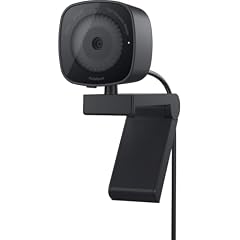
Dell 2K QHD Webcam WB3023
- Resolution
- 2K (1440p)
- Built-in microphone
- Yes
$48.48 price as of 2026-10-01 05:28 UTC (Details) Typical price: $57.99, 16% off
The Dell WB3023 is the only pick that combines 2K QHD resolution with a listed Sony sensor and noise reduction mic from a major PC maker. QHD sits between 1080p and 4K, so it upgrades sharpness without requiring the full 4K ecosystem. It is a business-first design rather than a streaming bundle.
Pros
- 2K QHD resolution above 1080p
- Listed Sony sensor and noise reduction microphone
- From a major PC maker
- Business-oriented listing matched to meetings
Cons
- No autofocus listed
- No privacy cover listed
- No 60 fps frame rate listed
Good fit if
- People who want sharper meeting video from a large brand
- Laptop or desktop users who plug in one USB webcam and go
Skip if
- You want 4K capture
- You need a privacy cover on the lens
Verdict: The Dell WB3023 is the pick to choose when a major brand and QHD sharpness matter more than specs like autofocus or 60 fps.
3 Best for remote work

Lenovo FHD Webcam
- Resolution
- 1080p
- Frame rate
- 30 fps
- Built-in microphone
- Yes
- Privacy cover
- Yes
$45.99 price as of 2026-10-01 05:35 UTC (Details)
The Lenovo FHD Webcam is aimed at meetings, with 1080p, 30 fps, dual noise-cancelling microphones, AI noise cancellation, and a privacy cover all listed. That combination covers the daily video-call checklist without asking you to add a separate mic. It is a conservative 1080p pick from an established PC maker.
Pros
- Dual noise-cancelling microphones listed
- AI noise cancellation listed
- Privacy cover included
- 1080p and 30 fps from an established PC maker
Cons
- 1080p, not 4K or 2K
- 30 fps, so not aimed at fast motion
- Not the wide-angle option compared with 90° and 110° cams in the pool
Good fit if
- Remote workers and students on daily calls
- People who want a privacy cover without buying one separately
Skip if
- You want 4K sensor detail
- You stream games or need 60 fps
Verdict: The Lenovo FHD is the most complete meeting-first webcam in this list, on paper.
4 Best 4K with AI noise-canceling mic

Acer A640 4K Webcam with AI Noise Canceling Mic for Streaming Meetings
- Resolution
- 4K
- Built-in microphone
- Yes
$39.98 price as of 2026-10-01 05:23 UTC (Details)
The Acer A640 is one of the few 4K picks from a major PC maker, and it lists an AI noise-canceling microphone. That matters for buyers who want higher sensor resolution and decent audio without a separate mic. It does not list autofocus, which separates it from the EMEET C960 and JOYUSING Flip600R 4K picks.
Pros
- 4K resolution listed
- AI noise-canceling microphone listed
- Established PC maker with a 4K model here
Cons
- No autofocus listed
- Frame rate at 4K not stated by the seller
- No privacy cover listed
Good fit if
- Buyers who want a 4K sensor from a known brand
- Meeting and streaming use where the webcam mic is the only mic
Skip if
- You move around and need autofocus
- You want a physical privacy shutter
Verdict: The Acer A640 is the top 4K-with-microphone choice from an established PC maker, provided you can live without autofocus.
5 Best from an established webcam brand

Logitech Brio 105 Full HD 1080p Business Webcam with Auto-Light Balance
- Resolution
- 1080p
$39.33 price as of 2026-10-01 05:35 UTC (Details)
The Logitech Brio 105 is the only major webcam-specialist brand in this pool, and its listed spec is a clean business 1080p camera with auto-light balance. There is no built-in microphone in the listing, so it is for buyers who already have a headset or desk mic. It earns the established-brand award for buyers who value that name recognition over the higher-resolution picks here.
Pros
- Only major webcam-specialist brand in this pool
- 1080p resolution with auto-light balance listed
- Business webcam positioning per the listing name
Cons
- No microphone listed in the product spec
- No autofocus listed
- No privacy cover listed
Good fit if
- Buyers who already own a headset or separate microphone
- People who want a webcam-specialist brand at this budget
Skip if
- You need a built-in microphone
- You want 4K or 2K resolution
Verdict: The Logitech Brio 105 is the safest 1080p-from-a-webcam-specialist pick if you can supply your own audio.
6 Best 1080p for Chromebooks

HP 320 FHD Webcam
- Resolution
- 1080p
- Built-in microphone
- Yes
- Privacy cover
- Yes
$28.99 price as of 2026-10-01 05:33 UTC (Details)
The HP 320 FHD is a straightforward USB-A webcam: 1080p, microphone, privacy cover, and a listing that calls out Chromebook support. That makes it a sensible choice for classrooms, home offices, and older laptops where simplicity wins. It does not try to be a 4K streaming camera.
Pros
- 1080p with microphone and privacy cover listed
- Listing names Chromebook compatibility
- USB-A works with a wide range of desktops and laptops
- From a major PC maker
Cons
- 1080p, not 4K or 2K
- No autofocus listed
- No frame rate listed
Good fit if
- Chromebook and classroom use
- Users who want one cable and no setup
Skip if
- You need 4K capture
- You want autofocus for movement
Verdict: The HP 320 FHD is the right 1080p workhorse when compatibility and simplicity matter more than headline specs.
7 Best for streaming

AOC 4K Webcam for PC with PDAF
- Resolution
- 4K
- Frame rate
- 60 fps or more
- Autofocus
- Yes
$35.99 price as of 2026-10-01 05:24 UTC (Details)
The AOC 4K lists a Sony sensor, PDAF autofocus, 4K capture, and 1080p output at 60 fps, the combination most useful for streaming. Smooth 60 fps motion matters when you gesture or move in front of the camera. It does not list a microphone, so a streaming mix or headset mic is expected.
Pros
- 1080p output at 60 fps listed
- PDAF autofocus listed
- Sony sensor listed
- 4K capture for detail and cropping
Cons
- No microphone listed in the product spec
- No privacy cover listed
- Streaming features may exceed what meeting apps use
Good fit if
- Streamers and content creators who move on camera
- Users who already have a separate microphone
Skip if
- You need the webcam to double as your mic
- Your meetings are short and you prefer a fixed-focus 1080p camera
Verdict: The AOC 4K is the pick for smooth 60 fps streaming in this budget, if you bring your own audio.
8 Best 1080p with low-distortion lens

NexiGo N60 Pro
- Resolution
- 1080p
- Built-in microphone
- Yes
- Privacy cover
- Yes
$39.99 price as of 2026-10-01 05:38 UTC (Details)
The NexiGo N60 Pro (Gen 2) lists a distortion-free lens, a noise reduction mic, and a privacy cover. The lens claim is the differentiator: wide-angle webcams can bend the edges of the frame, and this listing says the N60 Pro corrects for that. It is a 1080p camera for users who care about straight vertical lines behind them.
Pros
- Distortion-free lens listed
- Noise reduction microphone listed
- Privacy cover included
- USB-A to USB-C data cable listed in the name
Cons
- 1080p, not 4K or 2K
- No frame rate listed
- No stated tripod or light accessory
Good fit if
- Desk setups with visible shelves or door frames that should stay straight
- Users who want a privacy cover and a mic in one 1080p camera
Skip if
- You want 4K sensor detail
- You need a stated 60 fps mode
Verdict: The NexiGo N60 Pro stands out for its listed distortion-free lens, a detail that matters for clean desk shots.
9 Best 4K with tripod

JOYUSING Flip600R 4K Webcam for PC
- Resolution
- 4K
- Autofocus
- Yes
- Built-in microphone
- Yes
- Privacy cover
- Yes
$39.99 price as of 2026-10-01 05:34 UTC (Details)
The JOYUSING Flip600R bundles 4K, PDAF autofocus, noise-cancelling mics, a privacy cover, and a tripod in one listing. That makes it the most complete 4K kit in the pool for someone who does not already own a mount. Its feature list is close to the EMEET C960 with an added tripod and privacy cover.
Pros
- Tripod included in the listing
- 4K resolution with PDAF autofocus
- Noise-cancelling microphones listed
- Privacy cover listed
Cons
- Frame rate at 4K not stated by the seller
- 79° field of view is narrower than the 90° and 110° cams in the pool
- Bundle includes more pieces than a simple clip-on cam
Good fit if
- Users who want 4K and a flexible mount right out of the box
- Desks where a monitor clip cannot fit
Skip if
- You want a simple clip-on camera with no extra pieces
- You prefer a major PC brand
Verdict: The JOYUSING Flip600R is the fullest 4K-with-tripod package in this budget range based on its listed specs.
10 Best 4K with microphone from an established brand
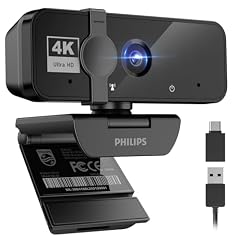
PHILIPS 4K Webcam for PC with Microphone
- Resolution
- 4K
- Built-in microphone
- Yes
$31.99 price as of 2026-10-01 05:39 UTC (Details)
The Philips 4K webcam lists 4K capture and a built-in microphone under a recognizable electronics brand. It is a simpler 4K option than the EMEET C960 or JOYUSING Flip600R because no autofocus is listed. For buyers who want 4K from a name they know without chasing a streaming feature set, this is the middle path.
Pros
- 4K resolution listed
- Built-in microphone listed
- Established electronics brand
- Positioned for meetings in the listing name
Cons
- No autofocus listed
- No privacy cover listed
- Frame rate at 4K not stated by the seller
Good fit if
- Users who want a 4K meeting webcam from a familiar brand
- Buyers who do not need autofocus
Skip if
- You move around during calls and need autofocus
- You want a privacy shutter
Verdict: The Philips 4K is the plainest 4K-with-mic choice from an established brand in this list.
11 Best 1080p streamer with fill light

NBPOWER 1080P 60FPS Streaming Camera Webcam
- Resolution
- 1080p
- Frame rate
- 60 fps or more
- Autofocus
- Yes
- Built-in microphone
- Yes
$29.99 price as of 2026-10-01 05:38 UTC (Details)
The NBPOWER 1080P is the only pick that lists 60 fps, autofocus, a microphone, and an RGB fill light together. The fill light is the reason it earns a streaming award: a built-in light can improve a dim desk setup without extra gear. It stays at 1080p rather than 4K, which keeps the listing focused on smoothness and lighting.
Pros
- 1080p at 60 fps listed
- RGB fill light listed
- Microphone and autofocus listed
- Aimed at streaming and desktop use
Cons
- 1080p, not 4K
- Brightness and color of the fill light not stated by the seller
- No privacy cover listed
Good fit if
- Streamers on a desk with weak ambient light
- Users who want 60 fps without paying for 4K
Skip if
- You have a proper studio light and a separate mic
- You want 4K capture for cropping
Verdict: The NBPOWER 1080P is the budget pick for streamers who need 60 fps and a fill light on one USB device.
12 Best 1080p privacy-first webcam

Amcrest 1080P Webcam with Microphone & Privacy Cover
- Resolution
- 1080p
- Built-in microphone
- Yes
- Privacy cover
- Yes
$25.99 price as of 2026-10-01 05:24 UTC (Details)
The Amcrest 1080P lists a microphone, a privacy cover, and 1080p in one compact USB webcam. The privacy cover is the headline because it gives visual certainty after a call without relying on app permissions. There is no autofocus or 60 fps claim, so it is best for stationary video calls.
Pros
- Microphone listed
- Privacy cover included
- 1080p resolution with USB plug-and-play positioning
- Compact webcam design for PC desktop and laptop per listing
Cons
- No autofocus listed
- No frame rate listed
- No 4K or 2K resolution
Good fit if
- Users who want a physical lens cover on a budget
- Home-office setups where the camera stays mounted between calls
Skip if
- You want 4K or 2K detail
- You need autofocus for movement
Verdict: The Amcrest 1080P is the privacy-first 1080p pick, with mic and shutter in one simple package.
13 Best 2K 60fps with privacy cover

XFGsertXD V11 2K Webcam for PC
- Resolution
- 2K (1440p)
- Frame rate
- 60 fps or more
- Built-in microphone
- Yes
- Privacy cover
- Yes
$49.51 price as of 2026-10-01 05:43 UTC (Details)
The XFGsertXD V11 is the only pick that lists 2K resolution, 60 fps, a microphone, a privacy cover, and a 90° field of view together. That makes it useful for users who want more than 1080p and smoother motion than a 30 fps office cam. The listing attaches the 60 fps label to 1080p output, while the 2K frame rate is not stated by the seller.
Pros
- 2K (1440p) resolution listed
- 60 fps listed
- Microphone and privacy cover listed
- 90° field of view for a wider room view
Cons
- No autofocus listed
- 2K is still below 4K capture
- 2K frame rate not stated by the seller
Good fit if
- People who want 1440p detail and 60 fps at the same time
- Users who want a wider group view from a desktop cam
Skip if
- You prefer a brand with a long consumer lineup
- You need 4K capture
Verdict: The XFGsertXD V11 bundles 2K, 60 fps, a mic, a privacy cover, and a wide view into one budget listing.
14 Best 4K with metal body

The POHO 4K lists an anodized aluminum alloy body, which is unusual in this budget group, alongside 4K, PDAF autofocus, and a 75° field of view. There is no microphone in the listed specs, so it suits users who already have separate audio. It wins the metal-body award because no other pick states that build material.
Pros
- Anodized aluminum alloy body stated in listing
- 4K resolution with PDAF autofocus
- 75° field of view listed
Cons
- No microphone listed in the product spec
- No privacy cover listed
- Frame rate at 4K not stated by the seller
Good fit if
- Users who like the feel and appearance of a metal camera body
- People with a separate mic or headset
Skip if
- You need a built-in microphone
- You want a privacy cover
Verdict: The POHO 4K is the pick for a 4K autofocus camera with a stated metal body and no reliance on a built-in mic.
15 Best 4K with ring light and remote control

TOALLIN 4K Webcam with Ring Light
- Resolution
- 4K
- Autofocus
- Yes
$38.99 price as of 2026-10-01 05:41 UTC (Details)
The TOALLIN 4K lists a ring light, a remote control, PDAF autofocus, and 4K capture. That makes it an all-in-one choice for presenters who want to adjust lighting or framing without touching the camera. It has no microphone in the listed specs, so plan for separate audio.
Pros
- Ring light listed
- Remote control listed
- PDAF autofocus and 4K listed
Cons
- No microphone listed in the product spec
- No privacy cover listed
- Frame rate at 4K not stated by the seller
Good fit if
- Presenters who want a remote to adjust the camera
- Desks that need extra light built into the webcam
Skip if
- You need the webcam mic for calls
- You want a bare camera with no accessories
Verdict: The TOALLIN 4K is the pick to choose when you want a ring light and remote control built around the camera.
Side by side
| # | Webcam | Resolution | Frame rate | Autofocus | Built-in microphone | Privacy cover | AI tracking |
|---|---|---|---|---|---|---|---|
| 1 | EMEET C960 4K Webcam for PC | 4K | not stated | Yes | Yes | not stated | not stated |
| 2 | Dell 2K QHD Webcam WB3023 | 2K (1440p) | not stated | not stated | Yes | not stated | not stated |
| 3 | Lenovo FHD Webcam | 1080p | 30 fps | not stated | Yes | Yes | not stated |
| 4 | Acer A640 4K Webcam with AI Noise Canceling Mic for Streaming Meetings | 4K | not stated | not stated | Yes | not stated | not stated |
| 5 | Logitech Brio 105 Full HD 1080p Business Webcam with Auto-Light Balance | 1080p | not stated | not stated | not stated | not stated | not stated |
| 6 | HP 320 FHD Webcam | 1080p | not stated | not stated | Yes | Yes | not stated |
| 7 | AOC 4K Webcam for PC with PDAF | 4K | 60 fps or more | Yes | not stated | not stated | not stated |
| 8 | NexiGo N60 Pro | 1080p | not stated | not stated | Yes | Yes | not stated |
| 9 | JOYUSING Flip600R 4K Webcam for PC | 4K | not stated | Yes | Yes | Yes | not stated |
| 10 | PHILIPS 4K Webcam for PC with Microphone | 4K | not stated | not stated | Yes | not stated | not stated |
| 11 | NBPOWER 1080P 60FPS Streaming Camera Webcam | 1080p | 60 fps or more | Yes | Yes | not stated | not stated |
| 12 | Amcrest 1080P Webcam with Microphone & Privacy Cover | 1080p | not stated | not stated | Yes | Yes | not stated |
| 13 | XFGsertXD V11 2K Webcam for PC | 2K (1440p) | 60 fps or more | not stated | Yes | Yes | not stated |
| 14 | POHO 4K Webcam for PC | 4K | not stated | Yes | not stated | not stated | not stated |
| 15 | TOALLIN 4K Webcam with Ring Light | 4K | not stated | Yes | not stated | not stated | not stated |
How we picked
The pool for this guide started with 60 webcams priced within the budget tier in the live catalog. We folded near-duplicate listings, kept models sold as new, and preferred established makers where the specs allowed, although this budget tier is largely served by smaller brands. We shortlisted 15 picks that cover the useful spread of features: 4K sensors, 2K (1440p) sensors, 1080p at 30 and 60 fps, PDAF and other autofocus listings, built-in microphones, privacy covers, tripods, ring lights, and USB-A or USB-C connectivity. Every specification in the pros, cons, and awards comes from the product listing or a maker's public specification page, and the key standards are linked in Sources. None of the webcams were tested by this site. Prices on this page are read live from the store listing and carry their own read time; the guide deliberately avoids guessing what anything costs today.
How to choose
Resolution: what the label means in this budget range
Resolution is the first spec to check. In this pool of 60 webcams in the budget tier, 29 list 4K capture, 3 list 2K (1440p), and 28 list 1080p. 4K gives the most detail and the most room to crop, but it pushes the rest of the camera: check whether the listing also says something about autofocus, the microphone, and the frame rate at 4K, because many sellers leave those details out. 1080p remains the practical resolution for meetings, and it is the most common label in this budget range.
Autofocus and field of view
Autofocus matters when you lean in, lean back, or move around in a call. 21 of the 60 webcams in the pool list autofocus; some specify PDAF (phase detection autofocus), while others just say autofocus or auto focus. If a listing does not mention autofocus, plan on a fixed-focus lens.
Field of view controls how much of the room is visible. The picks span from a 73° EMEET C960 to a 90° XFGsertXD and a 110° HZQDLN in the pool; wider angles fit group calls but show more background.
Microphones and noise handling
Almost every webcam in this price range has a built-in microphone, but the designs differ. Several picks list dual microphones, including the EMEET C960 and Lenovo FHD; others list noise cancellation or AI noise cancellation, such as the Acer A640 and Lenovo FHD. If you use a headset or a separate desktop mic, the webcam mic matters less. If you rely on the webcam's audio, look for a listing that names the number of mics or a noise-canceling feature; a few 4K picks in this list, such as the AOC, POHO, and TOALLIN, list no microphone at all.
Frame rate: 30 fps versus 60 fps
Frame rate controls how smooth motion looks in the video feed. Five of the 60 webcams in the pool list 60 fps or more: the XFGsertXD V11 and RUWBY Pro QHD at 2K, the AOC 4K and OIEXEN 4K with 1080p output at 60 fps, and the NBPOWER 1080p. A 60 fps listing helps for gaming, streaming, or any time there is fast movement in front of the lens.
Premium webcams such as the Elgato Facecam Pro advertise true 4K60 capture, which is a different tier from the 60 fps modes in this pool. For ordinary meetings, a 30 fps webcam is still a normal choice, and several picks here list 30 fps.
Privacy covers and mounting
Privacy is handled differently from model to model. 24 of the 60 webcams in the pool list a privacy cover or shutter. A cover that slides over the lens gives visual certainty when the camera is not in use, and it does not depend on an app or an operating system setting.
Mounting also matters: most of these listings describe a clip or a desktop base, the JOYUSING Flip600R includes a tripod, and the NBPOWER lists a built-in fill light. If your monitor has a thick bezel, read the listing for mount details before you choose.
Connectivity, drivers, and privacy settings
Budget webcams on this list are USB devices. Many webcams sold as plug-and-play follow the USB Video Class standard, and when a device does, Windows includes the driver and you do not need a CD; Microsoft's UVC overview describes that class. Connectors vary: USB-A is the common desktop and laptop port, and some listings include a USB-C adapter; the USB-IF Type-C page documents the connector ecosystem.
After you plug in, Windows must allow the camera: in Settings, then Privacy & security, then Camera, turn on Camera access and let desktop apps use the camera. Microsoft's camera permissions page walks through that. Meeting rooms with full Teams Rooms certification follow a separate hardware program from Microsoft; a consumer webcam is not covered by that room certification, so check the meeting app's own requirements.
Questions
Is a budget webcam good enough for video calls?
Yes for normal meetings, if you choose the right specs. The 1080p models in this list cover standard meeting resolution, and the ones with a built-in microphone avoid a second device. The 4K models add detail and cropping room, but not every app uses 4K video. Look for autofocus if you move around, and a privacy cover if you want a physical lens block when the call ends.
What does 4K mean on a budget webcam?
On these listings, 4K describes the camera's capture resolution. Of the 60 webcams in the pool, 29 list 4K. That does not tell you everything: a budget 4K cam may or may not list autofocus, a microphone, or the frame rate at 4K. If the seller leaves those details out, check the maker's specification page or choose a 1080p model with a more complete listed feature set.
Do I need to install drivers for these webcams?
Webcams that follow the USB Video Class (UVC) standard work with the driver built into Windows, so no CD or separate driver package is required. Microsoft's UVC overview explains that class of device. If a camera does not appear in an app, first check the Windows camera privacy settings, then try a different USB port or cable.
Why is my webcam showing a black screen?
Windows controls camera access in two layers. Open Settings, then Privacy & security, then Camera. Make sure Camera access is on, and turn on access for desktop apps, because meeting clients and browsers count as desktop apps. After changing a permission, close and reopen the app that was showing black.
Should I choose 1080p or 4K in this price range?
Start with what your software and workflow actually use. If your meetings stay at 1080p and you do not crop or zoom in software, a 1080p webcam with a microphone and privacy cover is enough. If you want extra detail from the sensor or plan to crop the frame, 4K helps, but confirm the listing states the autofocus and microphone you need, since a few 4K models in this list list no microphone.
How does a privacy cover work?
A privacy cover on this list is a physical part of the webcam, usually a sliding shutter that blocks the lens when closed. It does not need software, which is why it appears in the specs separately from any app-based camera lock. Of the 60 webcams in this pool, 24 list a privacy cover. It is useful when the camera stays mounted while you are not on a call.
Recent updates
- : First published.