
Best Logitech Webcams in 2026: 11 Picks Compared on Specs
The MX Brio offers the best balance of 4K resolution, a built-in noise-reducing microphone, and a privacy cover among the picks in this guide. This guide compares 11 unique Logitech webcams drawn from a catalog of 33 listings, focusing on stated specifications such as resolution, microphone, tracking, and privacy. No units were tested; prices are live and read from the catalog at the time of writing.
11 picks from 33 webcams that match this guide with a price we can quote today. Every price below is live and carries the moment it was read.
The picks at a glance
Which one should you buy?
- For home office calls: If you primarily use video calling for work and want a certified, dependable 1080p webcam with a mic, the C920e is a safe choice. See pick 5
- For streamers: Streamers who want 60fps at 720p and a separate mic will like the C922x Pro bundle with Blue Yeti Nano. See pick 8
- For conference rooms: Organizations equipping a meeting room should look at the Rally Bar Room Kit for its 4K PTZ camera and beamforming mics. See pick 9
- For budget users: If you just need a basic webcam for casual video chats and don't mind 720p, the C270 is the entry point. See pick 11
The 11 picks
1 Best overall

Logitech MX Brio Ultra HD 4K Webcam with Noise Reducing Microphones
- Resolution
- 4K
- Built-in microphone
- Yes
- Privacy cover
- Yes
$198.99 price as of 2026-10-01 05:36 UTC (Details)
This MX Brio combines 4K resolution, noise-reducing microphones, and a privacy cover in one unit, making it the most complete personal webcam in this list. It edges out the other MX Brio here because it adds the mic and shutter that most users expect from a premium model.
Pros
- 4K ultra HD resolution
- Noise-reducing microphones
- Integrated privacy cover
- AI-enhanced image quality
Cons
- No auto-framing or tracking
- No stated 60fps mode
Good fit if
- Professionals who want a 4K image and a clean desk
- Users who need a built-in mic and privacy shutter
Skip if
- You need auto-framing for moving presentations
- You prefer to use an external microphone
Verdict: The most feature-rich Logitech webcam for a single desk, balancing 4K, audio, and privacy.
2 Best 4K without extras
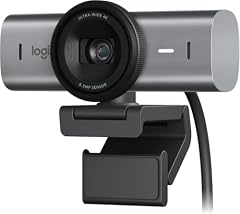
This version of the MX Brio offers 4K resolution in a simpler package, without a built-in microphone or privacy cover. It suits users who already have a separate mic and want the highest resolution Logitech offers for a lower price than the fully loaded model.
Pros
- 4K ultra HD resolution
- Compact, clean design
- Low-profile mounting
Cons
- No built-in microphone
- No privacy cover
- No auto-framing
Good fit if
- Streamers who own a dedicated microphone
- Users who want 4K without paying for extras they don't need
Skip if
- You need a mic and privacy in one device
- You rely on webcam software for autoframing
Verdict: A straightforward 4K webcam for those who already have their own audio setup.
3 Best auto-framing 1080p

Logitech Brio 500 Full HD Webcam
- Resolution
- 1080p
- Built-in microphone
- Yes
- AI tracking
- Yes
$119.99 price as of 2026-10-01 05:35 UTC (Details)
The Brio 500 is the only 1080p pick here with auto-framing, letting it adjust the view to keep you centered during calls. It also has a built-in mic and noise reduction, making it a versatile choice for users who move around.
Pros
- Auto-framing (tracking)
- 1080p resolution
- Built-in noise-reducing microphone
- Privacy cover included
Cons
- No 4K option
- No stated field-of-view options
Good fit if
- People who present while moving
- Users who want a 1080p camera with automatic framing
Skip if
- You need 4K video
- You already have a microphone and want a simpler 1080p camera
Verdict: A smart 1080p webcam that keeps you in frame without manual adjustment.
4 Best for show mode
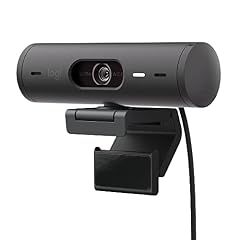
Logitech Brio 501 Full HD Webcam Auto Light Correction Show Mode
- Resolution
- 1080p
$129.99 price as of 2026-10-01 05:35 UTC (Details)
The Brio 501 is built around Show Mode, which automatically corrects lighting when you present objects or documents. Its 1080p sensor is paired with auto light correction, a feature not found on other desktop picks here.
Pros
- 1080p resolution
- Auto light correction (Show Mode)
- Suitable for desk presentations
Cons
- No built-in microphone
- No privacy cover
- No auto-framing
Good fit if
- Salespeople who show products on camera
- Users who need a webcam that adjusts to lighting changes
Skip if
- You need a mic in the webcam
- You want a 4K image
Verdict: A specialized 1080p webcam for presenters who frequently share physical items.
5 Best certified 1080p

Logitech C920e HD 1080p Mic Enabled Webcam Certified Zoom Microsoft
- Resolution
- 1080p
- Built-in microphone
- Yes
$69.94 price as of 2026-10-01 05:36 UTC (Details)
The C920e is certified for Microsoft Teams and Zoom, as stated in the product name, making it a safe choice for enterprise video calls. Its 1080p sensor and built-in mic deliver dependable clarity without the need for extra software.
Pros
- 1080p resolution
- Built-in microphone
- Certified for Zoom and Microsoft Teams
Cons
- No privacy cover
- No auto-framing
- Uses USB-A (not stated, but common)
Good fit if
- Remote workers on Teams or Zoom
- Organizations that want predictable compatibility
Skip if
- You need 4K video
- You want a privacy shutter
Verdict: A straightforward, enterprise-friendly 1080p webcam with large platform certifications.
6 Best with manual privacy shutter

Logitech Webcam C920S HD Pro with Privacy Shutter
- Resolution
- 1080p
- Built-in microphone
- Yes
- Privacy cover
- Yes
$68.44 price as of 2026-10-01 05:36 UTC (Details)
The C920S pairs a 1080p sensor and built-in microphone with a physical privacy shutter, giving you a simple way to block the lens when not in use. It is one of only two picks here with a manual shutter at a consumer price.
Pros
- 1080p resolution
- Built-in microphone
- Physical privacy shutter
Cons
- No auto-framing
- No 4K mode
Good fit if
- Privacy-conscious users who want a quick cover
- People who need a reliable 1080p webcam for calls
Skip if
- You want a USB-C connection (this model is USB-A)
- You need auto-framing
Verdict: A dependable 1080p webcam that adds a physical shutter for privacy.
7 Best USB-C budget pick

Logitech Brio 300 HD Webcam with Privacy Shutter
- Built-in microphone
- Yes
- Privacy cover
- Yes
$54.99 price as of 2026-10-01 05:35 UTC (Details)
The Brio 300 offers a USB-C connection, a noise-reducing mic, and a privacy shutter at a modest price. Its resolution is not stated on the listing, but it is positioned as a HD webcam and is certified for Zoom and Teams.
Pros
- USB-C connection
- Noise-reducing microphone
- Privacy shutter
- Certified for Zoom and Microsoft Teams
Cons
- Resolution not stated by the seller
- No auto-framing
Good fit if
- Users with modern laptops that only have USB-C
- Budget-conscious buyers who want privacy features
Skip if
- You need a specific resolution like 4K
- You already have a USB-A webcam and don't need USB-C
Verdict: A modern, privacy-focused webcam that is easy to plug into current laptops.
8 Best streaming bundle

Logitech C922x Pro Webcam + Blue Yeti Nano
- Resolution
- 1080p
- Frame rate
- 30 fps
$219.98 price as of 2026-10-01 05:36 UTC (Details)
The C922x Pro webcam and Blue Yeti Nano bundle gives streamers a dedicated microphone and a webcam that supports 720p at 60fps. No other pick here includes a separate mic, making this a complete starter kit.
Pros
- 720p at 60 fps capability
- Includes Blue Yeti Nano microphone
- Bundle saves desk setup time
Cons
- Only 1080p at 30fps (not 4K)
- Takes up space on a desk
Good fit if
- New streamers who want a single purchase
- Content creators who prefer 60fps for smooth motion
Skip if
- You already have a microphone
- You need 4K video
Verdict: A practical bundle for streamers who need both a webcam and a good microphone from the start.
9 Best conference room system
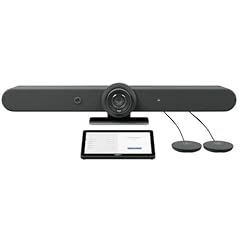
Logitech Rally Bar Room Kit
- Resolution
- 4K
- Built-in microphone
- Yes
$5,549.00 price as of 2026-10-01 05:36 UTC (Details)
The Rally Bar Room Kit is designed for medium to large meeting rooms, with a 4K PTZ camera and beamforming microphones for full-room coverage. It is the only pick here that can capture a whole room without external mics.
Pros
- 4K PTZ camera
- Beamforming microphones
- Designed for room-scale meetings
Cons
- Requires mounting and installation
- Not intended for single-desktop use
Good fit if
- Businesses outfitting conference rooms
- Teams that need a permanent, high-quality room camera
Skip if
- You work alone at a desk
- You need a portable webcam for travel
Verdict: A room-scale solution that brings professional video and audio to any meeting space.
10 Best touch controller bundle

Logitech Rally Bar + Tap IP Graphite Bundle for Video Meeting Rooms
$4,464.41 price as of 2026-10-01 05:36 UTC (Details)
This bundle pairs the Rally Bar with a Tap IP touch controller, streamlining meeting room control. While the listing provides no detailed specs, the package is aimed at organizations that want an integrated room experience.
Pros
- Includes Tap IP touch panel
- Integrated camera and speaker bar
- Graphite finish for professional looks
Cons
- Specifications not stated by the seller
- Complex installation and integration
Good fit if
- Companies standardizing on Teams Rooms
- Rooms that need a dedicated control surface
Skip if
- You need a simple desktop webcam
- You prefer to manage meetings with your own laptop
Verdict: A complete room bundle for organizations that want a unified meeting control surface.
11 Best basic budget pick

Logitech C270 720p Webcam Plug-and-Play Wide Screen Video Calling
- Resolution
- 720p
$16.89 price as of 2026-10-01 05:36 UTC (Details)
The C270 is the simplest and least expensive pick here, offering 720p resolution and plug-and-play setup without a built-in mic or privacy shutter. It is best for occasional video calls where image quality is not critical.
Pros
- 720p resolution
- Plug-and-play, no driver required
- Wide-screen format
Cons
- No built-in microphone
- No privacy cover
- No auto-framing or 1080p
Good fit if
- Users who already have a headset or external mic
- People who want a bare-bones backup webcam
Skip if
- You need a mic in the webcam
- You want HD 1080p video
Verdict: A no-frills 720p webcam for users who just need a working lens at an entry price.
Side by side
| # | Webcam | Resolution | Frame rate | Autofocus | Built-in microphone | Privacy cover | AI tracking |
|---|---|---|---|---|---|---|---|
| 1 | Logitech MX Brio Ultra HD 4K Webcam with Noise Reducing Microphones | 4K | not stated | not stated | Yes | Yes | not stated |
| 2 | LOGITECH MX BRIO Ultra HD 4K Webcam | 4K | not stated | not stated | not stated | not stated | not stated |
| 3 | Logitech Brio 500 Full HD Webcam | 1080p | not stated | not stated | Yes | not stated | Yes |
| 4 | Logitech Brio 501 Full HD Webcam Auto Light Correction Show Mode | 1080p | not stated | not stated | not stated | not stated | not stated |
| 5 | Logitech C920e HD 1080p Mic Enabled Webcam Certified Zoom Microsoft | 1080p | not stated | not stated | Yes | not stated | not stated |
| 6 | Logitech Webcam C920S HD Pro with Privacy Shutter | 1080p | not stated | not stated | Yes | Yes | not stated |
| 7 | Logitech Brio 300 HD Webcam with Privacy Shutter | not stated | not stated | not stated | Yes | Yes | not stated |
| 8 | Logitech C922x Pro Webcam + Blue Yeti Nano | 1080p | 30 fps | not stated | not stated | not stated | not stated |
| 9 | Logitech Rally Bar Room Kit | 4K | not stated | not stated | Yes | not stated | not stated |
| 10 | Logitech Rally Bar + Tap IP Graphite Bundle for Video Meeting Rooms | not stated | not stated | not stated | not stated | not stated | not stated |
| 11 | Logitech C270 720p Webcam Plug-and-Play Wide Screen Video Calling | 720p | not stated | not stated | not stated | not stated | not stated |
How we picked
The pool consisted of 33 Logitech webcam listings from the catalog. After removing near-duplicates, 11 distinct models remained, and all are included. Each pick's specifications come from the product listing itself; no unit was tested. Choices were based on stated specs, including resolution, microphone, privacy cover, auto-framing, and certifications, compared across the group. Prices on this page are the live prices from the catalog at the time of data collection, and they update with every page load.
How to choose
Resolution: 720p, 1080p, or 4K
Resolution determines how sharp your video looks. 720p (1280x720) is the minimum you'll find today, and it's fine for casual calls. 1080p (1920x1080) is the standard for professional meetings and streaming, offering good detail. 4K (3840x2160) gives you four times as many pixels, which is useful if you edit video or want to zoom in without losing quality. Keep in mind that your computer and internet connection also affect the final image.
Built-in microphone or separate audio
Many Logitech webcams include a built-in microphone, which is convenient and saves desk space. However, if you want higher audio quality, you'll likely use a dedicated USB or XLR microphone. In this list, the MX Brio and Brio 500 have noise-reducing mics, while the C270 has none. If you already own a microphone, you can save money by choosing a webcam without one, such as the MX Brio basic or the Brio 501.
Privacy cover and shutter
A privacy cover lets you physically block the lens when the webcam is not in use, protecting you from accidental exposure. The C920S and Brio 300 include a manual privacy shutter, while the MX Brio has an integrated privacy cover. If you work in an open office or are concerned about security, look for a webcam with this feature. Models without a shutter can still be unplugged or turned off in software, but a physical cover is more direct.
Certifications for Zoom and Microsoft Teams
Webcams that are certified for popular video platforms meet specific performance and reliability standards set by those platforms. The C920e and Brio 300 are explicitly certified for Zoom and Microsoft Teams, as stated in their product names. Certification often ensures that the camera's auto-exposure, white balance, and microphone work consistently within those applications. This is especially useful for enterprise users who depend on video calls.
Connectivity and USB specification
Modern laptops increasingly use USB-C ports, and some webcams now ship with a USB-C connection. The Brio 300 is the most affordable USB-C webcam here. Older models like the C270 and C920S use USB-A, which may require an adapter with newer computers. If you have a device with only USB-C, choose a webcam that connects directly, or carry a USB-A to USB-C adapter. All Logitech webcams are plug-and-play under the USB Video Class standard, so you typically don't need to install a separate driver.
Questions
How do I set up a Logitech webcam with Windows?
Logitech webcams that use the USB Video Class are plug-and-play with Windows 10 and Windows 11. Plug the webcam into a USB port, then make sure camera access is enabled in the Windows privacy settings. Go to Settings, Privacy and security, Camera, and turn on camera access. You may also need to allow individual apps to use the camera. Most Logitech models appear automatically and require no additional driver.
Do Logitech webcams have built-in microphones?
Many do. Models like the MX Brio, Brio 500, C920e, C920S, and Brio 300 include a built-in microphone. Others, such as the C270 and the basic MX Brio, do not. If you already have a separate microphone for streaming or recording, you can choose a model without a built-in mic to save money. For conference calls, a built-in mic is convenient and adequate for most users.
Are Logitech webcams certified for Zoom or Microsoft Teams?
Some models are specifically certified. For example, the C920e and Brio 300 are listed as certified for Zoom and Microsoft Teams. Certification means the camera has been tested to meet certain quality and performance standards for those platforms. If you rely on video conferencing, choosing a certified model can reduce the chance of compatibility issues. Always check the product listing for specific certification claims.
What is the difference between 720p and 1080p webcams?
720p and 1080p describe the resolution of the video output. 720p has a resolution of 1280x720 pixels, while 1080p is 1920x1080. Higher resolution provides more detail and a sharper image on large screens. For casual video calls, 720p is acceptable, but for professional meetings or streaming, 1080p is the recommended minimum. 4K resolution (2160p) is also available on higher-end models like the MX Brio.
Recent updates
- : First published.