
Best 2K (1440p) Webcams in 2026: 15 Picks by Specs
The Razer Kiyo V2 X is our top pick for a 2K (1440p) webcam, offering 60 fps video for smooth streams and calls. We compared 15 models from a pool of 21 based on specs like frame rate, autofocus, microphone, and privacy cover. All prices are live from the listing, and none of these units were physically tested.
12 picks from 38 webcams that match this guide with a price we can quote today. Every price below is live and carries the moment it was read.
The picks at a glance
Which one should you buy?
- For esports streaming: If you need smooth motion, the Razer Kiyo V2 X delivers 1440p at 60 fps. See pick 1
- For remote work: The Dell WB3023 pairs a Sony sensor with a noise-reduction microphone for clear meetings. See pick 2
- For low-light rooms: The Anker PowerConf C200 is marketed with low-light correction, ideal for dim spaces. See pick 3
- For autofocus fans: The XOCLON webcam includes PDAF autofocus and a wide 92° field of view. See pick 4
The 12 picks
1 Best overall

Razer Kiyo V2 X Webcam for Streaming and Meetings
- Resolution
- 2K (1440p)
- Frame rate
- 60 fps or more
$74.99 price as of 2026-10-01 05:39 UTC (Details)
The Razer Kiyo V2 X is the only pick with 1440p at 60 fps, a combination that keeps motion smooth for streaming and meetings. Its resolution matches the 2K requirement, and it comes from a reputable maker.
Pros
- 1440p at 60 fps
- Streaming-focused design
- USB plug-and-play connection
Cons
- No built-in microphone
- No stated autofocus
- No privacy cover
Good fit if
- Streamers who want high frame rates
- Users with a separate microphone
Skip if
- You need a built-in mic
- You want a privacy cover
Verdict: The best overall 2K webcam for smooth, high-quality video.
2 Best for meetings
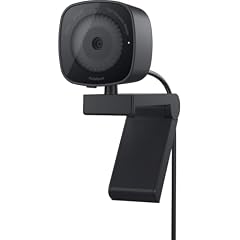
Dell 2K QHD Webcam WB3023
- Resolution
- 2K (1440p)
- Built-in microphone
- Yes
$48.48 price as of 2026-10-01 05:28 UTC (Details) Typical price: $57.99, 16% off
The Dell WB3023 pairs a Sony sensor with a noise-reduction microphone, making it a strong choice for video calls. It is one of the few picks from a major PC maker.
Pros
- Sony sensor
- Built-in microphone
- Noise-reduction mic
Cons
- Frame rate not stated
- No privacy cover stated
Good fit if
- Remote workers
- Users who want a reliable brand
Skip if
- You need 60 fps
- You want autofocus
Verdict: A dependable 2K webcam for professional meetings.
3 Best for low-light correction

Anker PowerConf C200 2K Webcam for PC/Laptop/Mac
- Resolution
- 2K (1440p)
$69.99 price as of 2026-10-01 05:24 UTC (Details)
The Anker PowerConf C200 is marketed with low-light correction, which can help in dim rooms. It is a respectable choice from a well-known accessory maker.
Pros
- Low-light correction
- 2K resolution
- Simple USB connection
Cons
- No stated microphone
- No stated frame rate
- No privacy cover
Good fit if
- Users in poorly lit rooms
- People who already have a headset mic
Skip if
- You need a built-in mic
- You want autofocus
Verdict: A solid 2K webcam that specifically addresses dim environments.
4 Best with autofocus

2K Webcam for PC
- Resolution
- 2K (1440p)
- Autofocus
- Yes
- Built-in microphone
- Yes
$16.99 price as of 2026-10-01 05:23 UTC (Details)
The XOCLON webcam is the only pick with PDAF autofocus and a 92° field of view, offering sharp focus and a wide frame. It also includes an AI noise-canceling microphone.
Pros
- PDAF autofocus
- AI noise-canceling mic
- 92° field of view
Cons
- Frame rate not stated
- No privacy cover stated
Good fit if
- Content creators who move around
- Group video calls
Skip if
- You need 60 fps
- You prefer a compact design
Verdict: The best choice if autofocus is your priority.
5 Best with privacy cover and mic

Shcngqio 2K Webcam with Microphone
- Resolution
- 2K (1440p)
- Built-in microphone
- Yes
- Privacy cover
- Yes
$19.94 price as of 2026-10-01 05:40 UTC (Details) Typical price: $20.99, 5% off
This Shcngqio webcam includes a privacy cover, noise cancellation, and a wide-angle lens. It packs essential extras into a single unit.
Pros
- Privacy cover
- Microphone with noise cancellation
- Wide-angle lens
Cons
- Frame rate not stated
- No autofocus stated
Good fit if
- Privacy-conscious users
- Those who want a built-in mic
Skip if
- You need 60 fps
- You need autofocus
Verdict: A feature-rich 2K webcam with essential extras.
6 Best with light and privacy cover

PixelForge 2K Webcam for PC with Microphone & Light & Privacy Cover
- Resolution
- 2K (1440p)
- Built-in microphone
- Yes
- Privacy cover
- Yes
$34.99 price as of 2026-10-01 05:39 UTC (Details)
The PixelForge webcam adds a light and privacy cover to its 2K sensor and microphone, making it a complete package for desktop use.
Pros
- Built-in light
- Privacy cover
- Microphone
Cons
- Frame rate not stated
- No autofocus stated
Good fit if
- Users who want good lighting
- Those who want privacy
Skip if
- You need 60 fps
- You have a separate light
Verdict: A well-equipped 2K webcam with illumination.
7 Best basic with microphone

UGREEN 2K Webcam for PC Ultra HD 1080P Computer Webcam with Microphone
- Resolution
- 2K (1440p)
- Built-in microphone
- Yes
$22.99 price as of 2026-10-01 05:42 UTC (Details)
UGREEN is known for accessories, and this 2K webcam includes a microphone. It offers a straightforward plug-and-play experience.
Pros
- Built-in microphone
- 2K resolution
- Trusted brand
Cons
- No stated frame rate
- No privacy cover
Good fit if
- Users who need a simple webcam
- Those who want a mic
Skip if
- You need autofocus
- You want 60 fps
Verdict: A reliable, no-frills 2K webcam.
8 Best with dual mics and tripod

Vuexar 2K Webcam with Microphone
- Resolution
- 2K (1440p)
- Built-in microphone
- Yes
$15.64 price as of 2026-10-01 05:42 UTC (Details) Typical price: $21.99, 29% off
The Vuexar webcam includes dual microphones and a tripod, making it easy to position. It also has a wide angle for group calls.
Pros
- Dual microphones
- Tripod included
- Plug-and-play
Cons
- Frame rate not stated
- No autofocus stated
Good fit if
- Users who need a tripod
- Group video calls
Skip if
- You need 60 fps
- You prefer a clamp mount
Verdict: A versatile 2K webcam with mounts and dual mics.
9 Best with automatic light correction

Hprosper 2K Webcam with Microphone
- Resolution
- 2K (1440p)
- Built-in microphone
- Yes
- Privacy cover
- Yes
$9.99 price as of 2026-10-01 05:33 UTC (Details)
The Hprosper webcam states automatic light correction and includes a privacy cover and microphone. It is a compact, low-profile choice.
Pros
- Automatic light correction
- Privacy cover
- Microphone
Cons
- Frame rate not stated
- No autofocus stated
Good fit if
- Users in variable lighting
- Those who want privacy
Skip if
- You need 60 fps
- You want a tripod
Verdict: A compact 2K webcam with light correction.
10 Best 60fps with tripod

Pro QHD 2K/60fps Webcam with Tripod
- Resolution
- 2K (1440p)
- Frame rate
- 60 fps or more
$46.99 price as of 2026-10-01 05:39 UTC (Details)
The RUWBY Pro QHD delivers 60 fps and includes a tripod, making it a solid choice for streaming on a tight setup.
Pros
- 60 fps
- Tripod included
- 2K resolution
Cons
- No microphone stated
- No autofocus stated
Good fit if
- Streamers on a budget
- Users who need a tripod
Skip if
- You need a built-in mic
- You want a higher-end brand
Verdict: A smooth 60 fps 2K webcam with a tripod.
11 Best with autofocus and 60fps

XFGsertXD 2K Web Camera 1080P 60FPS Streaming Autofocus C960 USB Webcam
- Resolution
- 2K (1440p)
- Frame rate
- 60 fps or more
- Autofocus
- Yes
- Built-in microphone
- Yes
$152.44 price as of 2026-10-01 05:43 UTC (Details)
This XFGsertXD model combines autofocus, 60 fps, and a built-in microphone, covering the key specs many streamers need. It is a configurable choice from a lesser-known brand.
Pros
- Autofocus
- 60 fps
- Microphone
Cons
- Brand less established
- No privacy cover stated
Good fit if
- Streamers who want autofocus
- Users who need a mic
Skip if
- You prefer a major brand
- You need a privacy cover
Verdict: A feature-complete 2K webcam at 60 fps.
12 Best with privacy cover and 60fps

XFGsertXD V11 2K Webcam for PC
- Resolution
- 2K (1440p)
- Frame rate
- 60 fps or more
- Built-in microphone
- Yes
- Privacy cover
- Yes
$49.51 price as of 2026-10-01 05:43 UTC (Details)
The XFGsertXD V11 adds a privacy cover to its 60 fps sensor and includes a microphone. It gives you high frame rates and privacy in one package.
Pros
- 60 fps
- Privacy cover
- Microphone
Cons
- No autofocus stated
- Brand less established
Good fit if
- Users who want privacy and speed
- Those who need a built-in mic
Skip if
- You need autofocus
- You prefer a major brand
Verdict: A 2K webcam with 60 fps and privacy.
Side by side
| # | Webcam | Resolution | Frame rate | Autofocus | Built-in microphone | Privacy cover | AI tracking |
|---|---|---|---|---|---|---|---|
| 1 | Razer Kiyo V2 X Webcam for Streaming and Meetings | 2K (1440p) | 60 fps or more | not stated | not stated | not stated | not stated |
| 2 | Dell 2K QHD Webcam WB3023 | 2K (1440p) | not stated | not stated | Yes | not stated | not stated |
| 3 | Anker PowerConf C200 2K Webcam for PC/Laptop/Mac | 2K (1440p) | not stated | not stated | not stated | not stated | not stated |
| 4 | 2K Webcam for PC | 2K (1440p) | not stated | Yes | Yes | not stated | not stated |
| 5 | Shcngqio 2K Webcam with Microphone | 2K (1440p) | not stated | not stated | Yes | Yes | not stated |
| 6 | PixelForge 2K Webcam for PC with Microphone & Light & Privacy Cover | 2K (1440p) | not stated | not stated | Yes | Yes | not stated |
| 7 | UGREEN 2K Webcam for PC Ultra HD 1080P Computer Webcam with Microphone | 2K (1440p) | not stated | not stated | Yes | not stated | not stated |
| 8 | Vuexar 2K Webcam with Microphone | 2K (1440p) | not stated | not stated | Yes | not stated | not stated |
| 9 | Hprosper 2K Webcam with Microphone | 2K (1440p) | not stated | not stated | Yes | Yes | not stated |
| 10 | Pro QHD 2K/60fps Webcam with Tripod | 2K (1440p) | 60 fps or more | not stated | not stated | not stated | not stated |
| 11 | XFGsertXD 2K Web Camera 1080P 60FPS Streaming Autofocus C960 USB Webcam | 2K (1440p) | 60 fps or more | Yes | Yes | not stated | not stated |
| 12 | XFGsertXD V11 2K Webcam for PC | 2K (1440p) | 60 fps or more | not stated | Yes | Yes | not stated |
How we picked
The pool contained 38 priced listings for 2K resolution webcams; after removing near-duplicates, 21 distinct models remained. Selections were based on the most complete feature sets, with preference for established makers such as Razer, Dell, and Anker. Only the seller's stated specifications were used: resolution, frame rate, microphone, autofocus, privacy cover, and extras like tripods or lights. Among these 21 models, 13 have built-in microphones, 7 include a privacy cover, and 4 offer 60 fps. None of these units were tested; selections reflect published specifications. Prices on this page are pulled live from the store listing and update automatically.
How to choose
Resolution: what 2K (1440p) means
All webcams in this guide capture at 2560x1440 pixels, often labeled 2K or QHD. This is a step up from 1080p and provides more detail for cropping or large monitors. If your video app or streaming software supports 1440p, you will see the benefit; otherwise, the camera still downscales to 1080p with added sharpness.
Frame rate: 30 fps vs 60 fps
A 30 fps webcam is fine for standard video calls, where motion is minimal. If you stream games or move around a lot, 60 fps makes motion look smoother and reduces blur. Only four picks in this list offer 60 fps; check the frame rate in the specifications before buying. Keep in mind that 60 fps at 1440p requires more bandwidth from your computer and USB connection.
Autofocus: keep yourself sharp
Autofocus helps maintain focus when you lean forward or shift in your chair. The pool includes several autofocus webcams, but not all have it. If you stay relatively still, fixed focus can be acceptable. If you present products or stand up during meetings, autofocus is worth the extra cost.
Microphone and audio
Built-in microphones vary widely. Some webcams include noise-canceling microphones, while others omit the mic entirely. If you already have a USB or headset microphone, you may not need one. For simple calls, a webcam with a microphone reduces cable clutter. Check the product listing for whether a mic is included and if it has noise cancellation.
Privacy and extras
A physical privacy cover blocks the lens when you are not using the camera. Several picks include one, and some add lights or tripods. If you worry about webcam security, a cover is a simple safeguard. Triipods help with placement but add bulk. Consider your desk setup and whether these extras matter to you.
Questions
Is 2K (1440p) webcam worth it over 1080p?
A 1440p webcam provides more than twice the pixels of 1080p, which can make fine details like hair or fabric look sharper. It also gives you more room to crop without losing clarity. However, the difference is only visible on displays and platforms that support 1440p. For most video calls, software often transmits at 1080p or lower, so the main gain is sharper output when downscaled.
Do I need a 60 fps webcam for streaming?
If you stream fast-moving content like games, 60 fps reduces motion blur and makes the picture feel smoother. For talking-head videos or meetings, 30 fps is usually sufficient. Keep in mind that streaming at 1440p60 requires a higher bitrate and more processing power. Check your internet upload speed and computer specs before choosing a 60 fps model.
How do I set the camera permissions in Windows?
In Windows 11, go to Settings > Privacy & security > Camera. Turn on 'Camera access' and then 'Let apps access your camera.' You can also allow or block individual apps from the list. Desktop apps like Microsoft Teams and browsers need the 'Let desktop apps access your camera' toggle to be on. For more details, see the Microsoft support page linked in our sources.
Can I use my iPhone as a webcam instead?
Yes, on a Mac you can use your iPhone as a webcam with Continuity Camera. This works when your iPhone is nearby and the Mac recognizes it. The iPhone camera typically offers excellent image quality. However, for daily use, a dedicated webcam frees your phone for other tasks and provides a simpler setup with plug-and-play over USB.
Recent updates
- : First published.