
Best Webcams Under $150 in 2026: 15 Picks Compared on Specs
The NexiGo N660P Pro is our top choice for most people because it offers 4K resolution, 60 fps support, autofocus, a built-in microphone, and a privacy cover, covering all the essential features in one package. To find the rest, we compared 15 webcams under $150 from a catalogue of more than 300 models, using only the stated specifications and maker information. Prices are live, and we did not test these units.
13 picks from 314 webcams that match this guide with a price we can quote today. Every price below is live and carries the moment it was read.
The picks at a glance
Which one should you buy?
- For esports on a budget: If you stream games and need fluid 60 fps video, the AOC 4K or the NexiGo N660P Pro are strong choices. Both support 1080p at 60 fps, and the NexiGo adds 4K and autofocus. See pick 1
- For remote workers: The Lenovo FHD Webcam and the HP 320 FHD both include microphones, privacy covers, and reliable 1080p video, making them solid for daily meetings. See pick 8
- For content creators: If you want AI tracking, auto framing, and gesture control, the Insta360 Link 2C or the OBSBOT Tiny 2 Lite give you advanced features in a compact body. See pick 2
- For small meeting rooms: The WYRESTORM conference webcam bundles 4K video, microphones, and speakers in one device, and it is Zoom certified for hassle-free integration. See pick 13
The 13 picks
1 Best Overall

NexiGo N660P Pro 4K Webcam with Distortion-Free Lens
- Resolution
- 4K
- Frame rate
- 60 fps or more
- Autofocus
- Yes
- Built-in microphone
- Yes
- Privacy cover
- Yes
$79.99 price as of 2026-10-01 05:38 UTC (Details)
The NexiGo N660P Pro combines 4K resolution, 60 fps support, autofocus, a built-in microphone, and a privacy cover, making it the most complete package in this list. It outperforms the Acer and AOC picks by adding 60 fps while keeping a microphone, and it does all this without AI tracking, which not everyone needs.
Pros
- 4K resolution with 1080p at 60 fps support
- Autofocus and privacy cover included
- Built-in microphone
- Distortion-free lens as stated by the seller
Cons
- No stated field of view
- No HDR or low-light enhancement listed
- No stated sensor size
Good fit if
- Streamers who want 4K but also need smooth 1080p high frame rates
- Remote workers who want a single device with a microphone and privacy shutter
Skip if
- You need AI tracking or gesture control
- You prefer a webcam from a more established brand like Logitech or Dell
Verdict: The NexiGo N660P Pro is the most feature-dense webcam under $150, covering nearly every basic need.
2 Best for AI-Powered Features
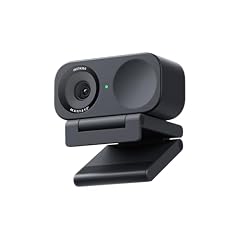
Insta360 Link 2C
- Resolution
- 4K
- Built-in microphone
- Yes
- AI tracking
- Yes
$149.99 price as of 2026-10-01 05:34 UTC (Details)
The Insta360 Link 2C stands out with its 1/2-inch sensor, AI auto framing, HDR, noise-canceling microphone, and gesture control. It offers a level of smart automation that most webcams lack, making it ideal for creators who want a camera that follows them.
Pros
- 4K resolution with HDR support
- AI auto framing and gesture control
- Built-in noise-canceling microphone
- 1/2-inch sensor as stated
Cons
- No stated privacy cover
- Frame rate not specified
- No stated autofocus (only auto framing)
Good fit if
- Content creators who move around during streams or presentations
- Users who appreciate advanced AI features like gesture control
Skip if
- You want a simple plug-and-play webcam without extra software
- You need a physical privacy shutter
Verdict: A smart 4K webcam with powerful AI tools for those who want a camera that adapts to them.
3 Best PTZ with AI Tracking

OBSBOT Tiny 2 Lite 4K PTZ Webcam AI-Tracking 1/2" CMOS
- Resolution
- 4K
- AI tracking
- Yes
$121.00 price as of 2026-10-01 05:38 UTC (Details) Typical price: $131.00, 8% off
The OBSBOT Tiny 2 Lite is a Pan-Tilt-Zoom webcam with AI tracking and a 1/2-inch CMOS sensor. It can follow you as you move, making it a standout for presentations and dynamic video calls.
Pros
- 4K resolution with PTZ capability
- AI tracking and autofocus
- 1/2-inch CMOS sensor
- Compact design with mini tripod included
Cons
- No stated microphone
- No privacy cover
- Frame rate not specified
Good fit if
- Presenters who move around on stage
- Streamers who want a camera that follows them automatically
Skip if
- You need a built-in microphone
- You prefer a traditional fixed webcam for simplicity
Verdict: A versatile PTZ webcam with AI tracking for those who need to stay in frame.
4 Best 1080p from a Major Brand
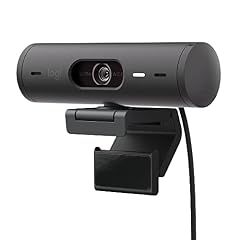
Logitech Brio 501 Full HD Webcam Auto Light Correction Show Mode
- Resolution
- 1080p
$129.99 price as of 2026-10-01 05:35 UTC (Details)
The Logitech Brio 501 is a full HD webcam from a trusted brand, with auto light correction and Show Mode. It lacks a microphone and only offers 1080p, but it is a solid choice for users who already have a separate mic and want reliable performance from a known manufacturer.
Pros
- Full HD 1080p resolution
- Auto light correction and Show Mode
- Trusted brand with wide software support
Cons
- No built-in microphone
- Only 1080p, not 4K
- No stated frame rate above 30 fps
Good fit if
- Users with a dedicated microphone who need a reliable camera
- Those who prefer established brands and ecosystem integration
Skip if
- You need a microphone in the webcam
- You want 4K resolution for future-proofing
Verdict: A dependable 1080p camera for users who already have audio gear.
5 Best for Teams Certified Quality

Dell 4K UHD Webcam WB7022
- Resolution
- 4K
$104.99 price as of 2026-10-01 05:28 UTC (Details) Typical price: $118.64, 12% off
The Dell WB7022 is a 4K UHD webcam with a Sony sensor and Teams certification, making it a strong choice for professional meeting rooms. It delivers high-resolution video and is trusted to work smoothly with Microsoft Teams, though it lacks a built-in microphone.
Pros
- 4K UHD resolution
- Sony sensor
- Teams certified
Cons
- No built-in microphone
- No stated autofocus
- Frame rate not specified
Good fit if
- Business users who rely on Microsoft Teams
- Professionals who need a high-quality 4K camera for conference rooms
Skip if
- You need a microphone
- You want a webcam for casual home use
Verdict: A premium 4K camera for business environments with certification assurance.
6 Best 4K with Microphone

Acer 4K Webcam for PC/Mac with All-Metal Unibody Sculpted
- Resolution
- 4K
- Autofocus
- Yes
- Built-in microphone
- Yes
- Privacy cover
- Yes
$69.99 price as of 2026-10-01 05:23 UTC (Details)
The Acer 4K Webcam offers 4K resolution, autofocus, two noise reduction microphones, and a privacy cover at an affordable price. It provides a higher resolution than the Lenovo FHD and includes a mic, making it a great choice for users who want 4K without extra bulk.
Pros
- 4K resolution with autofocus
- Dual noise-reducing microphones
- Privacy cover included
- All-metal unibody construction
Cons
- No stated frame rate above 30 fps
- No HDR or low-light enhancement specified
- No stated field of view
Good fit if
- Budget-conscious users who want 4K and a microphone
- Users who prefer a sturdy metal build
Skip if
- You need 60 fps for smooth streaming
- You want a webcam from a brand with a larger webcam lineup
Verdict: A feature-packed 4K webcam with a microphone and privacy cover at a reasonable price.
7 Best for Low-Light Correction

Anker PowerConf C200 2K Webcam for PC/Laptop/Mac
- Resolution
- 2K (1440p)
$69.99 price as of 2026-10-01 05:24 UTC (Details)
The Anker PowerConf C200 is a 2K (1440p) webcam with low-light correction, making it a solid choice for home offices with variable lighting. It offers a higher resolution than standard 1080p webcams and is from a reputable brand known for charging accessories, though it lacks a microphone.
Pros
- 2K (1440p) resolution, above full HD
- Low-light correction for dim environments
- Compact and easy to mount
Cons
- No built-in microphone
- No stated autofocus
- No stated frame rate
Good fit if
- Users with poor lighting conditions who need a decent image
- People who want a sharp 1440p image without going 4K
Skip if
- You need a microphone in the camera
- You want autofocus for moving around
Verdict: A reliable 2K webcam with low-light performance for improved video calls.
8 Best for Work-from-Home

Lenovo FHD Webcam
- Resolution
- 1080p
- Frame rate
- 30 fps
- Built-in microphone
- Yes
- Privacy cover
- Yes
$45.99 price as of 2026-10-01 05:35 UTC (Details)
The Lenovo FHD Webcam delivers 1080p at 30 fps, two noise-cancelling microphones, AI noise cancellation, and a privacy cover. It is a complete package for remote workers who need clear video and audio in a professional setting.
Pros
- 1080p resolution at 30 fps
- Dual noise-cancelling microphones with AI enhancements
- Privacy cover included
- Trusted brand with corporate backing
Cons
- Only 1080p, no 4K option
- No stated autofocus
- Frame rate is limited to 30 fps
Good fit if
- Remote workers who want a plug-and-play camera with good audio
- Users who prefer a simple, reliable camera from a major PC maker
Skip if
- You need 60 fps for gaming or fast-moving scenes
- You want 4K resolution for content creation
Verdict: A dependable webcam for everyday work calls with excellent microphone pickup.
9 Best 1080p with Microphone

HP 320 FHD Webcam
- Resolution
- 1080p
- Built-in microphone
- Yes
- Privacy cover
- Yes
$28.99 price as of 2026-10-01 05:33 UTC (Details)
The HP 320 FHD is an affordable 1080p webcam with a built-in microphone and privacy cover, ideal for basic meetings. It offers solid performance for the price, though it lacks autofocus and 4K.
Pros
- 1080p resolution with microphone
- Privacy cover included
- USB-A connectivity, works with Chromebooks
Cons
- No autofocus
- No stated frame rate
- No 4K or 2K option
Good fit if
- Students or home users on a tight budget
- Users who need a simple camera for video calls
Skip if
- You want higher resolution or autofocus
- You need USB-C connection
Verdict: A no-frills webcam that covers the basics well at an entry-level price.
10 Best for Streaming

AVerMedia Live Streamer Cam 313
- Resolution
- 1080p
- Built-in microphone
- Yes
- Privacy cover
- Yes
$57.19 price as of 2026-10-01 05:26 UTC (Details)
The AVerMedia Live Streamer Cam 313 is a 1080p webcam with a privacy shutter, dual microphones, and a 360-degree swivel, tailored for streamers who want a reliable camera without extra features. It is a step up from basic 1080p cameras with its dual mics and flexible mount.
Pros
- 1080p resolution with privacy shutter
- Dual microphones
- 360-degree swivel for flexible angles
- Trusted brand in streaming peripherals
Cons
- Only 1080p, no 4K
- No autofocus
- No stated frame rate above 30 fps
Good fit if
- Streamers who want a budget camera with a privacy shutter
- Users who need a webcam that can rotate for different views
Skip if
- You require 4K or 60 fps
- You want a camera with AI tracking
Verdict: A solid 1080p streaming camera with essential features for new streamers.
11 Best for Dual Camera Versatility
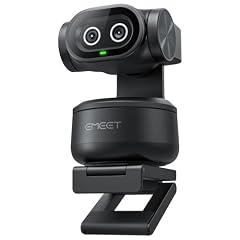
EMEET PIXY Dual-Camera AI-Powered PTZ Camera 4K
- Resolution
- 4K
- AI tracking
- Yes
$99.99 price as of 2026-10-01 05:29 UTC (Details)
The EMEET PIXY is a dual-camera AI-powered PTZ camera that offers 4K resolution and AI tracking, making it unique in this price range. It can switch between two cameras for different angles, which is useful for presentations or showing objects.
Pros
- Dual-camera design for multiple angles
- 4K resolution with AI tracking
- PTZ functionality
Cons
- No stated microphone
- No privacy cover
- Frame rate not specified
Good fit if
- Presenters who need to show both themselves and their work
- Users who want a creative webcam for streaming or demos
Skip if
- You need a simple fixed webcam
- You prefer a single-lens design for simplicity
Verdict: An innovative dual-camera webcam that offers more flexibility than traditional webcams.
12 Best for Streamers from a Gaming Brand

Razer Kiyo V2 Webcam for Streaming and Collaboration 4K 30Fps
- Resolution
- 4K
- Frame rate
- 30 fps
$111.53 price as of 2026-10-01 05:39 UTC (Details)
The Razer Kiyo V2 is a 4K 30fps webcam from a well-known gaming brand, with no microphone but great software support via Razer Synapse. It offers 4K resolution at a reasonable price, though it lacks autofocus and a privacy cover.
Pros
- 4K resolution at 30 fps
- Trusted gaming brand with robust software
- Compact and easy to mount
Cons
- No built-in microphone
- No autofocus
- Frame rate limited to 30 fps
Good fit if
- Gamers who already have a dedicated microphone
- Streamers who want 4K from a reputable brand
Skip if
- You need a microphone or autofocus
- You want a higher frame rate for fast-paced games
Verdict: A solid 4K camera for gamers who value brand and aesthetics over extra features.
13 Best for Conference Rooms

4K AI-Powered Conference Webcam with Microphones Speakers
- Resolution
- 4K
- Built-in microphone
- Yes
$149.99 price as of 2026-10-01 05:23 UTC (Details)
The WYRESTORM conference webcam bundles 4K resolution, built-in microphones, speakers, and Zoom certification in one device. It is designed for small meeting rooms where you need clear audio and video without external peripherals.
Pros
- 4K resolution with integrated microphones and speakers
- Zoom certified (as stated by the seller)
- All-in-one design simplifies setup
Cons
- No stated autofocus
- No stated frame rate
Good fit if
- Meeting rooms that need an all-in-one audio/video solution
- Users who want a simple setup for conference calls
Skip if
- You need a webcam with autofocus for close-ups
- You already have a separate microphone and speaker system
Verdict: A convenient, all-in-one conference webcam that brings video and audio together for official meetings.
Side by side
| # | Webcam | Resolution | Frame rate | Autofocus | Built-in microphone | Privacy cover | AI tracking |
|---|---|---|---|---|---|---|---|
| 1 | NexiGo N660P Pro 4K Webcam with Distortion-Free Lens | 4K | 60 fps or more | Yes | Yes | Yes | not stated |
| 2 | Insta360 Link 2C | 4K | not stated | not stated | Yes | not stated | Yes |
| 3 | OBSBOT Tiny 2 Lite 4K PTZ Webcam AI-Tracking 1/2" CMOS | 4K | not stated | not stated | not stated | not stated | Yes |
| 4 | Logitech Brio 501 Full HD Webcam Auto Light Correction Show Mode | 1080p | not stated | not stated | not stated | not stated | not stated |
| 5 | Dell 4K UHD Webcam WB7022 | 4K | not stated | not stated | not stated | not stated | not stated |
| 6 | Acer 4K Webcam for PC/Mac with All-Metal Unibody Sculpted | 4K | not stated | Yes | Yes | Yes | not stated |
| 7 | Anker PowerConf C200 2K Webcam for PC/Laptop/Mac | 2K (1440p) | not stated | not stated | not stated | not stated | not stated |
| 8 | Lenovo FHD Webcam | 1080p | 30 fps | not stated | Yes | Yes | not stated |
| 9 | HP 320 FHD Webcam | 1080p | not stated | not stated | Yes | Yes | not stated |
| 10 | AVerMedia Live Streamer Cam 313 | 1080p | not stated | not stated | Yes | Yes | not stated |
| 11 | EMEET PIXY Dual-Camera AI-Powered PTZ Camera 4K | 4K | not stated | not stated | not stated | not stated | Yes |
| 12 | Razer Kiyo V2 Webcam for Streaming and Collaboration 4K 30Fps | 4K | 30 fps | not stated | not stated | not stated | not stated |
| 13 | 4K AI-Powered Conference Webcam with Microphones Speakers | 4K | not stated | not stated | Yes | not stated | not stated |
How we picked
We searched our catalogue of 314 webcams priced under $150 and shortlisted 15 that cover a range of use cases: streaming, work-from-home meetings, PTZ tracking, and conference room setups. We prioritized established brands and products with clear feature sets, then verified every claim against the seller's stated specifications. We did not test the cameras or read customer reviews. Prices shown on this page are pulled live from the store listing and update with each page load.
How to choose
Resolution: 1080p vs 4K, what actually matters
Most webcams under $150 offer either 1080p or 4K. 1080p (Full HD) is sufficient for standard video calls and streaming, as most platforms cap at 1080p. 4K gives you more detail and flexibility when cropping or zooming in software, but requires a capable computer and sufficient bandwidth. Many 4K webcams also allow you to capture 4K for recording while still outputting 1080p for calls.
Frame rate: when 60 fps is worth it
A higher frame rate (60 fps) results in smoother motion, which is valuable for gaming, sports, or any fast-moving content. Instead of a 4K sensor at 30 fps, a 1080p camera at 60 fps can be more beneficial for streamers who prioritize smoothness over resolution. However, most meeting apps only support 30 fps, so for work calls, 1080p/30 is sufficient.
Autofocus: crucial if you move around
Autofocus keeps you sharp as you move closer or farther from the camera. If you are stationary during calls, a fixed-focus webcam is fine. But if you gesture or lean in, autofocus prevents blurry frames. Look for webcams with PDAF (Phase Detection Autofocus) for faster, more accurate focusing, especially in 4K models.
Microphone: built-in vs external
Many webcams include a built-in microphone, which is convenient but often lower quality than a dedicated USB mic. If you are on a budget, a webcam with dual noise-cancelling mics can be adequate for meetings. For streaming or podcasting, you will likely want a separate microphone. Some webcams forgo a mic entirely, saving cost, which is fine if you already own one.
Privacy: covers and shutters
A privacy cover or shutter allows you to physically block the lens when the camera is not in use. This is useful for peace of mind. Some webcams include a built-in sliding shutter, while others come with a separate snap-on cover. If you are security-conscious, prioritize this feature.
AI features: tracking and framing
Some webcams (like the Insta360 Link 2C or OBSBOT Tiny 2) have AI tracking, which keeps you centered in the frame, and auto framing, which adjusts the zoom to fit your whole body or face. These are great for content creators and presenters, but they require additional processing and may use more CPU. If you do not need these, a simpler webcam will save money.
Questions
Do I need a 4K webcam for home office meetings?
No, for most video conferencing platforms like Zoom, Teams, or Meet, the maximum output is usually 1080p. A 4K webcam will downscale to 1080p, so it may not improve your meeting quality. However, 4K is useful if you want to record high-resolution videos or if you plan to crop into the image during streaming.
What is the difference between 30 fps and 60 fps?
Frame rate is the number of frames captured per second. 60 fps produces smoother, more fluid motion, which is important for fast-moving scenes like gaming or active presentations. Most video calls and standard streaming use 30 fps, which is sufficient for talking-head content. If you play games or show movement, a 60 fps webcam can make a visible difference.
Are webcam microphones good enough for podcasts?
Most built-in webcam microphones are adequate for casual meetings but lack the clarity and isolation of a dedicated microphone. If you are serious about podcasts, streaming, or recording voiceovers, you should invest in a separate USB or XLR microphone. Webcam mics can sound distant and pick up background noise, even with noise cancellation.
How important is a privacy cover?
A privacy cover ensures that the camera lens is physically blocked, preventing any software or hackers from seeing you. It provides peace of mind, especially if you keep your webcam plugged in. Many webcams include a sliding shutter or a snap-on cover. If yours does not, you can use a piece of tape or a stick-on lens cover.
What should I check for compatibility with my computer?
Most webcams are USB plug-and-play, meaning they work with Windows, macOS, and many Linux systems without extra drivers. However, some advanced features (like AI tracking) may require specific software. Also, check if the webcam uses USB-A or USB-C. If your laptop only has USB-C ports, you may need an adapter.
Is it worth spending more on a name brand like Logitech or Dell?
Name brands often offer better software support, regular firmware updates, and greater reliability due to rigorous testing. They may also have clearer warranties. If you need a webcam for professional use, investing in a known brand can reduce the risk of hardware failures. However, budget brands like NexiGo and Acer offer impressive specs at lower prices, so the choice depends on your priorities.
Recent updates
- : First published.