
Best 30 FPS Webcams in 2026: 15 Picks Compared on Specs
Looking for a webcam that runs at 30 frames per second? The Lenovo FHD Webcam is our top pick: it delivers 1080p resolution, dual noise-cancelling microphones, and a physical privacy cover, making it the most balanced daily driver. We compared 15 models from the pool using only published specifications, including resolution, microphone presence, autofocus, and privacy features. Prices shown are live at the time of reading.
15 picks from 32 webcams that match this guide with a price we can quote today. Every price below is live and carries the moment it was read.
The picks at a glance
Which one should you buy?
- For video calls with privacy worries: If you want a simple 1080p cam with a physical privacy cover and dual microphones for clear audio, the Lenovo FHD Webcam is a strong choice. See pick 1
- For 4K broadcasting on a budget: The VAKUNICE 4K Webcam offers 4K resolution, autofocus, and a privacy cover at a modest price point, ideal for creators who want sharp video without breaking the bank. See pick 6
- For streamers who already own a mic: The Logitech C922x Pro Webcam comes with a Blue Yeti Nano, giving you both a quality cam and a dedicated microphone in one bundle. See pick 2
The 15 picks
1 Best overall

Lenovo FHD Webcam
- Resolution
- 1080p
- Frame rate
- 30 fps
- Built-in microphone
- Yes
- Privacy cover
- Yes
$45.99 price as of 2026-10-01 05:35 UTC (Details)
The Lenovo FHD Webcam delivers 1080p video at 30 fps with built-in dual noise-cancelling microphones and a privacy cover, making it the most complete package for everyday use. Its spec set edges out other 1080p picks by offering both audio and privacy in one unit.
Pros
- 1080p resolution
- Dual noise-cancelling microphones
- Privacy cover included
Cons
- No autofocus
- 30 fps only (no 60 fps option)
Good fit if
- Daily video calls
- Users who want a physical shutter
Skip if
- You need 4K video
- You already have a separate microphone and want a bare camera
Verdict: A balanced choice for most people, covering video, audio, and privacy.
2 Best bundle with dedicated mic

Logitech C922x Pro Webcam + Blue Yeti Nano
- Resolution
- 1080p
- Frame rate
- 30 fps
$219.98 price as of 2026-10-01 05:36 UTC (Details)
The Logitech C922x Pro Webcam pairs a 1080p/30fps camera with a Blue Yeti Nano microphone, giving you a complete streaming or conferencing kit. The bundle stands out because it combines a proven webcam with an external mic, something other picks don't offer.
Pros
- Bundle includes Blue Yeti Nano microphone
- 720p/60fps available
- Recognized brand
Cons
- Bulky setup
- No privacy cover
- No autofocus mentioned
Good fit if
- Streamers who need a mic and camera
- Users who prefer a dedicated microphone
Skip if
- You already have a quality mic
- You want a compact single-unit webcam
Verdict: If you're starting from scratch, this bundle simplifies your gear.
3 Best 4K for streaming

Razer Kiyo V2 Webcam for Streaming and Collaboration 4K 30Fps
- Resolution
- 4K
- Frame rate
- 30 fps
$111.53 price as of 2026-10-01 05:39 UTC (Details)
The Razer Kiyo V2 streams 4K at 30 fps, making it the highest-resolution pick here. Its large sensor size isn't specified, but the 4K output gives it an edge over 1080p models for content creators.
Pros
- 4K resolution
- Black design
- Recognized brand
Cons
- No built-in microphone
- No privacy cover
- No autofocus mentioned
Good fit if
- 4K content creation
- Streamers with an external mic
Skip if
- You need a microphone
- You're on a tight budget
Verdict: For pure video quality, this is the sharpest option.
4 Best 4K with built-in microphone

UGREEN 4K@30fps Webcam for PC Ultra HD Web Camera
- Resolution
- 4K
- Frame rate
- 30 fps
- Built-in microphone
- Yes
$44.99 price as of 2026-10-01 05:42 UTC (Details)
UGREEN's 4K webcam includes noise-canceling mics, combining high resolution with convenience. It's a good middle ground for those who want 4K without a separate microphone.
Pros
- 4K resolution
- Built-in noise-canceling mics
- Built-in microphone eliminates the need for an external one
Cons
- No privacy cover
- No autofocus mentioned
Good fit if
- 4K video calls
- Users who avoid extra gear
Skip if
- You need autofocus
- You require a privacy shutter
Verdict: A practical 4K webcam with integrated audio.
5 Best 4K with ring light
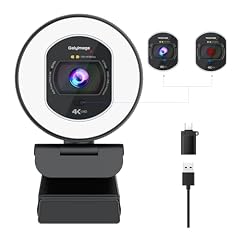
Galyimage 4K Full HD Webcam with Ring Light
- Resolution
- 4K
- Frame rate
- 30 fps
- Autofocus
- Yes
- Built-in microphone
- Yes
- Privacy cover
- Yes
$36.99 price as of 2026-10-01 05:30 UTC (Details)
The Galyimage webcam adds a ring light, autofocus, and a privacy cover to its 4K sensor, making it a self-contained lighting and video solution. The included TOF autofocus is a standout among 4K models.
Pros
- 4K resolution
- Ring light included
- Autofocus
- Privacy cover
Cons
- Field of view not stated
- No 60 fps option
Good fit if
- Video creators wanting integrated lighting
- Users who need autofocus
Skip if
- You already have a ring light
- You prefer a simple design
Verdict: Packing in lighting and focus, this is a feature-rich 4K option.
6 Best 4K with autofocus and privacy cover

VAKUNICE 4K Webcam for PC with Dual Microphones
- Resolution
- 4K
- Frame rate
- 30 fps
- Autofocus
- Yes
- Built-in microphone
- Yes
- Privacy cover
- Yes
$17.99 price as of 2026-10-01 05:42 UTC (Details)
The VAKUNICE webcam brings 4K resolution, dual microphones, autofocus, and a privacy cover into one unit, matching the Galyimage but without the ring light. It's a compact choice for those who want sharp video and privacy.
Pros
- 4K resolution
- Autofocus
- Dual microphones
- Privacy cover
Cons
- No ring light
- Field of view not stated
Good fit if
- Streamers who need autofocus
- Users who want a privacy shutter
Skip if
- You need built-in lighting
- You already have a tripod
Verdict: A well-equipped 4K cam that covers the essentials.
7 Best compact 4K
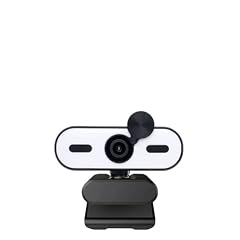
XFGsertXD 4K 2K Mini Webcam 1080P HD for PC Laptop Autofocus 30 FPS USB
- Resolution
- 4K
- Frame rate
- 30 fps
- Autofocus
- Yes
- Built-in microphone
- Yes
- Privacy cover
- Yes
$50.89 price as of 2026-10-01 05:43 UTC (Details)
This XFGsertXD mini webcam is listed at 4K (with 2K and 1080p support), includes autofocus, a noise-reducing mic, and a privacy cover in a small form factor. Its compact size distinguishes it from bulkier alternatives.
Pros
- 4K resolution
- Autofocus
- Built-in mic
- Privacy cover
Cons
- Field of view not stated
- Brand recognition lower
Good fit if
- Users with limited desk space
- Travelers needing a small camera
Skip if
- You prefer major brands
- You need a wide-angle lens
Verdict: A tiny but feature-packed 4K webcam.
8 Best wide-angle 4K

XFGsertXD UHD 4K USB Webcam
- Resolution
- 4K
- Frame rate
- 30 fps
$37.16 price as of 2026-10-01 05:43 UTC (Details)
The XFGsertXD UHD 4K features a 120° wide-angle lens, making it ideal for group video calls or showing more of your desk. It still delivers 4K at 30 fps, although no microphone is specified.
Pros
- 120° field of view
- 4K resolution
- Good for group calls
Cons
- No built-in microphone
- No autofocus mentioned
Good fit if
- Group meetings
- Content creators showing physical objects
Skip if
- You need a microphone
- You want autofocus
Verdict: For wide framing at 4K, this is a top pick.
9 Best 2K autofocus

XFGsertXD 4K USB Webcam Auto 8MP 30FPS
- Resolution
- 2K (1440p)
- Frame rate
- 30 fps
$21.99 price as of 2026-10-01 05:43 UTC (Details)
Though named '4K', the spec lists 2K (1440p) as the actual output, with autofocus and a Type-C adapter for easy connectivity. It's a cost-effective way to get sharp 2K video.
Pros
- 2K resolution
- Autofocus
- Type-C adapter included
Cons
- Not true 4K
- No microphone specified
Good fit if
- Users who want higher than 1080p without full 4K
- People with USB-C ports
Skip if
- You specifically want 4K
- You need a built-in mic
Verdict: A solid 2K autofocus cam with modern connectivity.
10 Best 1080p dual mic

XFGsertXD 1080p 30fps Mini Web Computer Camera Webcam for Pc
- Resolution
- 1080p
- Frame rate
- 30 fps
- Built-in microphone
- Yes
$28.34 price as of 2026-10-01 05:43 UTC (Details)
This XFGsertXD mini webcam sticks to 1080p but sports dual microphones, which is rare at this level. It's a straightforward companion for video calls.
Pros
- 1080p resolution
- Dual microphones
- Compact design
Cons
- No privacy cover
- No autofocus
Good fit if
- Simple video conferencing
- Users who want good audio without a headset
Skip if
- You need 4K or autofocus
- You require a privacy shutter
Verdict: A no-frills 1080p cam with dual mics.
11 Best 1080p with tripod

Pro HD 1080p/30fps Webcam with Tripod
- Resolution
- 1080p
- Frame rate
- 30 fps
$29.99 price as of 2026-10-01 05:39 UTC (Details)
The RUWBY webcam comes with a tripod, making it easy to position. It offers 1080p at 30fps, though no microphone is listed.
Pros
- Includes tripod
- 1080p resolution
- Tripod allows flexible positioning
Cons
- No built-in microphone
- No autofocus
Good fit if
- Users who want a stable mount
- DIY setups without a monitor clamp
Skip if
- You prefer a clamp mount
- You need a microphone
Verdict: A budget-friendly 1080p cam with a tripod included.
12 Best 1080p for video conferencing

RichEast HD PC Webcam
- Resolution
- 1080p
- Frame rate
- 30 fps
$22.98 price as of 2026-10-01 05:39 UTC (Details)
RichEast's webcam is advertised with clear audio and light correction, targeting online meetings. It lists 1080p/30fps and mentions compatibility with Teams and Google Meet.
Pros
- 1080p resolution
- Works with Teams and Google Meet
- Clear audio (per spec)
Cons
- No privacy cover
- No autofocus
Good fit if
- Office workers on multiple platforms
- Users who want simple plug-and-play
Skip if
- You need 4K or autofocus
- You require a physical shutter
Verdict: A dependable choice for everyday video calls.
13 Best 1080p autofocus with USB-C adapter

Gritto 1080P HD Webcam with Auto Focus & Microphone
- Resolution
- 1080p
- Frame rate
- 30 fps
- Autofocus
- Yes
- Built-in microphone
- Yes
$19.99 price as of 2026-10-01 05:31 UTC (Details)
The Gritto webcam adds autofocus and a Type-C adapter to its 1080p sensor, plus a 360° design. Its autofocus sets it apart from many 1080p models.
Pros
- 1080p resolution
- Autofocus
- Type-C adapter included
- 360° rotation
Cons
- No privacy cover
- Microphone present but not detailed
Good fit if
- Users who want autofocus on a budget
- People with USB-C devices
Skip if
- You need 4K
- You prefer a premium design
Verdict: A well-featured 1080p cam with autofocus and USB-C.
14 Best 1080p wide angle
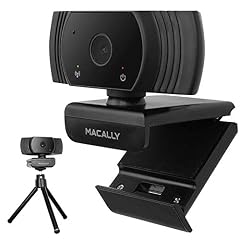
Macally 1080P Webcam with Microphone
- Resolution
- 1080p
- Frame rate
- 30 fps
- Built-in microphone
- Yes
$9.99 price as of 2026-10-01 05:36 UTC (Details)
Macally's webcam features a 120° field of view and a built-in microphone, making it suitable for group calls or showing more of your workspace at 1080p.
Pros
- 120° wide angle
- Built-in microphone
- 1080p resolution
Cons
- No autofocus
- No privacy cover
Good fit if
- Group conversations
- Users who want a wide view
Skip if
- You need autofocus
- You want a small camera
Verdict: A wide-angle 1080p cam with internal audio.
15 Best 1080p with autofocus and wide angle

Streaming Camera Hd 1080p 30fps Webcam with Microphone
- Resolution
- 1080p
- Frame rate
- 30 fps
- Autofocus
- Yes
- Built-in microphone
- Yes
$5.99 price as of 2026-10-01 05:41 UTC (Details)
The Lovskoo streaming camera combines 1080p, autofocus, and a 120° field of view, plus a built-in microphone. It's a versatile pick for streamers and vloggers who need to keep focus without manual adjustments.
Pros
- 1080p resolution
- Autofocus
- 120° field of view
- Built-in microphone
Cons
- No privacy cover
- No tripod included
Good fit if
- Streamers who move around
- Users who want a wide view without extra gear
Skip if
- You need 4K
- You require a privacy shutter
Verdict: A feature-packed 1080p option that covers most needs.
Side by side
| # | Webcam | Resolution | Frame rate | Autofocus | Built-in microphone | Privacy cover | AI tracking |
|---|---|---|---|---|---|---|---|
| 1 | Lenovo FHD Webcam | 1080p | 30 fps | not stated | Yes | Yes | not stated |
| 2 | Logitech C922x Pro Webcam + Blue Yeti Nano | 1080p | 30 fps | not stated | not stated | not stated | not stated |
| 3 | Razer Kiyo V2 Webcam for Streaming and Collaboration 4K 30Fps | 4K | 30 fps | not stated | not stated | not stated | not stated |
| 4 | UGREEN 4K@30fps Webcam for PC Ultra HD Web Camera | 4K | 30 fps | not stated | Yes | not stated | not stated |
| 5 | Galyimage 4K Full HD Webcam with Ring Light | 4K | 30 fps | Yes | Yes | Yes | not stated |
| 6 | VAKUNICE 4K Webcam for PC with Dual Microphones | 4K | 30 fps | Yes | Yes | Yes | not stated |
| 7 | XFGsertXD 4K 2K Mini Webcam 1080P HD for PC Laptop Autofocus 30 FPS USB | 4K | 30 fps | Yes | Yes | Yes | not stated |
| 8 | XFGsertXD UHD 4K USB Webcam | 4K | 30 fps | not stated | not stated | not stated | not stated |
| 9 | XFGsertXD 4K USB Webcam Auto 8MP 30FPS | 2K (1440p) | 30 fps | not stated | not stated | not stated | not stated |
| 10 | XFGsertXD 1080p 30fps Mini Web Computer Camera Webcam for Pc | 1080p | 30 fps | not stated | Yes | not stated | not stated |
| 11 | Pro HD 1080p/30fps Webcam with Tripod | 1080p | 30 fps | not stated | not stated | not stated | not stated |
| 12 | RichEast HD PC Webcam | 1080p | 30 fps | not stated | not stated | not stated | not stated |
| 13 | Gritto 1080P HD Webcam with Auto Focus & Microphone | 1080p | 30 fps | Yes | Yes | not stated | not stated |
| 14 | Macally 1080P Webcam with Microphone | 1080p | 30 fps | not stated | Yes | not stated | not stated |
| 15 | Streaming Camera Hd 1080p 30fps Webcam with Microphone | 1080p | 30 fps | Yes | Yes | not stated | not stated |
How we picked
Our pool started with 32 matched listings for 30 fps webcams. After removing near-duplicates, we had 19 distinct models. We shortlisted 15 that cover a range of resolutions (1080p, 2K, 4K), built-in microphones, autofocus, and privacy covers. No unit was physically tested; selection relies on the sellers' stated specifications and manufacturer information. Prices on this page are pulled live from the store listing at the moment of display.
How to choose
Resolution and sensor size
At 30 fps, the webcam's resolution determines the level of detail you can capture. 1080p is the standard for clear video calls, while 2K and 4K offer more sharpness but also require a faster computer and more bandwidth. Higher resolution also often comes with a larger sensor, which can improve low-light performance, but those specs are not always listed. Check the maker's page for sensor details if that matters to you.
Autofocus and field of view
Autofocus keeps you sharp when you shift position. Some webcams list no autofocus, which may be fine if you sit still, but for presentations or dynamic shots, a model with autofocus is better. Field of view, often not stated for budget models, affects how much of your background appears. Wide angles like 120° are ideal for group calls, while narrower lenses reduce distractions.
Microphone and audio quality
A built-in microphone can save you from buying extra gear. Look for dual microphones if you want better sound pickup, though dedicated microphones still outperform webcam mics. If you already own a headset or external mic, you can skip the webcam's audio features and focus on video quality. Some webcams, like the high-end 4K models, omit microphones entirely, assuming you'll have your own.
Privacy covers and connectivity
A privacy cover provides peace of mind when you're not using the camera. It usually comes as a sliding shutter or a separate lens cap. Connectivity matters too: many modern webcams use USB-A, but some include a USB-C adapter for easier connection to newer laptops. USB Video Class (UVC) support means the camera works without extra drivers, as explained in Microsoft's UVC overview.
Questions
Is 30 fps enough for streaming?
Yes, for most video calls and casual streaming, 30 fps is standard and perfectly smooth. If you pan quickly or show fast-moving content, 60 fps can reduce motion blur, but that's usually only needed for gaming or fast-action scenes. At 30 fps, your bandwidth and computer processing are lower, so it's a good balance for most users.
Do I need a 4K webcam for 30 fps?
Not necessarily. 4K gives you extra detail, but on a small video call window, 1080p may look almost identical. For streaming or recording videos that you later crop, 4K offers more flexibility. 4K video also requires more storage and a more powerful computer to process, so consider your hardware before upgrading.
What does USB video class (UVC) mean?
UVC is a standard that lets webcams work without installing special drivers. When you plug in a UVC-compliant camera, your operating system recognizes it automatically. Microsoft's UVC driver supports common formats like MJPEG and YUY2, so most 30 fps webcams are plug-and-play on Windows and macOS.
Can I use a 30 fps webcam for Zoom or Teams?
Yes, both platforms support 30 fps video. Most webcams run at 30 fps out of the box. For the best experience, make sure your camera has autofocus and a decent microphone. Microsoft's Teams certification program sets higher quality targets for peripherals, but even uncertified webcams work fine for everyday meetings.
Recent updates
- : First published.