
Best Webcams for Working From Home in 2026: 12 Picks
For most people working from home, the NexiGo N960E is the best webcam because it combines 1080p resolution, autofocus, and 60 frames per second with a built-in microphone and privacy cover. We chose from 30 webcams in our catalog, narrowing to 12 based on the features remote workers need most. Prices are live from the listings and may change.
12 picks from 43 webcams that match this guide with a price we can quote today. Every price below is live and carries the moment it was read.
The picks at a glance
Which one should you buy?
- For smooth video on calls: If you move around during meetings and want a sharp, blur-free image, look for autofocus and 60 fps support. See pick 1
- For a familiar name: If you prefer a well-known peripheral brand with a long history in consumer webcams, this pick is a safe choice. See pick 3
- For a basic setup: If you only need a simple 1080p webcam with a microphone and a privacy cover, this budget model covers the essentials. See pick 9
The 12 picks
1 Best overall

NexiGo N960E 1080P 60FPS Webcam with Light
- Resolution
- 1080p
- Frame rate
- 60 fps or more
- Autofocus
- Yes
- Built-in microphone
- Yes
- Privacy cover
- Yes
$69.99 price as of 2026-10-01 05:38 UTC (Details)
This is one of only two picks in our list that list both autofocus and 60 fps support. That combination reduces motion blur during meetings and keeps your face sharp, making it the most capable webcam here for everyday work calls.
Pros
- Lists autofocus and 60 fps support, the most advanced focus and motion specs in this list
- Built-in privacy cover
- Includes a microphone
- The listing mentions included software
Cons
- No 4K resolution, only 1080p
- Autofocus is not confirmed by a separate spec sheet
Good fit if
- People who want the smoothest video without upgrading to a streaming camera
- Those who value autofocus for moving around during presentations
Skip if
- You need 4K resolution for detailed video
- You prefer a no-software plug-and-play experience without extra apps
Verdict: The best overall webcam for remote work if you want autofocus and 60 fps in a compact package.
2 Best 60 fps alternative
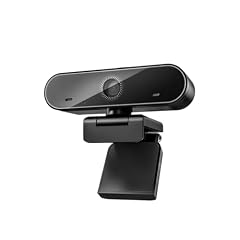
XFGsertXD 60FPS 1080P Live Streaming & Conference Webcam Dual
- Resolution
- 1080p
- Frame rate
- 60 fps or more
- Autofocus
- Yes
- Built-in microphone
- Yes
- Privacy cover
- Yes
$60.33 price as of 2026-10-01 05:43 UTC (Details)
Like our top pick, this model lists autofocus and 60 fps support, making it a strong alternative if the NexiGo is not available. It also includes a privacy cover and a microphone, matching the essential features we shortlisted.
Pros
- Lists autofocus and 60 fps support
- Built-in privacy cover
- Dual microphones, according to the listing
Cons
- No 4K resolution
- Less established brand compared to Logitech or Lenovo
Good fit if
- Users who want a second option with the same core specs as the top pick
- People streaming or recording at 60 fps for smoother motion
Skip if
- You prefer a brand with a longer track record in webcams
- You need 4K output
Verdict: A solid 60 fps pick with autofocus, but we lean toward the NexiGo for its software and wider recognition.
3 Best known name

Logitech Webcam C920S HD Pro with Privacy Shutter
- Resolution
- 1080p
- Built-in microphone
- Yes
- Privacy cover
- Yes
$68.44 price as of 2026-10-01 05:36 UTC (Details)
Logitech is a widely recognized name in computer peripherals, and this webcam lists the basics: 1080p, a built-in microphone, and a privacy cover. While it does not list autofocus in the specifications, it remains a dependable choice for users who trust the brand.
Pros
- 1080p resolution
- Built-in microphone
- Privacy cover
- Recognizable brand with a long history
Cons
- No autofocus listed in the specs
- No frame rate specified beyond 1080p
Good fit if
- Users who prefer a well-known brand with broad software compatibility
- Those who want a straightforward webcam without extra features
Skip if
- You specifically need autofocus for frequent movement
- You want 60 fps for smoother video
Verdict: A reliable 1080p webcam from a familiar brand, but it lacks the autofocus and high frame rate of our top pick.
4 Best for stated 30 fps

Lenovo FHD Webcam
- Resolution
- 1080p
- Frame rate
- 30 fps
- Built-in microphone
- Yes
- Privacy cover
- Yes
$45.99 price as of 2026-10-01 05:35 UTC (Details)
This is the only pick in our list that explicitly lists a 30 fps frame rate in its specifications. While 30 fps is standard for video calls, having it stated gives you a clear expectation. It also includes a microphone and privacy cover.
Pros
- Explicitly lists 30 fps frame rate
- 1080p resolution
- Built-in microphone
- Privacy cover
Cons
- No autofocus listed
- Frame rate is lower than 60 fps models
Good fit if
- Those who want a spec sheet that clearly states 30 fps
- Users looking for a simple, no-frills webcam from a major PC maker
Skip if
- You need autofocus for moving around
- You want the smoother look of 60 fps
Verdict: A dependable 1080p webcam with a transparent frame rate spec, but not the most feature-rich option.
5 Best for Chromebook compatibility

HP 320 FHD Webcam
- Resolution
- 1080p
- Built-in microphone
- Yes
- Privacy cover
- Yes
$28.99 price as of 2026-10-01 05:33 UTC (Details)
The product name explicitly mentions Chromebook, which is useful if you use a Chromebook for work. It lists a 1080p camera, a microphone, and a privacy cover, making it a straightforward pick for education or classroom settings.
Pros
- 1080p resolution
- Built-in microphone
- Privacy cover
- Product name states Chromebook support
Cons
- No autofocus listed
- No frame rate spec in the pool
Good fit if
- Chromebook users who want a plug-and-play webcam
- Teachers or students who need a simple, reliable camera
Skip if
- You need autofocus or 60 fps
- You prefer a webcam with a dedicated software suite
Verdict: A budget-friendly 1080p webcam with Chromebook compatibility in mind, though it lacks advanced focus features.
6 Best for streaming

AVerMedia Live Streamer Cam 313
- Resolution
- 1080p
- Built-in microphone
- Yes
- Privacy cover
- Yes
$57.19 price as of 2026-10-01 05:26 UTC (Details)
The product name includes 'Live Streamer', and AVerMedia is known for capture and streaming equipment. This webcam lists 1080p, a microphone, and a privacy cover. For someone who occasionally streams or records, this is a reasonable fit.
Pros
- 1080p resolution
- Built-in microphone
- Privacy cover
- Product name suggests streaming orientation
Cons
- No autofocus listed
- No 60 fps spec in the pool
Good fit if
- Casual streamers who want a simple webcam
- Users who need a privacy cover and a microphone
Skip if
- You need autofocus for sharp video while moving
- You want 60 fps output for high-motion content
Verdict: A fair streaming-oriented webcam, but it does not offer the autofocus or frame rate of our top picks.
7 Best for security-minded buyers

Amcrest 1080P Webcam with Microphone & Privacy Cover
- Resolution
- 1080p
- Built-in microphone
- Yes
- Privacy cover
- Yes
$25.99 price as of 2026-10-01 05:24 UTC (Details)
Amcrest is primarily known for security cameras, and this webcam includes a privacy cover, a feature that aligns with privacy-conscious users. It lists 1080p, a microphone, and a privacy cover, meeting the essentials for remote work.
Pros
- 1080p resolution
- Built-in microphone
- Privacy cover
- Brand reputation in security and surveillance
Cons
- No autofocus listed
- No frame rate spec in the pool
Good fit if
- Users who prioritize privacy and like a physical shutter
- Those who value a brand with a security camera background
Skip if
- You need autofocus or 60 fps
- You want a webcam from a dedicated peripheral maker
Verdict: A straightforward 1080p webcam with a privacy cover, but not notable beyond the brand.
8 Best for compact design

EMEET C950 1080P Webcam
- Resolution
- 1080p
- Built-in microphone
- Yes
- Privacy cover
- Yes
$17.99 price as of 2026-10-01 05:29 UTC (Details)
The EMEET C950 lists 1080p, a microphone, and a privacy cover. The product name does not mention any bulky mount or tripod, and EMEET is associated with compact conference cameras. It is a simple, small webcam that covers the basics.
Pros
- 1080p resolution
- Built-in microphone
- Privacy cover
- Compact form factor, according to the listing
Cons
- No autofocus listed
- No frame rate spec in the pool
Good fit if
- Travelers who need a small webcam
- Users who want a discreet camera for a clean desk setup
Skip if
- You need autofocus for movement
- You want a wide field of view for group calls
Verdict: A compact 1080p webcam with the essential features, but it does not stand out in focus or speed.
9 Best for basic plug-and-play

AUSDOM AF640 1080P Webcam with Microphone
- Resolution
- 1080p
- Built-in microphone
- Yes
- Privacy cover
- Yes
$9.99 price as of 2026-10-01 05:26 UTC (Details) Typical price: $13.99, 29% off
The AUSDOM AF640 lists 1080p, a microphone, and a privacy cover. Its name does not mention any extra features, and it is positioned as a straightforward plug-and-play camera. For anyone who just needs a working webcam without complexity, this is a fine choice.
Pros
- 1080p resolution
- Built-in microphone
- Privacy cover
- Simple plug-and-play design, according to the listing
Cons
- No autofocus listed
- No frame rate spec in the pool
Good fit if
- Users who want a no-nonsense webcam for casual calls
- People with basic needs and no desire to tweak settings
Skip if
- You need autofocus or 60 fps
- You want a privacy cover that is integrated into the body
Verdict: A dependable, simple 1080p webcam that gets the job done without extra frills.
10 Best for noise cancellation
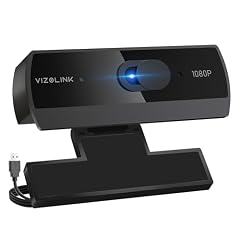
VIZOLINK 1080P Webcam with Built-in Microphone
- Resolution
- 1080p
- Built-in microphone
- Yes
- Privacy cover
- Yes
$9.99 price as of 2026-10-01 05:42 UTC (Details)
The product name mentions 'Noise Cancellation' and 'W2N', suggesting a focus on audio clarity. It also lists 1080p, a microphone, and a privacy cover. If you often take calls in a noisy room, this could be a helpful feature.
Pros
- 1080p resolution
- Built-in microphone
- Privacy cover
- Listing mentions noise cancellation
Cons
- No autofocus listed
- No frame rate spec in the pool
Good fit if
- People who work in noisy environments and want clearer audio
- Users who appreciate a privacy cover and a built-in mic
Skip if
- You need autofocus for moving around
- You prioritize video smoothness over audio capture
Verdict: A 1080p webcam with a noise-cancelling microphone, good for voice-focused work calls.
11 Best for tripod users

Gowzsad USB HD Webcam with Built-in Microphone and Rotatable Tripod
- Resolution
- 1080p
- Built-in microphone
- Yes
- Privacy cover
- Yes
$20.99 price as of 2026-10-01 05:31 UTC (Details)
The product name mentions a rotatable tripod, which adds mounting flexibility beyond the typical clip. It lists 1080p, a microphone, and a privacy cover. This is a useful option if you prefer to place the webcam away from your monitor.
Pros
- 1080p resolution
- Built-in microphone
- Privacy cover
- Listing says it includes a rotatable tripod
Cons
- No autofocus listed
- No frame rate spec in the pool
Good fit if
- Users who need a standalone mount for better camera angle
- People who want a webcam that can be placed on a desk or floor
Skip if
- You already have a stable monitor mount and need nothing extra
- You require autofocus or 60 fps
Verdict: A versatile 1080p webcam with a built-in tripod, but it lacks advanced focus capabilities.
12 Best for wide-angle shots

Tewiky Full HD Webcam with Built-in Microphone and Rotatable Tripod
- Resolution
- 1080p
- Built-in microphone
- Yes
- Privacy cover
- Yes
$18.04 price as of 2026-10-01 05:41 UTC (Details)
The product name mentions a wide-angle camera, which can be useful if you need to show more than just your face during calls. It also includes a privacy cover and a microphone, matching our essential criteria.
Pros
- 1080p resolution
- Built-in microphone
- Privacy cover
- Listing mentions wide-angle view
Cons
- No autofocus listed
- No frame rate spec in the pool
Good fit if
- Users who want to include a whiteboard or background in frame
- People who need a webcam with a broader field of view
Skip if
- You need autofocus for sharp video
- You require 60 fps for smooth motion
Verdict: A useful 1080p webcam with a wide-angle lens, but it sticks to a standard 30 fps and no autofocus.
Side by side
| # | Webcam | Resolution | Frame rate | Autofocus | Built-in microphone | Privacy cover | AI tracking |
|---|---|---|---|---|---|---|---|
| 1 | NexiGo N960E 1080P 60FPS Webcam with Light | 1080p | 60 fps or more | Yes | Yes | Yes | not stated |
| 2 | XFGsertXD 60FPS 1080P Live Streaming & Conference Webcam Dual | 1080p | 60 fps or more | Yes | Yes | Yes | not stated |
| 3 | Logitech Webcam C920S HD Pro with Privacy Shutter | 1080p | not stated | not stated | Yes | Yes | not stated |
| 4 | Lenovo FHD Webcam | 1080p | 30 fps | not stated | Yes | Yes | not stated |
| 5 | HP 320 FHD Webcam | 1080p | not stated | not stated | Yes | Yes | not stated |
| 6 | AVerMedia Live Streamer Cam 313 | 1080p | not stated | not stated | Yes | Yes | not stated |
| 7 | Amcrest 1080P Webcam with Microphone & Privacy Cover | 1080p | not stated | not stated | Yes | Yes | not stated |
| 8 | EMEET C950 1080P Webcam | 1080p | not stated | not stated | Yes | Yes | not stated |
| 9 | AUSDOM AF640 1080P Webcam with Microphone | 1080p | not stated | not stated | Yes | Yes | not stated |
| 10 | VIZOLINK 1080P Webcam with Built-in Microphone | 1080p | not stated | not stated | Yes | Yes | not stated |
| 11 | Gowzsad USB HD Webcam with Built-in Microphone and Rotatable Tripod | 1080p | not stated | not stated | Yes | Yes | not stated |
| 12 | Tewiky Full HD Webcam with Built-in Microphone and Rotatable Tripod | 1080p | not stated | not stated | Yes | Yes | not stated |
How we picked
We started with 30 webcams in our catalog that match the work-from-home use case. We kept only models that list a 1080p resolution, a built-in microphone, and a privacy cover, since those are the essentials for video calls. We then shortlisted 12 picks, prioritizing autofocus and 60 fps support, which reduce blur and make motion appear smoother. We did not physically test any of these units. All product specifications come from the seller's listing, and the prices shown on this page are the live prices read from the store listing at the time of publication. We have not verified these specifications with the manufacturers.
How to choose
Resolution and frame rate
The resolution determines the sharpness of your video. All 12 picks in this guide list 1080p (Full HD), which is the standard for video conferencing. Frame rate affects smoothness: 30 fps is typical and sufficient for most calls, while 60 fps reduces motion blur if you move around frequently. Two picks here, the NexiGo N960E and the XFGsertXD, list 60 fps support, which is a step up for a more fluid image.
Autofocus and fixed focus
Autofocus keeps your face sharp as you move closer or farther from the camera, which is helpful if you lean in to show a document or gesture. Only two picks in this guide list autofocus: the NexiGo N960E and the XFGsertXD. The others rely on a fixed-focus lens, which typically keeps a reasonable range in focus but can blur if you get very close. If you rarely change your distance, fixed focus is fine.
Microphone quality and noise cancellation
Built-in microphones are essential for a clean desk setup, but they vary in quality. Some picks, like the VIZOLINK, explicitly mention noise cancellation, which can reduce background hum or keyboard clicks. Others list dual microphones, such as the XFGsertXD, which may pick up your voice more consistently. If you work in a noisy environment, prioritize a model with noise cancellation or consider a separate USB microphone.
Privacy cover
A physical privacy cover lets you block the lens when you are not on a call. All 12 picks include a privacy cover, which is a key feature for working from home. The covers are typically a sliding shutter or a clip-on cap. This gives you peace of mind that the camera is not capturing anything when you do not want it to. Some models, like the Logitech C920S, have a built-in shutter, while others include a separate clip.
Mounting options and field of view
Most webcams come with a clip that attaches to the top of your monitor. Some picks, such as the Gowzsad, include a rotatable tripod, which lets you place the camera on a desk or shelf and adjust the angle. Wide-angle lenses, like the one on the Tewiky, capture more of your surroundings, which is useful if you want to show a whiteboard or include other people. Consider how you intend to position the camera before choosing.
Questions
What resolution should I look for in a webcam for remote work?
For remote work, 1080p (Full HD) is the standard and provides a clear, professional image for video calls. All picks in this guide are 1080p. Some budget webcams still only offer 720p, which can look softer, especially on larger monitors. If you want extra detail for screen sharing or recording, you could consider a 4K webcam, but 1080p is sufficient for most meeting apps.
Is 60 fps worth it for video calls?
60 fps is not necessary for typical video calls, because most conferencing platforms output at 30 fps or even lower. However, if you record videos or stream presentations, 60 fps can make motion look smoother and reduce stutter. Only two picks in this guide list 60 fps support: the NexiGo N960E and the XFGsertXD. If you only attend meetings, 30 fps is perfectly adequate.
Do I need a webcam with a privacy cover?
A privacy cover is a simple way to protect your privacy when the camera is not in use. All picks in this guide include one, which we consider essential for working from home. You can also buy a separate clip-on cover if your webcam does not have one. This is a low-cost way to ensure the lens is blocked when you are not on a call.
Can I use my iPhone as a webcam instead of buying one?
Yes, if you have an iPhone and a Mac, you can use Continuity Camera to turn your iPhone into a webcam without purchasing a separate device. Apple's support page describes how to set this up. This can be a good temporary solution, but a dedicated webcam is often more convenient because it mounts on your monitor and does not drain your phone's battery.
Recent updates
- : First published.