
Best Webcams Under $200 in 2026: 15 Picks Compared on Specs
For a webcam under $200, the main decision is usually resolution, frame rate, autofocus, audio, or tracking. Our top pick, the Insta360 Link 2, covers most of them in one unit: 4K PTZ, AI tracking, HDR and a noise-canceling microphone. The 15 picks below include 4K, 2K and 1080p models for streaming, meetings and work from home. The selections are drawn from a catalogue of 60 webcams, compared on published specifications; no one at the site has used these cameras.
15 picks from 334 webcams that match this guide with a price we can quote today. Every price below is live and carries the moment it was read.
The picks at a glance
Which one should you buy?
- For streamers who want smooth 4K: If 60 fps matters more than a built-in mic, the Elgato Facecam 4K is the pick: its product name states 4K at 60 fps and it pairs with your own audio setup. See pick 4
- For Teams-heavy offices: The Dell WB7022 is Teams certified in its product name and lists 4K UHD with a Sony sensor, which fits rooms where certification lists matter. See pick 7
- For presenters who move around: The Insta360 Link 2 combines a PTZ motor, AI tracking, HDR and a noise-canceling mic, so the frame can follow you during demos without extra software. See pick 1
- For 1080p work-from-home setups: The Lenovo FHD webcam states 1080p at 30 fps, dual noise-canceling mics and a privacy cover, making it a complete all-in-one for daily calls. See pick 12
The 15 picks
1 Best overall

Insta360 Link 2
- Resolution
- 4K
- Built-in microphone
- Yes
- AI tracking
- Yes
$199.99 price as of 2026-10-01 05:34 UTC (Details)
The Link 2 is the only pick in this list that combines a PTZ motor, AI tracking, HDR and a built-in noise-canceling microphone. Its 4K resolution and 1/2-inch sensor are stated in the product name, and gesture control makes framing hands-free.
Pros
- 4K resolution with a stated 1/2-inch sensor
- PTZ motor, AI tracking and HDR all in the product name
- AI noise-canceling microphone listed
- Gesture control for hands-free framing
Cons
- Frame rate is not stated by the seller
- No stated privacy cover
Good fit if
- Presenters who move during a demo or lesson
- Streamers who want AI tracking without third-party software
Skip if
- Users who want a stated 60 fps mode
- Users who prefer a fixed camera with no motor
Verdict: The most complete all-in-one webcam in this comparison.
2 Best 4K from a major brand
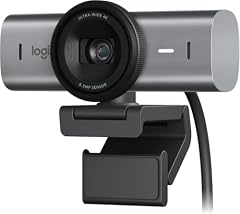
The MX Brio brings 4K Ultra HD to the list from one of the best-known webcam makers, with the resolution stated in the product name. It skips the extras: the seller does not list a microphone, autofocus or tracking, so plan to bring your own audio.
Pros
- 4K Ultra HD resolution listed
- Made by Logitech, a major webcam brand
- Simple spec sheet without unlisted extras
Cons
- Microphone, autofocus and frame rate not stated by the seller
- No privacy cover or tracking listed
Good fit if
- Users who want a trusted brand at 4K
- Buyers who already own a microphone and software they like
Skip if
- Users who need a built-in mic
- Users who want AI framing or tracking
Verdict: A clean 4K webcam from a major brand for users with their own audio.
3 Best compact AI tracking

OBSBOT Tiny 3 Lite AI-Powered Spatial Audio 4K Webcam
- Resolution
- 4K
- AI tracking
- Yes
$199.00 price as of 2026-10-01 05:38 UTC (Details)
The Tiny 3 Lite is the compact AI-tracking webcam in this comparison, with 4K resolution and OBSBOT's AI tracking stated in the product name. It is a smaller alternative to the PTZ models from Insta360 and EMEET for desks without much clearance.
Pros
- 4K resolution stated
- AI tracking in the product name
- Compact design stated in the product name
Cons
- Microphone is not stated by the seller
- Frame rate is not stated by the seller
Good fit if
- Users with a small desk who want AI framing
- Streamers who want tracking without a full PTZ head
Skip if
- Users who need a built-in mic
- Users who want a stated 60 fps mode
Verdict: A compact, AI-tracking 4K webcam for tight spaces.
4 Best for 4K60 streaming

Elgato Facecam 4K
- Resolution
- 4K
- Frame rate
- 60 fps or more
$169.99 price as of 2026-10-01 05:29 UTC (Details)
The Facecam 4K is the pick whose product name states 4K60 directly, which makes it the smooth-motion choice for streamers. Its studio-webcam positioning and DSLR-like control appear in the name, and the seller lists no built-in microphone, so streamers can keep their existing audio chain.
Pros
- Product name states 4K at 60 fps (4K60)
- Elgato is an established streaming gear maker
- No stated microphone keeps the feature set focused
Cons
- Microphone not stated by the seller
- No stated autofocus, tracking or privacy cover
Good fit if
- Streamers encoding 4K60 in OBS or similar software
- Users with a dedicated microphone or mixer
Skip if
- Video call users who do not need 60 fps
- Users who want an all-in-one camera with audio
Verdict: The 4K60 webcam for streamers in this price range.
5 Best for presenters
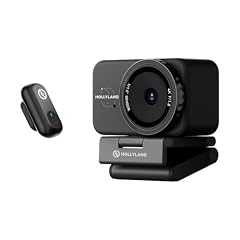
Hollyland Lyra 4K Webcam with 1/1.5" Sensor
- Resolution
- 4K
- Autofocus
- Yes
- Privacy cover
- Yes
- AI tracking
- Yes
$159.00 price as of 2026-10-01 05:32 UTC (Details)
The Lyra is the most autofocus-heavy pick here: it lists a 1/1.5-inch sensor, 50MP PDAF autofocus, AI tracking and auto-framing in the product name. It also mentions a direct wireless mic and a privacy cover, which suits presenters who move and talk.
Pros
- 50MP PDAF autofocus and 1/1.5-inch sensor stated
- AI tracking and auto-framing listed
- Privacy cover included and stated
- Direct wireless mic mentioned in the product name
Cons
- Frame rate is not stated by the seller
- Built-in microphone is not listed in the spec fields
Good fit if
- Presenters, teachers and demo hosts who move
- Users who want autofocus plus auto-framing in one unit
Skip if
- Streamers who need a stated 60 fps mode
- Users who prefer a fixed-focus webcam
Verdict: A 4K autofocus tracker built for presenters.
6 Best for streaming and collaboration

Razer Kiyo V2 Webcam for Streaming and Collaboration 4K 30Fps
- Resolution
- 4K
- Frame rate
- 30 fps
$111.53 price as of 2026-10-01 05:39 UTC (Details)
The Kiyo V2 is the gaming-branded 4K option in this list, with streaming and collaboration both named as use cases. Its 4K resolution is stated at 30 fps, which is a step down from the 60 fps picks, but it keeps the Razer name that many game streamers recognize.
Pros
- 4K resolution at a stated 30 fps
- Razer branding for gaming gear
- Product name covers streaming and collaboration
Cons
- 30 fps, lower than the 60 fps picks here
- Microphone, autofocus and privacy cover not stated by the seller
Good fit if
- Game streamers who want a Razer-branded 4K camera
- Users who split time between streaming and video calls
Skip if
- Users who need a stated 60 fps mode
- Users who want a built-in mic
Verdict: A recognizable 4K camera for game streamers at 30 fps.
7 Best for business meetings

Dell 4K UHD Webcam WB7022
- Resolution
- 4K
$104.99 price as of 2026-10-01 05:28 UTC (Details) Typical price: $118.64, 12% off
The WB7022 is the only pick here whose product name includes Teams certification, which matters in offices that standardize on certified hardware. Its 4K UHD resolution and Sony sensor put it on par with consumer cameras while keeping a business identity.
Pros
- Teams certified, stated in the product name
- 4K UHD resolution and Sony sensor listed
- Dell business-branded camera
Cons
- Microphone and autofocus not stated by the seller
- Frame rate not stated by the seller
Good fit if
- Remote workers in Teams-heavy organizations
- IT buyers who want a known business peripheral
Skip if
- Streamers who want a stated 60 fps mode
- Users who need a built-in mic
Verdict: The safest 4K choice for business meetings.
8 Best PTZ with dual cameras
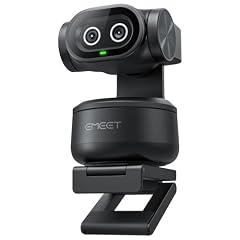
EMEET PIXY Dual-Camera AI-Powered PTZ Camera 4K
- Resolution
- 4K
- AI tracking
- Yes
$99.99 price as of 2026-10-01 05:29 UTC (Details)
The PIXY is the only pick here that states a dual-camera design, pairing 4K with AI-powered PTZ tracking. It gives presenters a second tracking option next to the Insta360 Link 2, with a different camera layout.
Pros
- Dual-camera AI-powered PTZ stated in the product name
- 4K resolution and AI tracking listed
- Compact PTZ form factor
Cons
- Microphone not stated by the seller
- Frame rate not stated by the seller
Good fit if
- Presenters who want AI tracking from a second brand
- Users who want PTZ movement in a smaller unit
Skip if
- Users who need a built-in mic
- Users who need a stated 60 fps mode
Verdict: A dual-camera PTZ that brings AI tracking to this class of webcam.
9 Best 4K with microphone

NexiGo N660P Pro 4K Webcam with Distortion-Free Lens
- Resolution
- 4K
- Frame rate
- 60 fps or more
- Autofocus
- Yes
- Built-in microphone
- Yes
- Privacy cover
- Yes
$79.99 price as of 2026-10-01 05:38 UTC (Details)
The N660P Pro is one of the few picks here that combines 4K, autofocus, 1080p 60 fps, a built-in microphone and a privacy cover. The product name positions it for USB streaming, and the seller also mentions 3DNR digital noise reduction.
Pros
- 4K resolution with a stated 1080p 60 fps mode
- Built-in microphone and autofocus listed
- Privacy cover stated
- 3DNR noise-reduction processing mentioned in the product name
Cons
- 4K frame rate is not stated by the seller
- No AI tracking or PTZ listed
Good fit if
- Streamers who want 1080p60 with a single USB cable
- Users who want mic and privacy cover in one package
Skip if
- Users who need 4K at 60 fps
- Users who want AI framing
Verdict: The best 4K-plus-microphone balance in this list.
10 Best 4K for everyday calls

Acer 4K Webcam for PC/Mac with All-Metal Unibody Sculpted
- Resolution
- 4K
- Autofocus
- Yes
- Built-in microphone
- Yes
- Privacy cover
- Yes
$69.99 price as of 2026-10-01 05:23 UTC (Details)
This Acer webcam offers a stated Sony 1/2-inch sensor, PDAF autofocus, two noise-reduction microphones and a privacy cover, making it the most well-rounded 4K pick from a major PC maker. For daily calls, a stated 4K sensor, dual mics and autofocus cover the essentials.
Pros
- Sony 1/2-inch sensor and PDAF autofocus stated
- Two noise-reduction microphones listed
- Privacy cover and all-metal unibody design mentioned
Cons
- Frame rate not stated by the seller
- No tracking or 60 fps mode listed
Good fit if
- Home office users who want 4K with built-in audio
- Users who want an Acer-branded camera for PC or Mac
Skip if
- Streamers who require 60 fps
- Presenters who need AI tracking
Verdict: A balanced 4K webcam with mics and a privacy cover.
11 Best 2K for video calls

Anker PowerConf C200 2K Webcam for PC/Laptop/Mac
- Resolution
- 2K (1440p)
$69.99 price as of 2026-10-01 05:24 UTC (Details)
The PowerConf C200 takes the middle path with 2K (1440p) resolution, which many video apps can use without the bandwidth of 4K. Its product name advertises low-light correction, and it comes from Anker, a brand known for phone accessories.
Pros
- 2K (1440p) resolution stated
- Low-light correction mentioned in the product name
- Anker is an established accessory maker
Cons
- Microphone not stated by the seller
- Frame rate, autofocus and privacy cover not stated by the seller
Good fit if
- Users who want more detail than 1080p without 4K bandwidth
- Video call users with an Anker accessory ecosystem
Skip if
- Users who require true 4K capture
- Users who need a built-in mic
Verdict: A practical 2K pick for video calls and desktop use.
12 Best 1080p for work from home

Lenovo FHD Webcam
- Resolution
- 1080p
- Frame rate
- 30 fps
- Built-in microphone
- Yes
- Privacy cover
- Yes
$45.99 price as of 2026-10-01 05:35 UTC (Details)
For 1080p setups, the Lenovo FHD webcam states its 30 fps rate, dual noise-canceling microphones and AI noise cancellation in the product name. It covers what a remote worker needs: audio, privacy and a familiar PC brand.
Pros
- 1080p resolution at a stated 30 fps
- Dual noise-canceling microphones and AI noise cancellation listed
- Privacy cover stated
Cons
- No 60 fps mode listed
- No autofocus or tracking stated
Good fit if
- Remote workers on daily video calls
- Users who want one 1080p unit with audio and privacy
Skip if
- Streamers who need 60 fps
- Users who want 4K resolution
Verdict: A complete 1080p work-from-home webcam.
13 Best 1080p for streaming

AVerMedia Live Streamer Cam 313
- Resolution
- 1080p
- Built-in microphone
- Yes
- Privacy cover
- Yes
$57.19 price as of 2026-10-01 05:26 UTC (Details)
The Live Streamer Cam 313 comes from a capture and streaming brand, and its name lists the features streamers need: 1080p, a privacy shutter and a dual microphone. The 360-degree swivel is also stated, which helps when aiming a camera on a monitor.
Pros
- 1080p resolution with a stated privacy shutter
- Dual microphone listed
- 360-degree swivel stated
Cons
- Frame rate not stated by the seller
- No autofocus or tracking listed
Good fit if
- Streamers who use capture cards and want a simple USB camera
- Users who want a physical shutter and swivel
Skip if
- Users who want 4K
- Users who need AI framing
Verdict: A focused 1080p streaming camera with a privacy shutter.
14 Best 1080p from a major PC maker

HP 320 FHD Webcam
- Resolution
- 1080p
- Built-in microphone
- Yes
- Privacy cover
- Yes
$28.99 price as of 2026-10-01 05:33 UTC (Details)
The HP 320 is a 1080p webcam with a stated microphone and privacy cover, and the product name calls out USB-A plus desktop, laptop and Chromebook support. It is a simple option for offices that already standardize on HP hardware.
Pros
- 1080p with a stated microphone and privacy cover
- USB-A connection stated
- Desktop, laptop and Chromebook support mentioned
Cons
- Frame rate not stated by the seller
- No autofocus or tracking listed
Good fit if
- Businesses standardizing on HP equipment
- Users with USB-A only PCs
Skip if
- Users who want 4K
- Streamers who need 60 fps
Verdict: A simple 1080p workhorse from a major PC maker.
15 Best for 1080p60 streaming

AOC 4K Webcam for PC with PDAF
- Resolution
- 4K
- Frame rate
- 60 fps or more
- Autofocus
- Yes
$35.99 price as of 2026-10-01 05:24 UTC (Details)
The AOC webcam states a 4K sensor with PDAF autofocus and a 1080p 60 fps streaming mode, which is a rare combination in this comparison. It is one of three picks here with a stated 60 fps mode, and the product name identifies it as a streaming camera.
Pros
- PDAF autofocus and 1080p 60 fps stated
- 4K sensor with Sony sensor listed
- One of three picks here with a stated 60 fps mode
Cons
- Microphone and privacy cover not stated by the seller
- 60 fps mode is listed as 1080p, not 4K
Good fit if
- Streamers who want smooth 1080p60 output
- Users upgrading from a 30 fps built-in laptop camera
Skip if
- Users who need a built-in mic
- Users who want 4K at 60 fps
Verdict: A capable 4K sensor camera for 1080p60 streaming.
Side by side
| # | Webcam | Resolution | Frame rate | Autofocus | Built-in microphone | Privacy cover | AI tracking |
|---|---|---|---|---|---|---|---|
| 1 | Insta360 Link 2 | 4K | not stated | not stated | Yes | not stated | Yes |
| 2 | LOGITECH MX BRIO Ultra HD 4K Webcam | 4K | not stated | not stated | not stated | not stated | not stated |
| 3 | OBSBOT Tiny 3 Lite AI-Powered Spatial Audio 4K Webcam | 4K | not stated | not stated | not stated | not stated | Yes |
| 4 | Elgato Facecam 4K | 4K | 60 fps or more | not stated | not stated | not stated | not stated |
| 5 | Hollyland Lyra 4K Webcam with 1/1.5" Sensor | 4K | not stated | Yes | not stated | Yes | Yes |
| 6 | Razer Kiyo V2 Webcam for Streaming and Collaboration 4K 30Fps | 4K | 30 fps | not stated | not stated | not stated | not stated |
| 7 | Dell 4K UHD Webcam WB7022 | 4K | not stated | not stated | not stated | not stated | not stated |
| 8 | EMEET PIXY Dual-Camera AI-Powered PTZ Camera 4K | 4K | not stated | not stated | not stated | not stated | Yes |
| 9 | NexiGo N660P Pro 4K Webcam with Distortion-Free Lens | 4K | 60 fps or more | Yes | Yes | Yes | not stated |
| 10 | Acer 4K Webcam for PC/Mac with All-Metal Unibody Sculpted | 4K | not stated | Yes | Yes | Yes | not stated |
| 11 | Anker PowerConf C200 2K Webcam for PC/Laptop/Mac | 2K (1440p) | not stated | not stated | not stated | not stated | not stated |
| 12 | Lenovo FHD Webcam | 1080p | 30 fps | not stated | Yes | Yes | not stated |
| 13 | AVerMedia Live Streamer Cam 313 | 1080p | not stated | not stated | Yes | Yes | not stated |
| 14 | HP 320 FHD Webcam | 1080p | not stated | not stated | Yes | Yes | not stated |
| 15 | AOC 4K Webcam for PC with PDAF | 4K | 60 fps or more | Yes | not stated | not stated | not stated |
How we picked
The site's budget filter for this price band returned 334 listings; after folding near-duplicates, the pool used for this article held 60 distinct webcams, and the 15 picks below are taken from that pool. Models with clearly stated resolution, frame rate, autofocus, microphone, privacy cover or tracking features were kept, and established makers were favored. Prices on this page are live and read from the store listing at the time the page loads, so they can change. No one at the site has used these units; every specification comes from the catalogue entry or the maker's published information. Where the seller does not state a spec, that is called out instead of guessed.
How to choose
Resolution: 4K vs 2K vs 1080p
The first filter on any webcam list is resolution. In this comparison, 11 of the 15 picks list 4K, one lists 2K (1440p) and three list 1080p. A 4K sensor gives more detail when you crop the frame, while 1080p is still the standard most video call apps transmit at. The 2K option from Anker splits the difference.
If you only join meetings, 1080p is usually enough. If you record or stream and want headroom for cropping, a 4K pick gives you that. Resolution is the spec most likely to drive the rest of the decision.
Frame rate: when 60 fps matters
Frame rate controls how smooth motion looks. Three of the 15 picks state a 60 fps mode: the Elgato Facecam 4K at 4K60, the AOC at 1080p60, and the NexiGo N660P Pro at 1080p60. Two picks state 30 fps (Razer Kiyo V2 and Lenovo FHD), and the rest leave frame rate unstated by the seller.
For talking-head calls, 30 fps is fine and saves bandwidth. For gameplay or fast movement, a stated 60 fps stream looks smoother. If the listing does not state a frame rate, treat it as an unknown rather than assuming 60 fps.
Autofocus and AI tracking: what they add
Autofocus keeps you sharp as you move closer to or farther from the camera. Four of the 15 picks state autofocus: the Hollyland Lyra, NexiGo N660P Pro, Acer 4K Webcam and AOC 4K Webcam. AI tracking goes further by following a subject around the frame; four picks state tracking features: the Insta360 Link 2, OBSBOT Tiny 3 Lite, Hollyland Lyra and EMEET PIXY.
If you sit still in a fixed chair, fixed focus may be enough. If you pace, present or move through a scene, look for a stated PDAF autofocus or tracking feature rather than assuming it exists.
Built-in microphones and external audio
A built-in mic is convenient but not a replacement for a separate microphone. Six of the 15 picks state a microphone: the Insta360 Link 2, NexiGo N660P Pro, Acer, Lenovo, AVerMedia and HP. The others either mention wireless mic support in the product name (Hollyland Lyra) or leave the microphone out of the listing.
For meetings and quick calls, a stated built-in mic can be enough. For streaming, a dedicated microphone or the Hollyland Lyra's direct wireless mic option is usually the better path, and several picks here are designed as camera-only units.
Privacy covers and lens shutters
A privacy cover gives you a physical way to block the lens when the camera is not in use. Six of the 15 picks state a privacy cover or shutter: the Hollyland Lyra, NexiGo N660P Pro, Acer, Lenovo, AVerMedia and HP. If privacy matters, choose one of those rather than relying on software settings.
Windows also lets you control camera access per app in Settings, under Privacy and security, Camera. That setting works with any webcam, but a physical cover does not depend on the operating system.
USB, UVC and plug-and-play compatibility
Most of the webcams in this comparison connect over USB and follow the USB Video Class (UVC) standard. Microsoft's UVC driver, Usbvideo.sys, lets the system provide driver support without a separate installation, so a UVC webcam usually works when you plug it in. Windows still requires that camera access be enabled in the privacy settings before an app can use it.
For connections, USB-A and USB-C both appear in this list. USB Type-C is the newer connector, described by the USB Implementers Forum, and some older PCs still use USB-A; check which port your computer has before buying.
Questions
Do I need a 4K webcam?
Not for every use. Eleven of the 15 picks here list 4K, but most video call services transmit at 1080p or lower. A 4K sensor helps when you crop, zoom or record for later editing. If you only join calls, a good 1080p model with a microphone and privacy cover is often the more practical choice.
What does 60 fps do for a webcam?
60 fps makes movement look smoother on screen, which matters for game streaming or camera pans. In this list, three picks state a 60 fps mode: the Elgato Facecam 4K at 4K60, plus the AOC and NexiGo N660P Pro at 1080p60. For regular video calls, 30 fps or an unstated lower rate is generally enough.
Should I buy a webcam with AI tracking?
AI tracking is useful if you move during a presentation, lesson or stream, because the camera can follow you. Four of the 15 picks here state tracking: the Insta360 Link 2, OBSBOT Tiny 3 Lite, Hollyland Lyra and EMEET PIXY. If you sit still, tracking adds a feature you will rarely use, so a fixed camera is fine.
Are built-in webcam microphones good enough?
They are convenient but limited. Six of the 15 picks here state a built-in microphone, and most are fine for quick meetings. For streaming or recording, a separate microphone usually sounds better, and several picks in this list are camera-only by design. The Hollyland Lyra offers a direct wireless mic mention if you want more audio flexibility in one camera.
Will a webcam work with my PC without installing drivers?
Usually, yes. Many USB webcams use the USB Video Class standard, and Windows supplies the UVC driver automatically, so the camera is recognized when plugged in. If an app cannot see the camera, check Windows camera permissions under Settings, Privacy and security, Camera and make sure desktop apps have access.
What does Teams certification mean on a webcam?
Microsoft's Teams certification program is for devices that meet specific hardware design, performance, audio and video quality targets for the Teams experience. In this list, the Dell WB7022 carries Teams certification in its product name. The certification does not evaluate feature-level or cloud environment support, so it is a hardware benchmark rather than a guarantee for every feature.
Recent updates
- : First published.