
Best 4K Webcams with Microphone in 2026: 15 Picks Compared on Specs
The Razer Kiyo Pro Ultra tops our list for its large sensor, true 4K image capture, and built-in privacy shutter, making it the best overall pick for most buyers. For this guide we compared 15 4K webcams across a variety of form factors, from PTZ room systems to compact desktop cameras, using only stated specifications from the sellers and the makers' own product pages. Prices are live and read from each listing; no units were tested.
15 picks from 75 webcams that match this guide with a price we can quote today. Every price below is live and carries the moment it was read.
The picks at a glance
Which one should you buy?
- For streamers who need autofocus and 1080p 60 fps: NexiGo N660P Pro offers 4K capture plus 1080p 60 fps and a distortion-free lens, ideal for smooth streaming with a built-in mic. See pick 11
- For conference rooms with multiple participants: Logitech Rally Bar Room Kit pairs 4K PTZ video with beamforming microphones, designed for medium to large meeting spaces. See pick 2
- For home offices on a budget: EMEET NOVA delivers 4K with PDAF autofocus and dual omni mics, making it a compact and easy choice for home offices. See pick 10
- For creators who want AI tracking and PTZ: Insta360 Link 2 Pro combines a 1/1.3-inch sensor, AI tracking, and a directional noise-canceling mic for polished video calls. See pick 3
The 15 picks
1 Best overall

Razer Kiyo Pro Ultra 4K Webcam
- Resolution
- 4K
- Built-in microphone
- Yes
- Privacy cover
- Yes
$399.99 price as of 2026-10-01 05:39 UTC (Details)
The Razer Kiyo Pro Ultra uses a large 1/1.2-inch Sony Starvis 2 sensor and an f/1.7 lens, which together capture more light than typical webcam sensors. It outputs native 4K at 30 fps or 1080p at 60 fps, and includes a built-in microphone and a physical shutter. This combination of image quality and privacy makes it the most versatile pick in this list.
Pros
- Large 1/1.2-inch sensor captures more light than smaller sensors
- Native 4K24 or 1080p60 output
- Built-in privacy shutter
- Built-in microphone (no external mic required)
Cons
- Heavier than most desktop webcams
- 4K only at 30 fps (not 60 fps)
Good fit if
- Streamers and video creators who need excellent low-light image quality
- Professionals who want a single device for video and audio without adding a separate mic
Skip if
- You need 4K at 60 fps; this webcam only does 4K24
- You prefer a compact, clip-on webcam for travel
Verdict: The Razer Kiyo Pro Ultra is the best all-round 4K webcam with a microphone for most users, thanks to its large sensor and strong feature set.
2 Best for conference rooms
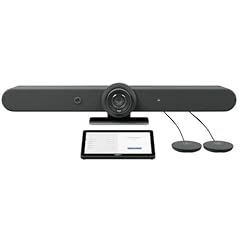
Logitech Rally Bar Room Kit
- Resolution
- 4K
- Built-in microphone
- Yes
$5,549.00 price as of 2026-10-01 05:36 UTC (Details)
The Logitech Rally Bar is a complete room system with a 4K PTZ camera, beamforming microphones, and built-in speakers, designed for medium to large rooms. It connects over USB or HDMI and is certified for major conferencing platforms. For a permanent meeting room installation, this is the most capable pick.
Pros
- 4K PTZ camera with motorized pan, tilt, and zoom
- Beamforming microphones pick up voices across the room
- Works with USB and HDMI connections
- Certified for Microsoft Teams Rooms (per source)
Cons
- Requires professional installation; not a simple desktop webcam
- Large footprint and high price
- Overkill for a single-person home office
Good fit if
- Medium to large meeting rooms with multiple participants
- Organizations that want a unified conferencing system with a single purchase
Skip if
- You need a personal webcam for solo calls
- Your room is too small for a PTZ camera's panning range
Verdict: The Logitech Rally Bar is the best choice if you're equipping a conference room, but it offers far more than a typical webcam buyer needs.
3 Best PTZ tracking

Insta360 Link 2 Pro
- Resolution
- 4K
- Built-in microphone
- Yes
- AI tracking
- Yes
$249.99 price as of 2026-10-01 05:34 UTC (Details)
The Insta360 Link 2 Pro combines a 1/1.3-inch sensor with AI tracking and auto framing, and adds a directional noise-canceling microphone. It can pan, tilt, and zoom to follow you, which makes it ideal for presentations and dynamic video calls. This level of tracking is rare in a webcam at this size.
Pros
- AI tracking with auto framing and zoom
- 1/1.3-inch sensor for good low-light performance
- Directional noise-canceling microphone
- HDR support for improved dynamic range
Cons
- No stated privacy cover (not mentioned in seller listing)
- Requires the Insta360 software for full tracking features
Good fit if
- Public speakers and teachers who move around during calls
- Streamers who want to change framing without touching the camera
Skip if
- You want a camera that stays still and you never move
- You prefer a simple plug-and-play webcam without companion software
Verdict: The Insta360 Link 2 Pro is the best pick for users who want AI-driven PTZ tracking and a built-in microphone in a desktop webcam.
4 Best premium desktop webcam

Logitech MX Brio Ultra HD 4K Webcam with Noise Reducing Microphones
- Resolution
- 4K
- Built-in microphone
- Yes
- Privacy cover
- Yes
$198.99 price as of 2026-10-01 05:36 UTC (Details)
Logitech's MX Brio offers 4K UHD resolution, AI-enhanced image quality, and noise-reducing microphones, all in a compact desk design. It includes a privacy shutter and USB-C connectivity. It's a step below the Razer for pure low-light performance but still excellent for most professional users.
Pros
- 4K UHD video with AI-enhanced image quality
- Built-in privacy shutter
- Noise-reducing microphones
- USB-C plug-and-play
Cons
- Smaller sensor than the Razer Kiyo Pro Ultra
- No built-in PTZ or tracking
- No stated frame rate beyond 4K (likely 30 fps)
Good fit if
- Remote workers who want a reliable, high-quality camera for daily calls
- Content creators who need consistent color and exposure
Skip if
- You need AI tracking or PTZ
- You're on a tight budget and only need basic 1080p
Verdict: The MX Brio is a strong premium desktop webcam that balances image quality, microphone performance, and privacy.
5 Best 12x optical zoom
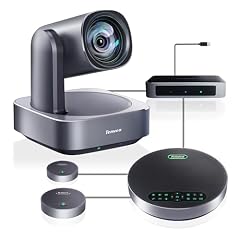
Tenveo 4K PTZ Conference Room Camera System
- Resolution
- 4K
- Built-in microphone
- Yes
- AI tracking
- Yes
$649.00 price as of 2026-10-01 05:41 UTC (Details)
The Tenveo 4K PTZ conference camera includes 12x optical zoom, AI auto-tracking, and Bluetooth, plus USB 3.0 and HDMI outputs. This is more optical zoom than most desktop webcams offer, and the PTZ mount lets you frame a room accurately. It's a solid choice for medium-sized meeting rooms.
Pros
- 12x optical zoom for close-up views without digital cropping
- AI auto-tracking
- USB 3.0 and HDMI outputs
- Bluetooth for remote control (per listing)
Cons
- Requires manual setup for PTZ positioning
- No privacy cover stated
- Bulky compared to a clip-on webcam
Good fit if
- Medium-sized conference rooms that need optical zoom
- Users who already have a separate microphone system
Skip if
- You want a simple camera for a single desk
- You need a built-in speaker for audio output
Verdict: The Tenveo delivers high optical zoom and tracking, making it a strong pick for dedicated meeting spaces.
6 Best 20x optical zoom

TONGVEO 4K PTZ Conference Room Camera System AI Auto-Tracking 20x Zoom
- Resolution
- 4K
- Built-in microphone
- Yes
- AI tracking
- Yes
$399.00 price as of 2026-10-01 05:41 UTC (Details)
The TONGVEO 4K PTZ camera offers 20x optical zoom, which is the highest in this list, plus AI auto-tracking and multiple connectivity options including USB 3.0, HDMI, and LAN. For large rooms or stages where you need extreme zoom range, this camera stands out.
Pros
- 20x optical zoom, the most among our picks
- AI auto-tracking
- USB 3.0, HDMI, and LAN outputs
- PTZ design allows flexible framing
Cons
- No stated privacy cover
- May require external microphone for best audio (built-in mic quality not specified in maker info)
- Heavy setup for casual use
Good fit if
- Large conference rooms or auditoriums
- Producers who need to zoom into a speaker from across a room
Skip if
- You need a compact webcam for a laptop
- You don't need more than 4x zoom
Verdict: The TONGVEO with 20x zoom is the best pick when distance and detail are critical.
7 Best AI PTZ for home offices

MT-VIKI 4K AI PTZ Webcam
- Resolution
- 4K
- Frame rate
- 60 fps or more
- Built-in microphone
- Yes
- AI tracking
- Yes
$99.00 price as of 2026-10-01 05:37 UTC (Details)
The MT-VIKI 4K AI PTZ webcam packs auto tracking, gesture control, a 92-degree wide angle, and 330-degree pan / 180-degree tilt into a desktop unit. It offers 1080p at 60 fps and a TOF sensor for depth detection. This is the most feature-rich PTZ webcam for a single-person desk.
Pros
- Auto tracking with gesture control
- 92-degree wide angle
- 330-degree pan and 180-degree tilt
- 1080p60 output in addition to 4K
Cons
- No stated privacy cover
- TOF sensor details not explained in listing
- May require software for full tracking features
Good fit if
- Home office workers who present to clients and want to be followed
- Streamers who need a camera that can reposition itself
Skip if
- You want a fixed camera with a privacy shutter
- You have a very small desk and the PTZ movement distracts you
Verdict: The MT-VIKI is a great value choice when you want PTZ and AI tracking without buying a room-scale system.
8 Best center-screen design

Uyissykia 4K Center Screen Webcam with Microphone
- Resolution
- 4K
- Autofocus
- Yes
- Built-in microphone
- Yes
$149.99 price as of 2026-10-01 05:42 UTC (Details)
The Uyissykia 4K center-screen webcam places the lens in the middle of the monitor, which helps you maintain eye contact during video calls. It has autofocus and comes with a USB Type-C/A adapter, working right out of the box. Its design is distinct from the typical top-mounted webcams.
Pros
- Lens centered on screen for better eye contact
- Autofocus
- Includes USB Type-C and Type-A adapter
- Plug-and-play (no driver needed per seller)
Cons
- No stated privacy cover
- Requires a monitor with a matching mounting mechanism
- Not portable like a clip-on webcam
Good fit if
- People who care about eye contact in meetings
- Users with a secondary monitor that can hold the webcam at eye level
Skip if
- You need a webcam that clips to a laptop lid
- You prefer a standard top-mounted position
Verdict: The Uyissykia is a unique pick for users who want a centered camera position.
9 Best all-metal build

Acer 4K Webcam for PC/Mac with All-Metal Unibody Sculpted
- Resolution
- 4K
- Autofocus
- Yes
- Built-in microphone
- Yes
- Privacy cover
- Yes
$69.99 price as of 2026-10-01 05:23 UTC (Details)
Acer's 4K webcam features an all-metal unibody chassis, a Sony 1/2-inch sensor, PDAF (phase detection autofocus), and two noise-reduction microphones. It also has a privacy shutter. This is a well-built, balanced webcam from a major brand.
Pros
- All-metal unibody construction
- Sony 1/2-inch sensor
- PDAF autofocus
- Two noise-reduction mics and privacy shutter
Cons
- No stated field of view
- No 60 fps option; only 4K at 30 fps
- Requires digital zoom (no optical zoom)
Good fit if
- Professionals who want a trustworthy brand with a metal body
- Users who need a simple, high-quality camera for desk use
Skip if
- You need a webcam with a wide field of view for group shots
- You want a PTZ or tracking feature
Verdict: The Acer 4K webcam is a solid, durable pick with good autofocus and dual mics.
10 Best compact autofocus webcam

EMEET NOVA 4K Webcam for PC
- Resolution
- 4K
- Autofocus
- Yes
- Built-in microphone
- Yes
$59.99 price as of 2026-10-01 05:29 UTC (Details)
The EMEET NOVA packs 4K video, PDAF autofocus, and dual omni-directional microphones into a small, portable body. It works with Windows and Mac without installing extra drivers (UVC standard). For a lightweight, compact webcam with solid specs, it's a top contender.
Pros
- Compact and portable design
- PDAF autofocus keeps you sharp
- Dual omni microphones
- UVC compliant, plug-and-play
Cons
- No optical zoom
- No stated privacy cover
- Maximum 4K30 (no 4K60)
Good fit if
- Students and remote workers who need a compact webcam
- Travelers who need a camera that fits in a laptop bag
Skip if
- You need a wide-angle lens for group calls
- You want a privacy shutter
Verdict: The EMEET NOVA offers excellent portability and solid features for a 4K webcam with a built-in microphone.
11 Best for 1080p60 streaming

NexiGo N660P Pro 4K Webcam with Distortion-Free Lens
- Resolution
- 4K
- Frame rate
- 60 fps or more
- Autofocus
- Yes
- Built-in microphone
- Yes
- Privacy cover
- Yes
$79.99 price as of 2026-10-01 05:38 UTC (Details)
The NexiGo N660P Pro supports 4K at 30 fps and 1080p at 60 fps, making it ideal for streamers who want smooth motion. It also has a distortion-free lens, autofocus, and a privacy shutter, plus 3DNR for noise reduction. This is a feature-rich option under the premium tier.
Pros
- 1080p60 for smooth streaming
- Autofocus with 3DNR (3D noise reduction)
- Privacy cover included
- Distortion-free lens
Cons
- 4K limited to 30 fps
- No optical zoom
- Microphone quality not specified (only that it has a mic)
Good fit if
- Streamers who play fast-paced games and need 60 fps
- Content creators who record at 1080p but want 4K capability as a bonus
Skip if
- You need 4K60 (this camera cannot do it)
- You want a camera with PTZ or tracking
Verdict: The NexiGo N660P Pro is the best pick for streamers who prioritize high frame rates at 1080p.
12 Best with built-in speakers

4K AI-Powered Conference Webcam with Microphones Speakers
- Resolution
- 4K
- Built-in microphone
- Yes
$149.99 price as of 2026-10-01 05:23 UTC (Details)
The WYRESTORM 4K AI-powered conference webcam includes not only a 4K sensor and microphones but also built-in speakers, making it an all-in-one device for small meeting rooms or a personal workspace. It's Zoom certified, which may matter if you rely on that platform.
Pros
- Built-in microphone and speaker
- 4K resolution
- AI-powered (as stated by seller)
- Zoom certified (per listing)
Cons
- No stated privacy cover
- No autofocus spec mentioned
- Speaker quality not verified in maker documentation
Good fit if
- Small conference rooms where you want a single device for audio and video
- Users who want a camera that doesn't require separate speakers
Skip if
- You already have a good microphone and speaker system
- You need a camera for streaming with high frame rates
Verdict: The WYRESTORM is a convenient all-in-one conferencing webcam with a microphone and speaker.
13 Best for simple 4K calls

UGREEN 4K@30fps Webcam for PC Ultra HD Web Camera
- Resolution
- 4K
- Frame rate
- 30 fps
- Built-in microphone
- Yes
$44.99 price as of 2026-10-01 05:42 UTC (Details)
UGREEN's 4K webcam offers a straightforward 4K@30fps feed, noise-canceling microphones, and a plug-and-play design. It has no extra gimmicks, making it a reliable choice for everyday video calls. Its large brand recognition and clean build add to its appeal.
Pros
- Noise-canceling microphones
- 4K at 30 fps
- Plug-and-play (UVC)
- Reliable brand with simple design
Cons
- No autofocus stated
- No privacy cover stated
- No 60 fps option
Good fit if
- Casual users who want a no-fuss 4K camera for Zoom, Teams, or Skype
- People who prefer a minimalist webcam without extra software
Skip if
- You need autofocus to keep a moving speaker sharp
- You want a privacy cover
Verdict: The UGREEN 4K webcam is a dependable, straightforward pick for 4K video calls.
14 Best autofocus with privacy cover

C65 4K Webcam for PC with Autofocus
- Resolution
- 4K
- Autofocus
- Yes
- Built-in microphone
- Yes
- Privacy cover
- Yes
$35.30 price as of 2026-10-01 05:27 UTC (Details)
The C65 4K webcam from Kemeiv includes autofocus, dual noise-reducing microphones, auto white balance, low-light correction, and a privacy cover. This combination of autofocus and privacy protection is uncommon in a compact form, making it a practical choice for users who want reliable video without extra software.
Pros
- Autofocus
- Dual noise-reducing microphones
- Privacy cover
- Low-light correction
Cons
- No stated frame rate beyond 4K30 (implied)
- Small sensor (not specified)
- Less established brand
Good fit if
- Users who want a simple 4K webcam with autofocus and a privacy cover
- Anyone who needs a compact camera for daily video calls
Skip if
- You need high frame rates for streaming
- You require a maker with a long track record in professional video
Verdict: The C65 offers a compelling set of features for a desktop webcam, making it a strong choice for users who want autofocus and a privacy cover.
15 Best AI auto framing
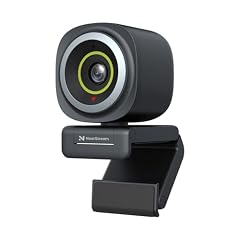
NearStream 4K Webcam for PC with AI Auto Framing and Noise-Canceling Mic
- Resolution
- 4K
- Built-in microphone
- Yes
- AI tracking
- Yes
$59.00 price as of 2026-10-01 05:38 UTC (Details)
The NearStream 4K webcam uses AI auto framing to keep you centered in the frame, and packs a noise-canceling microphone. It's designed for users who want a smart camera that adjusts the shot automatically without manual PTZ. This is a unique feature at its price level.
Pros
- AI auto framing keeps you in the picture
- Noise-canceling microphone
- 4K resolution
- Plug-and-play
Cons
- No stated privacy cover
- No optical zoom
- Limited manual controls (not specified)
Good fit if
- Users who move around while on video calls
- People who prefer a camera that automatically crops and follows them
Skip if
- You want a fixed, wide-angle shot of a group
- You need a PTZ motor for pan and tilt
Verdict: The NearStream is a smart choice if you want automatic framing without the complexity of a PTZ camera.
Side by side
How we picked
We started with a pool of 75 4K webcams with microphones and removed near-duplicates to arrive at 15 models that cover room systems, PTZ cameras, and desktop webcams. Each pick was evaluated on resolution, autofocus or tracking, microphone configuration, privacy features, and connectivity. All specifications come from the seller listings in the pool or from the makers' published pages, and every price on this page is the live listed price at the time it was read. We did not test any of these webcams, and we recommend checking the listings yourself for compatibility with your operating system and conferencing apps.
How to choose
Sensor size and low-light performance
A larger sensor generally captures more light, which improves image quality in dim environments. The Razer Kiyo Pro Ultra and Insta360 Link 2 Pro use sensors at 1/1.2-inch and 1/1.3-inch respectively, which are larger than the typical 1/2.5-inch or 1/2.7-inch sensors found in many budget webcams. If you often take calls in rooms with unpredictable lighting, a webcam with a larger sensor will likely produce a cleaner image. You can check the maker's product page for sensor specifications; if the listing omits it, treat that as a potential limitation.
Autofocus and image stabilization
Autofocus matters when you move closer to the screen to present a document or lean forward to point at something. Phase-detection autofocus (PDAF) is faster and more reliable than contrast-detection in most lighting. Several picks, including the Acer 4K and EMEET NOVA, specify PDAF. If you rarely move, a fixed-focus camera might suffice, but for most users autofocus is worth paying for.
Microphone configuration
Built-in microphones vary from a single omnidirectional mic to dual mics with noise cancellation, and even beamforming arrays in room systems. Dual mics are better for canceling background noise, which is why you see them on many desktop models. If you need high-quality audio for professional calls, consider using an external microphone anyway, but a built-in noise-canceling mic can be perfectly adequate for everyday use. For conference rooms, beamforming mics like those on the Logitech Rally Bar are designed to capture voices from across the room.
PTZ and AI tracking
Pan, tilt, and zoom (PTZ) webcams can move to follow you or adjust the scene. Some, like the Insta360 Link 2 Pro and MT-VIKI, use AI to automatically track a person's face and adjust framing. This is useful for presenters who pace or for dynamic streams. Room systems like the Logitech Rally Bar have motorized PTZ with presets. If you never move, a fixed camera is fine, but if you want the camera to follow you, PTZ with tracking is the solution.
Privacy and security
Many webcams include a physical privacy cover that slides over the lens, which is important if you're concerned about accidental activation. The Razer Kiyo Pro Ultra, Logitech MX Brio, and several other picks include one. Some webcams also go into a low-power sleep state when not in use. Check the listing for 'privacy cover' or 'shutter' if that's important to you. You can always use a sticky note, but a built-in shutter is cleaner.
Connectivity and compatibility
Most modern webcams connect over USB-A or USB-C and work with the USB Video Class (UVC) standard, so they work without installing special drivers on Windows and macOS. The Microsoft UVC driver overview explains that no proprietary driver is required. That means you can plug a compatible webcam into a computer and it will be recognized automatically. If you use a laptop with only USB-C ports, check that the webcam includes a USB-C cable or an adapter, as the Uyissykia model does.
Questions
Do all 4K webcams with a built-in microphone work on both Windows and Mac?
Most modern webcams use the USB Video Class (UVC) standard, which is supported natively by Windows and macOS, so you don't need to install a driver. The Microsoft USB Video Class driver overview confirms that no proprietary driver is required for UVC devices. Our picks, such as the EMEET NOVA and UGREEN, advertise plug-and-play compatibility. Always check the product listing for explicit Windows or Mac support, but UVC compatibility is a good sign.
Is 4K at 30 fps enough, or should I get a webcam that supports 4K60?
For most video calls, presentations, and even streaming, 4K30 is sufficient because video conferencing platforms often compress or scale down the input. However, if you record videos for YouTube or want slower-motion footage, a webcam that can output 1080p60 (like the NexiGo N660P Pro) will look smoother. No webcam in this list does 4K60; the Razer Kiyo Pro Ultra outputs 4K24 or 1080p60, and the MX Brio is likely limited to 4K30. If 4K60 is essential, you may need to look at dedicated mirrorless cameras.
Can I use a PTZ webcam like the Insta360 Link 2 Pro on a desktop for normal calls?
Yes, PTZ webcams work as standard UVC cameras and can be used for any video call. The tracking and PTZ features are controlled via the maker's software, but the video feed is a normal webcam stream. If you don't enable tracking, the camera remains still and acts like a fixed webcam. PTZ models are often heavier and larger, but they offer the flexibility to change framing without moving the camera.
How important is a privacy cover on a 4K webcam?
A privacy cover is a physical shutter that blocks the lens when you're not using the camera, preventing unwanted video capture. It's a nice security feature and appears on several of our picks, including the Razer Kiyo Pro Ultra, Logitech MX Brio, and Acer models. If you're frequently around others and concerned about a hacked webcam, a built-in shutter is more reliable than a software option. Some webcams also indicate when they're active with a light, but a shutter is the clearest indicator.
What does 'AI-powered' mean in a webcam listing?
'AI-powered' typically refers to features like auto framing, subject tracking, or digital low-light enhancement that use machine learning algorithms. For example, the Insta360 Link 2 Pro uses AI for tracking and auto zoom, while the NearStream uses AI auto framing. These features can improve your experience, but they depend on the maker's software. Check the product's official page or support documents to see which AI functions are included and how to enable them.
Recent updates
- : First published.