
Best Webcams Under $500 in 2026: 15 Picks Compared on Specs
For most people, the best webcam is the Razer Kiyo Pro Ultra, a 4K model with a built-in microphone and shutter and a stated 1/1.2-inch sensor from Razer. This guide compares 15 webcams in the same price category, using published specifications and the maker's own product information. No unit was used for this guide; every pick is a spec-based choice, and the live price on the listing refreshes with its own timestamp.
15 picks from 352 webcams that match this guide with a price we can quote today. Every price below is live and carries the moment it was read.
The picks at a glance
Which one should you buy?
- For streamers who want 4K60: If your channel needs a sharp 4K feed at 60 fps, the Elgato Facecam 4K is built around that specific combination and keeps image control in its companion software. See pick 4
- For presenters who move around: An AI-tracking PTZ webcam like the OBSBOT Tiny 2 follows you and keeps you framed, so you can stand and present without touching settings. See pick 2
- For distributed teams and meetings: If you spend the day in video calls, a certified room peripheral such as the Dell WB7022 is built around conferencing platforms and a Sony sensor. See pick 8
- For a simple work-from-home setup: The HP 320 FHD covers 1080p calls with a microphone and privacy cover without the complexity of PTZ or 4K. See pick 14
The 15 picks
1 Best overall

Razer Kiyo Pro Ultra 4K Webcam
- Resolution
- 4K
- Built-in microphone
- Yes
- Privacy cover
- Yes
$399.99 price as of 2026-10-01 05:39 UTC (Details)
The Razer Kiyo Pro Ultra is the most feature-dense pick in this list: 4K resolution, a built-in microphone and a shutter cover. Razer's product page describes a 1/1.2-inch Sony STARVIS 2 sensor and HDR support, which gives it an imaging argument that the 1080p and compact 4K picks here do not make. Compared with the Insta360 Link 2 Pro and OBSBOT Tiny 2, it gives up motorized PTZ and AI tracking but adds a larger stated sensor and built-in shutter.
Pros
- 4K resolution with a built-in microphone
- Stated privacy shutter for covering the lens
- Razer lists a 1/1.2-inch Sony STARVIS 2 sensor and HDR mode
- Razer lists uncompressed output modes up to 4K 24 fps or 1080p 60 fps
Cons
- No motorized PTZ or stated AI tracking
- Stated 4K capture is 30 fps, not 60 fps
- No stated optical zoom
Good fit if
- Creators who want a large-sensor webcam for solo streaming and recordings
- Users who want a built-in shutter and microphone
Skip if
- Streamers who need 4K at 60 fps, which the Elgato Facecam 4K covers
- Presenters who need auto-tracking PTZ movement
Verdict: The Razer Kiyo Pro Ultra is the strongest all-around webcam in this guide on stated specifications.
2 Best AI tracking

OBSBOT Tiny 2 Webcam 4K Voice Control PTZ
- Resolution
- 4K
- Frame rate
- 60 fps or more
- Autofocus
- Yes
- AI tracking
- Yes
$229.00 price as of 2026-10-01 05:38 UTC (Details)
OBSBOT Tiny 2 pairs 4K resolution with AI tracking, autofocus and 60 fps or more in the catalogue entry. Its product page adds voice control, gesture control and USB 3.0 transmission, making it the pick in this list with the most stated control methods around tracking.
Pros
- 4K resolution with stated 60 fps or more
- AI tracking, voice control and gesture control per OBSBOT
- All-pixel autofocus stated by OBSBOT
- USB 3.0 with uncompressed 1080p transmission stated by OBSBOT
Cons
- No built-in microphone stated in the catalogue entry
- 4K output is not stated at 60 fps; the 60 fps claim covers the camera overall
- PTZ control depends on OBSBOT software or its optional controller
Good fit if
- Streamers and presenters who move around and want the camera to follow them
- Users who want voice or gesture control during recordings
Skip if
- You need a built-in microphone for a single-cable setup
- You want the largest sensor in the price band instead of motorized tracking
Verdict: If you want a webcam that tracks you, the OBSBOT Tiny 2 is the reference pick in this guide.
3 Best PTZ for content creators

Insta360 Link 2 Pro
- Resolution
- 4K
- Built-in microphone
- Yes
- AI tracking
- Yes
$249.99 price as of 2026-10-01 05:34 UTC (Details)
The Insta360 Link 2 Pro combines a motorized PTZ mount with 4K resolution, AI tracking and a built-in microphone. Compared with the TONGVEO and DAIPU production cameras here, it is a desktop-size unit that connects over a USB cable and keeps the same subject-following behavior in a smaller body.
Pros
- 4K resolution with PTZ movement
- Stated AI tracking and built-in microphone
- Desktop form factor with a stated 1/1.3-inch sensor and HDR in the product name
- Stated directional noise-canceling in the product name
Cons
- No stated optical zoom range
- No stated privacy cover
- No NDI or SDI output for production switchers
Good fit if
- Creators who want 4K plus motorized framing on a desk
- Video calls where you sit near the camera and want AI framing
Skip if
- You need NDI or SDI outputs for a broadcast-style workflow
- You prefer manual zoom for product close-ups
Verdict: A balanced desktop PTZ webcam for creators who want 4K and AI framing without leaving the USB ecosystem.
4 Best 4K60 for streaming

Elgato Facecam 4K
- Resolution
- 4K
- Frame rate
- 60 fps or more
$169.99 price as of 2026-10-01 05:29 UTC (Details)
The Elgato Facecam 4K is one of only three picks in this list with both 4K resolution and a stated 60 fps or more. That combination matters for streamers who want a clean high-motion 4K signal, and it puts this webcam ahead of most other compact cameras in the guide for frame-rate-focused work.
Pros
- 4K resolution with stated 60 fps or more
- One of only three picks here with 4K and 60 fps or more
- Elgato's software platform is described as providing manual exposure and focus control
- Elgato describes on-board memory for saving image settings
Cons
- No stated built-in microphone
- No stated AI tracking or privacy cover
- Requires Elgato software for full manual control
Good fit if
- Streamers who want 4K at 60 fps for high-motion content
- Users who already use Elgato capture software
Skip if
- You want an all-in-one camera with a microphone
- You need AI tracking to follow you around the room
Verdict: For 4K at 60 fps in a webcam form factor, the Elgato Facecam 4K is the pick to beat in this guide.
5 Best for wireless microphone workflows
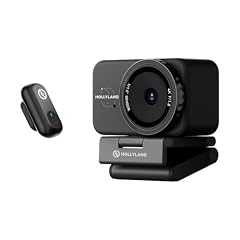
Hollyland Lyra 4K Webcam with 1/1.5" Sensor
- Resolution
- 4K
- Autofocus
- Yes
- Privacy cover
- Yes
- AI tracking
- Yes
$159.00 price as of 2026-10-01 05:32 UTC (Details)
The Hollyland Lyra is the pick in this list that pairs a 4K image with autofocus, AI tracking and a stated direct wireless microphone input. That makes it useful for interviewers and mobile presenters who need audio from a lavalier without carrying a separate audio interface.
Pros
- 4K resolution with stated PDAF autofocus
- Stated AI tracking and auto-framing
- Privacy cover included per catalogue entry
- Product name lists direct wireless microphone support
Cons
- No built-in microphone stated; the wireless input is not a built-in mic
- No stated frame rate above 30 fps
- No PTZ motors stated
Good fit if
- Content creators who want 4K plus wireless audio capture
- Users who want autofocus and AI tracking without a motorized PTZ base
Skip if
- You want built-in desktop microphones without extra audio gear
- You need NDI or SDI video output
Verdict: A 4K webcam with autofocus and wireless audio hookups that suits mobile creators who present from different spots.
6 Best NDI PTZ

TONGVEO 4K NDI PTZ Camera AI Auto-Tracking 20X Optical Zoom HDMI IP Live
- Resolution
- 4K
- AI tracking
- Yes
$459.00 price as of 2026-10-01 05:41 UTC (Details)
The TONGVEO 4K NDI PTZ adds NDI, HDMI, IP, SDI and USB 3.0 outputs to a motorized 20x optical zoom head with AI auto-tracking, which is more connection flexibility than any desktop webcam in this guide. Its 4K resolution and tracking make it a production-room tool rather than a desk accessory.
Pros
- 4K resolution with stated AI auto-tracking
- Multiple outputs stated in the product name: NDI, HDMI, IP, SDI, USB 3.0 and PoE
- 20x optical zoom stated in the product name
- Motorized PTZ head
Cons
- No built-in microphone stated
- No stated privacy cover
- Setup and network configuration are more involved than a USB webcam
Good fit if
- Churches, classrooms and events with existing NDI or SDI switching
- Users who need PoE power and long-distance video runs
Skip if
- You want a plug-and-play desktop webcam for video calls
- You need a compact camera that travels in a laptop bag
Verdict: For multi-output production and broadcast-style streaming, the TONGVEO NDI PTZ offers the widest connectivity in this guide.
7 Best 1080p PTZ with long zoom

DAIPU PTZ Camera 30X Optical Zoom 1080P60 HDMI USB3.0 SDI LAN PoE AI
- Resolution
- 1080p
- Frame rate
- 60 fps or more
- AI tracking
- Yes
$419.00 price as of 2026-10-01 05:27 UTC (Details)
The DAIPU PTZ camera is the one pick here built around a 30x optical zoom lens while keeping 1080p at 60 fps or more. That zoom reach far exceeds what the fixed-lens webcams can do, and the 1080p60 output is a practical format for live production without the bandwidth of 4K.
Pros
- 30x optical zoom, the longest stated zoom in this list
- 1080p at 60 fps or more
- AI auto-tracking stated in the product name
- HDMI, USB 3.0, SDI, LAN and PoE outputs stated in the product name
Cons
- 1080p resolution rather than 4K
- No built-in microphone stated
- Larger camera body and conference-room mounting profile
Good fit if
- Meeting rooms and houses of worship that need close-ups from across a room
- Productions that stay at 1080p and want smooth 60 fps pan and zoom
Skip if
- You want 4K output for future-proofing
- You need a small webcam for a single desk
Verdict: A 1080p60 PTZ with outstanding zoom reach for rooms where the camera sits far from the speaker.
8 Best for Microsoft Teams

Dell 4K UHD Webcam WB7022
- Resolution
- 4K
$104.99 price as of 2026-10-01 05:28 UTC (Details) Typical price: $118.64, 12% off
The Dell 4K UHD WB7022 is the pick here with an explicit Teams certification in its catalogue listing, along with 4K resolution and a Sony sensor. For organizations standardized on Teams rooms and conferencing, that certification is the type of checkable compatibility this list can lean on.
Pros
- 4K resolution with stated Sony sensor
- Teams certification stated in the product name
- Established PC maker with corporate support ecosystem
- Desk and room conferencing form factor from a major vendor
Cons
- No built-in microphone stated
- No stated AI tracking
- No stated privacy cover
Good fit if
- Teams-heavy organizations that want a certified camera
- Users who want a 4K webcam from a major PC vendor
Skip if
- You need a microphone built into the camera
- You want AI tracking for solo streaming
Verdict: A certified 4K room camera that is the safest Teams-centric pick in this guide by stated compatibility.
9 Best 4K60 with built-in microphone

NexiGo N660P Pro 4K Webcam with Distortion-Free Lens
- Resolution
- 4K
- Frame rate
- 60 fps or more
- Autofocus
- Yes
- Built-in microphone
- Yes
- Privacy cover
- Yes
$79.99 price as of 2026-10-01 05:38 UTC (Details)
The NexiGo N660P Pro brings together 4K resolution, 60 fps or more, autofocus, a microphone and a privacy cover in a desktop webcam. It is the only pick in this list that combines all five of those stated features, and it is one of only three picks with both 4K and 60 fps or more.
Pros
- 4K resolution with stated 60 fps or more
- Autofocus and built-in microphone
- Privacy cover stated in the catalogue entry
- Stated distortion-free lens and 3DNR in the product name
Cons
- No stated AI tracking
- No PTZ movement
- Brand is less established than Razer, Dell or Acer
Good fit if
- Streamers who want 4K60 without moving to a production PTZ
- Buyers who want autofocus and a microphone in one unit
Skip if
- You need AI tracking or motorized movement
- You prefer a camera from a large PC vendor
Verdict: The best-performing 4K60 desktop webcam in this guide by stated feature set.
10 Best 4K meeting webcam

Acer 4K Webcam for PC/Mac with All-Metal Unibody Sculpted
- Resolution
- 4K
- Autofocus
- Yes
- Built-in microphone
- Yes
- Privacy cover
- Yes
$69.99 price as of 2026-10-01 05:23 UTC (Details)
Acer's 4K webcam covers the meeting-focused essentials in one unit: 4K resolution, PDAF autofocus, two noise-reduction microphones and a privacy cover. It does this with the all-metal unibody design called out in the product name, and from an established PC maker that most IT teams already recognize.
Pros
- 4K resolution with stated PDAF autofocus
- Two noise-reduction microphones stated in the product name
- Privacy cover included
- Sony 1/2-inch sensor and all-metal unibody stated in the product name
Cons
- No stated 60 fps at 4K
- No stated AI tracking
- No PTZ movement
Good fit if
- Office and home-meeting users who want 4K plus privacy
- IT buyers who want a recognizable vendor for fleets
Skip if
- You need 4K60 for game streaming
- You need AI auto-framing
Verdict: A clean 4K meeting camera from an established maker with the mic, focus and privacy features most calls use.
11 Best 2K low-light webcam

Anker PowerConf C200 2K Webcam for PC/Laptop/Mac
- Resolution
- 2K (1440p)
$69.99 price as of 2026-10-01 05:24 UTC (Details)
The Anker PowerConf C200 sits at 2K (1440p) rather than 4K, a middle ground that keeps detail above 1080p. The product name lists low-light correction, which makes it a reasonable pick for desks without strong lighting, and Anker is an established maker in meeting-room peripherals.
Pros
- 2K (1440p) resolution, above 1080p
- Stated low-light correction in the product name
- Established power and meeting-accessory brand
- Compact desktop form factor
Cons
- No built-in microphone stated
- No stated AI tracking or privacy cover
- Resolution below 4K
Good fit if
- Users in dim offices who want more detail than 1080p
- Anker ecosystem owners who already use its conference gear
Skip if
- You need 4K output
- You want a built-in mic and privacy shutter in one unit
Verdict: A sensible 2K webcam for low-light desks that does not need the full 4K pipeline.
12 Best 1080p for hybrid work

AVerMedia Live Streamer Cam 313
- Resolution
- 1080p
- Built-in microphone
- Yes
- Privacy cover
- Yes
$57.19 price as of 2026-10-01 05:26 UTC (Details)
The AVerMedia Live Streamer CAM 313 is a no-surprise 1080p webcam with a microphone and privacy shutter from an established video-capture maker. It lacks the 4K and tracking found higher in this list, but for regular calls and light streaming the stated features cover the basics without extra setup.
Pros
- 1080p resolution with stated built-in microphone
- Privacy shutter stated in the catalogue entry
- Established video capture brand
- Stated 360-degree swivel in the product name
Cons
- No 4K or 2K resolution
- No stated autofocus or AI tracking
- Stated resolution is 1080p at standard 30 fps, not 60 fps
Good fit if
- Daily video calls and interviews where ease of use matters
- Users who want a physical privacy shutter
Skip if
- You need 4K or a high frame rate
- You want AI auto-framing
Verdict: A practical 1080p workhorse for hybrid work, with the mic and shutter most callers need.
13 Best 1080p with noise-canceling mics

Lenovo FHD Webcam
- Resolution
- 1080p
- Frame rate
- 30 fps
- Built-in microphone
- Yes
- Privacy cover
- Yes
$45.99 price as of 2026-10-01 05:35 UTC (Details)
The Lenovo FHD Webcam is one of the few 1080p picks here with dual noise-cancelling microphones and a privacy cover from a major PC maker. The product name also lists AI noise cancellation for the microphones, which is the kind of stated audio processing that separates it from simpler 1080p models.
Pros
- 1080p resolution at stated 30 fps
- Dual noise-cancelling microphones
- Privacy cover included
- Stated AI noise cancellation in the product name
Cons
- No 60 fps mode stated
- No 4K or 2K resolution
- No stated autofocus or tracking
Good fit if
- Work-from-home users who want clear voice pickup
- Lenovo laptop owners who want a matching accessory
Skip if
- You need higher-than-1080p resolution
- You need autofocus for reading documents or showing objects
Verdict: A focused 1080p webcam for calls where good voice pickup and a privacy shutter matter most.
14 Best simple 1080p webcam

HP 320 FHD Webcam
- Resolution
- 1080p
- Built-in microphone
- Yes
- Privacy cover
- Yes
$28.99 price as of 2026-10-01 05:33 UTC (Details)
The HP 320 FHD covers the essential webcam list with 1080p resolution, a built-in microphone and a privacy cover. It is the easiest sell in this guide for a standard home-office call setup, and HP is an established maker with broad device compatibility.
Pros
- 1080p resolution with built-in microphone
- Privacy cover stated in the product name
- USB-A connection for desktop and Chromebook setups
- Established PC maker
Cons
- No stated autofocus
- No 60 fps mode stated
- No 2K or 4K resolution
Good fit if
- Simple work-from-home calls on desktop or laptop
- Chromebook and basic office setups that need USB-A
Skip if
- You want 4K or a high frame rate
- You need autofocus for close-up document work
Verdict: The no-frills 1080p pick for anyone who wants a known brand, a mic, a shutter and nothing else to manage.
15 Best bundle with external microphone

Logitech C922x Pro Webcam + Blue Yeti Nano
- Resolution
- 1080p
- Frame rate
- 30 fps
$219.98 price as of 2026-10-01 05:36 UTC (Details)
This is the only pick in the guide that is a bundle: the Logitech C922x Pro webcam plus a Blue Yeti Nano microphone. The webcam supplies 1080p at 30 fps and 720p at 60 fps, while the separate microphone gives streamers and podcasters an audio path that most built-in mics cannot match on paper.
Pros
- Includes both webcam and separate desktop microphone
- 1080p at 30 fps and 720p at 60 fps stated in the catalogue
- Established gaming and streamer accessory brands
- Microphone is a physical separate device for better placement
Cons
- Resolution sits at 1080p, not 4K
- Bundle takes more desk space and cable management
- No stated AI tracking or autofocus
Good fit if
- New streamers who want a webcam plus a real microphone in one order
- Podcasters who need 720p60 for a secondary camera angle
Skip if
- You want 4K resolution
- You prefer a single-cable webcam with no extra audio setup
Verdict: A ready-to-stream starter kit that pairs a known 1080p webcam with a proper desktop microphone.
Side by side
| # | Webcam | Resolution | Frame rate | Autofocus | Built-in microphone | Privacy cover | AI tracking |
|---|---|---|---|---|---|---|---|
| 1 | Razer Kiyo Pro Ultra 4K Webcam | 4K | not stated | not stated | Yes | Yes | not stated |
| 2 | OBSBOT Tiny 2 Webcam 4K Voice Control PTZ | 4K | 60 fps or more | Yes | not stated | not stated | Yes |
| 3 | Insta360 Link 2 Pro | 4K | not stated | not stated | Yes | not stated | Yes |
| 4 | Elgato Facecam 4K | 4K | 60 fps or more | not stated | not stated | not stated | not stated |
| 5 | Hollyland Lyra 4K Webcam with 1/1.5" Sensor | 4K | not stated | Yes | not stated | Yes | Yes |
| 6 | TONGVEO 4K NDI PTZ Camera AI Auto-Tracking 20X Optical Zoom HDMI IP Live | 4K | not stated | not stated | not stated | not stated | Yes |
| 7 | DAIPU PTZ Camera 30X Optical Zoom 1080P60 HDMI USB3.0 SDI LAN PoE AI | 1080p | 60 fps or more | not stated | not stated | not stated | Yes |
| 8 | Dell 4K UHD Webcam WB7022 | 4K | not stated | not stated | not stated | not stated | not stated |
| 9 | NexiGo N660P Pro 4K Webcam with Distortion-Free Lens | 4K | 60 fps or more | Yes | Yes | Yes | not stated |
| 10 | Acer 4K Webcam for PC/Mac with All-Metal Unibody Sculpted | 4K | not stated | Yes | Yes | Yes | not stated |
| 11 | Anker PowerConf C200 2K Webcam for PC/Laptop/Mac | 2K (1440p) | not stated | not stated | not stated | not stated | not stated |
| 12 | AVerMedia Live Streamer Cam 313 | 1080p | not stated | not stated | Yes | Yes | not stated |
| 13 | Lenovo FHD Webcam | 1080p | 30 fps | not stated | Yes | Yes | not stated |
| 14 | HP 320 FHD Webcam | 1080p | not stated | not stated | Yes | Yes | not stated |
| 15 | Logitech C922x Pro Webcam + Blue Yeti Nano | 1080p | 30 fps | not stated | not stated | not stated | not stated |
How we picked
The price-filtered pool contains 60 webcams; the guide covers 15 of them across the main patterns: studio streaming, AI tracking, PTZ production, conferencing and simple 1080p calls. Selection favored established makers with complete catalogue entries, removed near-duplicate models, and checked stated features against maker product pages or the listing text. Prices shown are live and read from the store listing, with a timestamp on each one. No unit was used for this guide; every pick rests on stated specifications and maker-published information.
How to choose
Resolution: 4K vs 2K vs 1080p
Resolution is the first specification to settle. Nine of the 15 picks in this guide capture 4K, one is 2K (1440p), and five are 1080p. 4K gives you detail and cropping headroom for streaming or recording, but many video apps downscale to 1080p. If your workflow is calls and office documents, 1080p is often enough and easier on bandwidth. Pay attention to the actual output format your software uses, not just the sensor spec.
AI tracking and PTZ: what to expect
Five of the 15 picks state AI tracking in their catalogue entry: the OBSBOT Tiny 2, Insta360 Link 2 Pro, Hollyland Lyra, TONGVEO NDI PTZ and DAIPU PTZ. Some are desktop units that turn on a motorized base to follow you; others are production cameras that combine tracking with pan-tilt-zoom. If you present while standing or move around a room, tracking matters. If you sit still at a desk, a fixed webcam with good autofocus is simpler to set up.
Built-in microphones and separate audio
Seven of the 15 picks state a built-in microphone: the Razer, Insta360, NexiGo, Acer, AVerMedia, Lenovo and HP models. A built-in mic keeps the setup to one cable, but audio quality and pickup pattern are not stated in the catalogue, so treat the microphone as a convenience, not a known quantity. If you record voice regularly, plan for a separate microphone or an audio interface; the Logitech bundle in this guide is the only pick that includes one.
Connections: USB, PoE and video outputs
Most desktop webcams connect over USB and follow the USB Video Class standard, which means they work with the system-supplied Windows driver without extra installation. PTZ production cameras in this guide add other paths: PoE for power over a network cable, HDMI or SDI for video out, and NDI for IP-based video. Choose the connection type that matches your room and switcher. If you use a Mac with an iPhone, Apple also describes using the iPhone as a webcam when you need a quick camera option.
Privacy covers and physical shutters
Seven of the 15 picks state a privacy cover or shutter: the Razer, Hollyland, NexiGo, Acer, AVerMedia, Lenovo and HP models. If the camera sits on a monitor in a shared space, a physical shutter is the most direct way to block the lens. The picks that list one make it easy to find in the catalogue entry, without relying on unstated software controls.
Frame rate: why 60 fps matters
Four of the 15 picks state 60 fps or more: the OBSBOT Tiny 2, Elgato Facecam 4K, NexiGo N660P Pro and DAIPU PTZ. A 60 fps webcam produces smoother motion for game streaming, live presentations and fast head movement. Many conference apps cap video at 30 fps, so check the app's settings before choosing a high frame rate. Three of those four 60 fps picks also capture 4K.
Questions
Does a 4K webcam look better if my video app only shows 1080p?
Usually the app sets the output resolution, so a 4K feed is often downscaled to 1080p for calls. You still gain cropping headroom and a more detailed original recording if you save the file separately. Nine of the 15 picks in this guide are 4K, but for routine meetings a 1080p camera with a good microphone and mounting may serve you just as well.
What does USB Video Class mean and will I need drivers?
USB Video Class (UVC) is the standard way webcams communicate over USB. Windows includes a system-supplied UVC driver, so a UVC webcam can work without installing a separate driver from the maker. Microsoft documentation describes this as plug-and-play support for UVC 1.0, 1.1 and 1.5 devices. If a camera is not UVC-compliant, the seller usually includes its own driver instructions.
How do I let an app use the webcam in Windows?
Windows controls camera access through privacy settings. Go to Settings, Privacy and security, then Camera and turn on Camera access, app access and desktop app access. Desktop apps, including browsers and meeting clients, need the desktop apps setting turned on. If a webcam does not appear in an app, check those permissions first before assuming the camera is faulty.
Can I use my phone as a webcam instead of buying one?
Yes, if you are on a Mac, Apple documents using your iPhone as a webcam in Continuity Camera. Android and Windows tools also exist, but their feature set varies by model. A dedicated webcam still makes sense when you want 4K output, AI tracking, a physical shutter or a built-in microphone every day, because those features are usually not guaranteed by phone apps.
What is the difference between NDI and PTZ on a webcam?
PTZ stands for pan, tilt and zoom, so a PTZ camera has motors that move the lens head. NDI is a network protocol for sending video over IP, useful when a camera is far from a computer or switcher. In this guide, the TONGVEO and DAIPU PTZ picks combine both: motorized movement and network-ready output for production rooms.
Recent updates
- : First published.