
Best 60 FPS Webcams in 2026: 15 Picks Compared
The best 60 fps or more webcams deliver fluid, professional-looking video for streaming, video calls, and content creation. In this guide, we compare 15 models from a pool of 30 webcams that support frame rates of 60 fps or more, chosen for their specifications and manufacturer disclosures. Our top pick is the Elgato Facecam 4K for its native 4K60 output, wide-angle lens, and deep software control, making it the most versatile choice for streamers and professionals alike.
15 picks from 41 webcams that match this guide with a price we can quote today. Every price below is live and carries the moment it was read.
The picks at a glance
Which one should you buy?
- For esports streamers: A 60 fps webcam keeps your stream smooth and reduces motion blur. The Elgato Facecam 4K offers native 4K60 with adjustable settings, ideal for high-action content. See pick 1
- For video conferences: If you need plug-and-play simplicity with built-in mics and privacy covers, the NexiGo N660P Pro combines 1080p60 with autofocus and a distortion-free lens. See pick 4
- For AI tracking on a budget: The OBSBOT Tiny SE provides AI pan-tilt tracking and 1080p60, offering a taste of premium tracking without the price tag of its 4K sibling. See pick 3
The 15 picks
1 Best overall

Elgato Facecam 4K
- Resolution
- 4K
- Frame rate
- 60 fps or more
$169.99 price as of 2026-10-01 05:29 UTC (Details)
The Elgato Facecam 4K stands out for its native 4K60 capability, a 1/1.8-inch Sony STARVIS sensor, and a wide f/2.0 lens. It offers DSLR-like control through the Camera Hub software, making it the most capable consumer webcam in this list.
Pros
- Native 4K60 video output
- Large 1/1.8-inch sensor for low light
- Manual exposure and focus controls via software
- Built-in heat sink for sustained performance
Cons
- No built-in microphone
- Requires USB 3.0 for full bandwidth
- Higher price compared to 1080p models
Good fit if
- Streamers who want 4K60 quality
- Professionals needing manual camera settings
Skip if
- You need a built-in microphone
- You only need 1080p webcam for basic calls
Verdict: The Elgato Facecam 4K is the best all-around 60 fps webcam for those who demand high detail and control.
2 Best AI tracking

OBSBOT Tiny 2 Webcam 4K Voice Control PTZ
- Resolution
- 4K
- Frame rate
- 60 fps or more
- Autofocus
- Yes
- AI tracking
- Yes
$229.00 price as of 2026-10-01 05:38 UTC (Details)
The OBSBOT Tiny 2 brings a 1/1.5-inch CMOS sensor, 4K video at 60 fps (via sensor crop, but still supports 60fps in 1080p), and AI-powered auto tracking, zoom, and gesture control. It is the only webcam with voice commands and dual native ISO.
Pros
- AI tracking with auto zoom
- Voice and gesture control
- Large 1/1.5-inch sensor
- USB 3.0 for uncompressed 1080p
Cons
- Costs more than basic webcams
- No built-in microphone (needs external audio)
- Software setup required for full features
Good fit if
- Solo streamers who move around
- Presenters needing automatic framing
Skip if
- You want a simple plug-and-play webcam
- You have a strict budget
Verdict: For AI-driven tracking and premium image quality, the OBSBOT Tiny 2 is unmatched.
3 Best budget AI tracking

OBSBOT Tiny SE 1080P 100FPS Webcam for PC
- Resolution
- 1080p
- Frame rate
- 60 fps or more
- AI tracking
- Yes
$89.00 price as of 2026-10-01 05:38 UTC (Details)
The OBSBOT Tiny SE delivers 1080p60 (and even 100 fps in a lower resolution) with the same AI tracking and pan-tilt mechanics as its bigger sibling, but at a fraction of the price. It relies on a smaller sensor but still offers smooth motion.
Pros
- Affordable AI tracking
- 1080p at 60 fps
- Gesture control and auto framing
- Compact design
Cons
- Only 1080p resolution
- No 4K output
- Built-in microphone is basic
Good fit if
- Budget-conscious streamers
- Users who want tracking without 4K
Skip if
- You need 4K video
- You prefer a traditional fixed webcam
Verdict: The Tiny SE offers the most value for those who prioritize AI tracking over resolution.
4 Best for video calls

NexiGo N660P Pro 4K Webcam with Distortion-Free Lens
- Resolution
- 4K
- Frame rate
- 60 fps or more
- Autofocus
- Yes
- Built-in microphone
- Yes
- Privacy cover
- Yes
$79.99 price as of 2026-10-01 05:38 UTC (Details)
The NexiGo N660P Pro is a 4K webcam with a distortion-free lens, but its key strength is 1080p60 output with autofocus and a built-in microphone. It includes a privacy cover and works with popular video conferencing apps without extra drivers.
Pros
- Autofocus with 1080p60 output
- Built-in microphone
- Privacy cover included
- Plug-and-play USB connection
Cons
- 4K limited to 30 fps, not 60
- Microphone quality may be adequate but not exceptional
- No AI tracking
Good fit if
- Remote workers and students
- Users who need a reliable 60 fps option for meetings
Skip if
- You need 4K60 recording
- You want manual exposure controls
Verdict: The N660P Pro is a dependable, feature-rich webcam for everyday video communication.
5 Best 1440p60 compact

Razer Kiyo V2 X Webcam for Streaming and Meetings
- Resolution
- 2K (1440p)
- Frame rate
- 60 fps or more
$74.99 price as of 2026-10-01 05:39 UTC (Details)
The Razer Kiyo V2 X offers 1440p60 (QHD) output, a high-quality lens, and a lightweight design. It is a solid upgrade over 1080p webcams without jumping to 4K.
Pros
- 1440p at 60 fps
- Compact and portable
- Wide 82-degree field of view
- No driver needed for basic use
Cons
- No built-in microphone
- No AI tracking
- Requires Razer Synapse for advanced settings
Good fit if
- Content creators who want sharper than 1080p
- Users with a capable streaming setup
Skip if
- You need a microphone built in
- You have a 4K monitor and want native 4K output
Verdict: If you're satisfied with 1440p, the Kiyo V2 X is a compact and capable choice.
6 Budget 4K pick

AOC 4K Webcam for PC with PDAF
- Resolution
- 4K
- Frame rate
- 60 fps or more
- Autofocus
- Yes
$35.99 price as of 2026-10-01 05:24 UTC (Details)
The AOC 4K webcam offers 4K at 30 fps and 1080p at 60 fps, with a Sony sensor and PDAF autofocus. It's an affordable entry into 4K for streaming and online meetings.
Pros
- 4K resolution (30 fps) and 1080p60
- Autofocus with PDAF
- Sony sensor for better low light
- Compact design
Cons
- Plastic build may feel less premium
- No built-in microphone
- No privacy cover included
Good fit if
- Budget-conscious users wanting 4K flexibility
- Streamers who can rely on external mics
Skip if
- You need a microphone or privacy cover
- You want 4K60 output
Verdict: The AOC 4K is a strong budget option for those who want 4K for occasional use.
7 Best with microphone and privacy

N newline 4K Webcam for PC with PDAF Autofocus
- Resolution
- 4K
- Frame rate
- 60 fps or more
- Autofocus
- Yes
- Built-in microphone
- Yes
- Privacy cover
- Yes
$33.99 price as of 2026-10-01 05:38 UTC (Details)
The N newline 4K webcam combines 4K@30 and 1080p@60 with dual microphones, a privacy cover, and PDAF autofocus. It covers all essentials for remote work.
Pros
- Dual microphones
- Privacy cover included
- Autofocus with PDAF
- 4K@30 and 1080P@60 support
Cons
- 4K not at 60 fps
- Field of view is not specified
- Software may be limited
Good fit if
- Telecommuters who want a complete package
- Users who prioritize privacy
Skip if
- You need 4K60 output
- You already have a dedicated microphone
Verdict: The N newline is a practical all-in-one webcam for video calls and content creation.
8 Best compact 1080p60

OIEXEN 4K Ultra HD Webcam with Sony1/2.8" Sensor
- Resolution
- 4K
- Frame rate
- 60 fps or more
- Autofocus
- Yes
$33.83 price as of 2026-10-01 05:38 UTC (Details) Typical price: $39.99, 15% off
The OIEXEN webcam offers 1080p at 60 fps with PDAF autofocus and a Sony sensor, all in a tiny package. It's perfect for users who want smooth video without 4K bulk.
Pros
- 1080p60 for smooth motion
- PDAF autofocus
- Sony sensor for good color
- Very compact and portable
Cons
- No built-in microphone
- No privacy cover
- Limited field of view options
Good fit if
- Travelers and minimalists
- Streamers who already have a mic
Skip if
- You need a microphone or privacy cover
- You want 4K resolution
Verdict: The OIEXEN is a small, capable webcam that excels at 1080p60.
9 Best with ring light

NBPOWER 1080P 60FPS Streaming Camera Webcam
- Resolution
- 1080p
- Frame rate
- 60 fps or more
- Autofocus
- Yes
- Built-in microphone
- Yes
$29.99 price as of 2026-10-01 05:38 UTC (Details)
The NBPOWER webcam includes a built-in fill light (RGB) and a microphone, making it a ready-for-streaming package. It outputs 1080p at 60 fps with autofocus.
Pros
- Built-in RGB ring light
- 1080p60 with autofocus
- Internal microphone
- Works with laptops and desktops
Cons
- Slightly bulky design due to light
- Light may cause glare on glasses
- Image quality depends on lighting
Good fit if
- Streamers who want an all-in-one lighting solution
- Users in poorly lit rooms
Skip if
- You have a professional lighting setup
- You need higher than 1080p
Verdict: A budget-friendly webcam with built-in lighting for beginners.
10 Best budget 1080p60
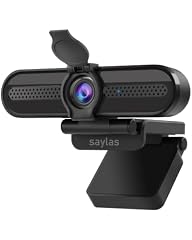
saylas 4K Webcam with Microphone
- Frame rate
- 60 fps or more
- Autofocus
- Yes
- Built-in microphone
- Yes
- Privacy cover
- Yes
$19.99 price as of 2026-10-01 05:40 UTC (Details)
The saylas webcam offers 1080p60, a built-in microphone, and a privacy cover at a very aggressive price. It includes a wide 78° FOV and autofocus.
Pros
- 1080p60 output
- Built-in microphone
- Privacy cover
- Autofocus
Cons
- Only 4K mode is 30fps
- Plastic build likely
- No software included
Good fit if
- Users on a tight budget
- Students attending online classes
Skip if
- You need manual exposure controls
- You want a higher frame rate than 60
Verdict: A solid budget option for smooth 1080p video.
11 Best HDR 1080p60

XFGsertXD 4K Webcam HDR 1080P@60FPS Noise Canceling Mic
- Resolution
- 4K
- Frame rate
- 60 fps or more
- Built-in microphone
- Yes
- AI tracking
- Yes
$102.27 price as of 2026-10-01 05:43 UTC (Details)
The XFGsertXD webcam supports 1080p at 60 fps with HDR, noise-canceling mic, and adjustable FOV. It also includes AI framing for an improved conference experience.
Pros
- HDR for better contrast
- 1080p60 output
- Adjustable field of view (45°-95°)
- Built-in noise-canceling microphone
Cons
- Brand less known
- 4K mode not 60fps
- No privacy cover mentioned
Good fit if
- Streamers who want HDR
- Users who need flexible FOV
Skip if
- You want a recognized brand
- You require 4K60
Verdict: A feature-packed webcam with HDR and flexible framing at a moderate price.
12 Best compact 4K with mic

XFGsertXD 4K Webcam Streaming Web Camera 1080P 60FPS Autofocus USB
- Resolution
- 4K
- Frame rate
- 60 fps or more
- Autofocus
- Yes
- Built-in microphone
- Yes
$88.21 price as of 2026-10-01 05:43 UTC (Details)
The XFGsertXD 4K webcam offers 1080p60, autofocus, and dual microphones in a small form factor. It also supports 4K at 30 fps for occasional high-res capture.
Pros
- 1080p60 for smooth streaming
- Dual microphones
- Autofocus
- Compact size
Cons
- 4K only at 30 fps
- No privacy cover
- Field of view not adjustable
Good fit if
- Users who want a simple 1080p60 webcam with mic
- Those who occasionally want 4K still images
Skip if
- You need 360 pan or tilt
- You want a wide FOV
Verdict: A straightforward and affordable 60 fps webcam with integrated audio.
13 Best autofocus budget
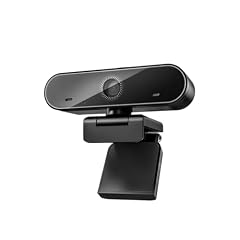
XFGsertXD 60FPS 1080P Live Streaming & Conference Webcam Dual
- Resolution
- 1080p
- Frame rate
- 60 fps or more
- Autofocus
- Yes
- Built-in microphone
- Yes
- Privacy cover
- Yes
$60.33 price as of 2026-10-01 05:43 UTC (Details)
The XFGsertXD 60FPS 1080p webcam includes autofocus, HDR, dual noise-canceling mics, and a privacy cover, all at a low price point. It's a great value for streamers on a budget.
Pros
- 1080p60 with autofocus
- Dual noise-canceling microphones
- HDR support
- Privacy cover included
Cons
- Brand reliability unknown
- No 4K output
- Field of view not stated
Good fit if
- Budget-conscious streamers
- Users who want a complete package for calls
Skip if
- You need high-resolution 4K
- You prefer a well-known brand
Verdict: This webcam packs essential features for an accessible price.
14 Best H.264 encoder

XFGsertXD 60FPS Business Conference Webcam
- Frame rate
- 60 fps or more
- Autofocus
- Yes
- Built-in microphone
- Yes
- Privacy cover
- Yes
$56.68 price as of 2026-10-01 05:43 UTC (Details)
The XFGsertXD 60FPS Business Conference webcam features H.264 encoding, autofocus, HDR, and dual noise-canceling mics, making it efficient for streaming software that supports H.264.
Pros
- H.264 encoding reduces CPU load
- 1080p60 with autofocus
- Dual microphones
- Privacy cover included
Cons
- No 4K sensor
- Product name may change
- Software may be minimal
Good fit if
- Users with older PCs that need efficient encoding
- Business users who want a professional look
Skip if
- You want 4K resolution
- You need 120 fps (not available)
Verdict: An efficient webcam for business and streaming use with H.264 support.
15 Best 2K with privacy

XFGsertXD V11 2K Webcam for PC
- Resolution
- 2K (1440p)
- Frame rate
- 60 fps or more
- Built-in microphone
- Yes
- Privacy cover
- Yes
$49.51 price as of 2026-10-01 05:43 UTC (Details)
The XFGsertXD V11 offers 2K (1440p) resolution and 1080p60, with a built-in microphone and privacy cover. It provides a middle ground between 1080p and 4K.
Pros
- 2K resolution (1440p) with 60 fps
- Built-in microphone
- Privacy cover
- 90° wide FOV
Cons
- No autofocus (fixed focus likely)
- No AI features
- Brand not widely recognized
Good fit if
- Users who want sharper than 1080p but don't need 4K
- Those who value a privacy cover
Skip if
- You need autofocus
- You want a well-known brand
Verdict: A cost-effective way to get 1440p60 with a privacy cover.
Side by side
| # | Webcam | Resolution | Frame rate | Autofocus | Built-in microphone | Privacy cover | AI tracking |
|---|---|---|---|---|---|---|---|
| 1 | Elgato Facecam 4K | 4K | 60 fps or more | not stated | not stated | not stated | not stated |
| 2 | OBSBOT Tiny 2 Webcam 4K Voice Control PTZ | 4K | 60 fps or more | Yes | not stated | not stated | Yes |
| 3 | OBSBOT Tiny SE 1080P 100FPS Webcam for PC | 1080p | 60 fps or more | not stated | not stated | not stated | Yes |
| 4 | NexiGo N660P Pro 4K Webcam with Distortion-Free Lens | 4K | 60 fps or more | Yes | Yes | Yes | not stated |
| 5 | Razer Kiyo V2 X Webcam for Streaming and Meetings | 2K (1440p) | 60 fps or more | not stated | not stated | not stated | not stated |
| 6 | AOC 4K Webcam for PC with PDAF | 4K | 60 fps or more | Yes | not stated | not stated | not stated |
| 7 | N newline 4K Webcam for PC with PDAF Autofocus | 4K | 60 fps or more | Yes | Yes | Yes | not stated |
| 8 | OIEXEN 4K Ultra HD Webcam with Sony1/2.8" Sensor | 4K | 60 fps or more | Yes | not stated | not stated | not stated |
| 9 | NBPOWER 1080P 60FPS Streaming Camera Webcam | 1080p | 60 fps or more | Yes | Yes | not stated | not stated |
| 10 | saylas 4K Webcam with Microphone | not stated | 60 fps or more | Yes | Yes | Yes | not stated |
| 11 | XFGsertXD 4K Webcam HDR 1080P@60FPS Noise Canceling Mic | 4K | 60 fps or more | not stated | Yes | not stated | Yes |
| 12 | XFGsertXD 4K Webcam Streaming Web Camera 1080P 60FPS Autofocus USB | 4K | 60 fps or more | Yes | Yes | not stated | not stated |
| 13 | XFGsertXD 60FPS 1080P Live Streaming & Conference Webcam Dual | 1080p | 60 fps or more | Yes | Yes | Yes | not stated |
| 14 | XFGsertXD 60FPS Business Conference Webcam | not stated | 60 fps or more | Yes | Yes | Yes | not stated |
| 15 | XFGsertXD V11 2K Webcam for PC | 2K (1440p) | 60 fps or more | not stated | Yes | Yes | not stated |
How we picked
We started with a pool of 30 webcams that list a maximum frame rate of 60 fps or higher in their specifications. From that pool, we selected 15 models representing a range of use cases and price tiers, favoring products from established brands and those with clearly stated specs. We excluded near-duplicate listings and focused on models with distinct features such as AI tracking, autofocus, or built-in microphones. Prices shown on the page are live from the store listings and updated in real time. We did not test these webcams; our selections are based on published specifications and manufacturer information.
How to choose
Choose your resolution: 1080p, 1440p, or 4K
Most webcams that support 60 fps do so at 1080p, which is sufficient for streaming and video calls. If you have a 1440p or 4K monitor and want to take full advantage of your display, consider a webcam that outputs at that resolution, like the Razer Kiyo V2 X (1440p) or the Elgato Facecam 4K (4K60). Note that 4K60 requires a USB 3.0 connection and more bandwidth, so ensure your computer meets that standard.
Look for autofocus and field of view
Autofocus is vital if you move closer or farther from the camera. Most modern webcams include fixed focus or PDAF, but check the specifications. Field of view (FOV) determines how much of your surroundings is captured. A narrow FOV (like 45 degrees) is good for solo streaming, while a wider FOV (90 degrees) suits group meetings. Some models like the XFGsertXD offer adjustable FOV.
Consider AI features like tracking and gestures
If you present while moving or want to avoid touching the camera, choose a webcam with AI tracking or gesture control. The OBSBOT Tiny 2 and Tiny SE are prime examples. These features use pan-tilt mechanics to keep you in frame. They are especially useful for streamers who stand up or walk around.
Check for microphones and privacy covers
Built-in microphones are convenient, but they often capture room noise and may not match the quality of a dedicated USB mic. If you already own a microphone, you can save money by choosing a webcam without one. Privacy covers are essential for security; most webcams in this list include one, but verify before purchase.
USB version and encoding
Webcams that output 4K60 or uncompressed 1080p need USB 3.0 or higher to avoid lag. Some webcams use H.264 encoding to reduce the bandwidth requirement, as seen in the XFGsertXD business model. Check your computer's ports and ensure the webcam is compatible with USB 3.0 for best performance.
Software support and compatibility
Many webcams rely on proprietary software for advanced settings like exposure, zoom, and white balance. The Elgato Camera Hub and Razer Synapse are examples. If you need manual controls, ensure the software is available for your operating system. Some webcams are plug-and-play and work with standard UVC drivers, which Microsoft supports for USB Video Class devices.
Questions
What does 60 fps mean for a webcam?
60 fps (frames per second) means the webcam captures 60 distinct frames each second. This results in smoother video, especially for fast-moving scenes like gaming or when you move your head. Most webcams default to 30 fps; 60 fps is often required for high-action streaming and professional video calls.
Do all 60 fps webcams work with Windows, macOS, and Linux?
Most webcams use the USB Video Class (UVC) driver, which is supported natively by Windows, macOS, and Linux. This means no additional drivers are needed for basic functionality. However, advanced features like noise reduction or AI tracking may require proprietary software, which may not be available for all operating systems.
Can I use a 4K60 webcam for video conferencing?
Yes, but video conferencing apps like Zoom or Teams typically limit streaming to 1080p or even 720p to reduce bandwidth. A 4K60 webcam will provide a high-quality image that is downscaled, resulting in a sharper 1080p feed. However, you'll need a good internet connection for stable video calls.
Are webcams that support 60 fps more expensive?
There are budget webcams that offer 1080p60, like the saylas or NBPOWER, so 60 fps does not automatically mean high cost. However, 4K60 webcams are generally more expensive due to the larger sensor and processing power required. Prices vary widely, so check the current live price on the product page.
How can I check if my computer can handle a 60 fps webcam?
Ensure your computer has a USB 3.0 or higher port for best performance, especially for 4K60. For 1080p60, USB 2.0 may suffice but could introduce latency. Also, modern CPUs and GPUs handle video encoding. If you use software like OBS Studio, check your system's CPU and GPU usage during streaming.
Recent updates
- : First published.