
Best Webcams for Streaming in 2026: 12 Picks Compared on Specs
The OBSBOT Tiny 2 is our top pick for streaming, chosen for its combination of 4K resolution, a frame rate of 60 fps or more, AI-powered auto tracking, and voice control, the most complete feature set among the picks. We selected 12 webcams from a pool of 19 based on stated specifications such as resolution, frame rate, autofocus, and microphone presence. Prices are live from the catalog, and no unit was tested.
12 picks from 19 webcams that match this guide with a price we can quote today. Every price below is live and carries the moment it was read.
The picks at a glance
Which one should you buy?
- For streamers who move around: If you tend to stand, pace, or lean in and out of frame, a webcam with AI tracking and PTZ keeps you centered automatically. The OBSBOT Tiny 2 is the only pick here with voice-controlled tracking. See pick 1
- For 1440p fans: If you want a middle ground between full HD and 4K, the XFGsertXD 2K delivers 1440p at 60 fps with autofocus and a built-in microphone, without needing the bandwidth of 4K. See pick 2
- For external mic users: If you already own a good USB or XLR microphone, you don't need a webcam with a built-in mic. The AOC 4K skips the microphone entirely, which can reduce system clutter and lets you invest in optics. See pick 4
- For compact setups with lighting: The NBPOWER 1080p webcam adds an integrated fill light, making it a simple all-in-one for streams without a separate ring light. It's a straightforward choice if you want just one device on the monitor. See pick 7
The 12 picks
1 Best overall

OBSBOT Tiny 2 Webcam 4K Voice Control PTZ
- Resolution
- 4K
- Frame rate
- 60 fps or more
- Autofocus
- Yes
- AI tracking
- Yes
$229.00 price as of 2026-10-01 05:38 UTC (Details)
The OBSBOT Tiny 2 stands apart with a 1/1.5-inch CMOS sensor, 4K resolution, 60 fps capability, and AI-powered features like auto tracking, gesture control, and voice commands. It's the only pick in this lineup that offers PTZ without physical handling.
Pros
- 4K resolution with 60 fps capability
- Large 1/1.5-inch CMOS sensor for improved light capture
- AI tracking, gesture control, and voice control
- USB 3.0 for uncompressed 1080p transmission
Cons
- No built-in microphone (not stated in pool specs)
- Requires OBSBOT software for full control, adding a layer of complexity
- Highest feature set may be overkill for simple fixed-angle streams
Good fit if
- Streamers who move around and want the camera to follow them
- Content creators who value hands-free control and PTZ flexibility
Skip if
- You prefer a simple fixed camera with no extra software
- You already have a manual PTZ setup and don't need AI tracking
Verdict: The most advanced webcam here, ideal for streamers who want to be followed automatically without touching the camera.
2 Best 1440p

XFGsertXD 2K Web Camera 1080P 60FPS Streaming Autofocus C960 USB Webcam
- Resolution
- 2K (1440p)
- Frame rate
- 60 fps or more
- Autofocus
- Yes
- Built-in microphone
- Yes
$152.44 price as of 2026-10-01 05:43 UTC (Details)
This is the only pick with true 2K (1440p) sensor output, offering a middle step between 1080p and 4K. It also includes autofocus, a built-in microphone, and 60 fps output, making it a well-rounded choice for streamers who want more detail than full HD.
Pros
- 2K (1440p) resolution, the only 1440p model in this list
- 60 fps output for smooth motion
- Autofocus and built-in microphone included
- Plug-and-play USB connection
Cons
- Resolution is not 4K, so it won't match 4K monitors natively
- No privacy cover listed
- Microphone quality not specified beyond presence
Good fit if
- Streamers who want extra detail without the file size of 4K
- Users who need a built-in mic for convenience
Skip if
- You plan to output 4K to a 4K display or recording
- You require a privacy cover for peace of mind
Verdict: A practical 1440p option that balances resolution and performance for streaming.
3 Best 4K streaming with mic

NexiGo N660P Pro 4K Webcam with Distortion-Free Lens
- Resolution
- 4K
- Frame rate
- 60 fps or more
- Autofocus
- Yes
- Built-in microphone
- Yes
- Privacy cover
- Yes
$79.99 price as of 2026-10-01 05:38 UTC (Details)
The NexiGo N660P Pro offers native 4K output, 1080p at 60 fps, and an integrated microphone plus privacy cover. Its distortion-free lens is a distinct advantage over some rivals that rely on software correction.
Pros
- Native 4K resolution with full-sensor readout
- 1080p at 60 fps for high-frame-rate streaming
- Built-in microphone and privacy cover
- Distortion-free lens reduces the need for cropping
Cons
- No stated 4K at 60 fps (only 1080p60)
- Microphone quality may not match dedicated mics
- Requires USB connection, no wireless option
Good fit if
- Streamers who want 4K look with a built-in mic for casual use
- Users who prefer a single cable and a privacy cover
Skip if
- You need 4K at 60 fps for action-heavy content
- You already own a high-quality external microphone
Verdict: A strong all-rounder for 4K streaming at 30 fps and 1080p at 60 fps, with the convenience of an integrated mic.
4 Best 4K without mic

AOC 4K Webcam for PC with PDAF
- Resolution
- 4K
- Frame rate
- 60 fps or more
- Autofocus
- Yes
$35.99 price as of 2026-10-01 05:24 UTC (Details)
For streamers who use a dedicated microphone, the AOC 4K drops the built-in mic to keep the focus on image quality. It offers 4K, 1080p at 60 fps, and PDAF autofocus with a Sony sensor.
Pros
- 4K resolution plus 1080p60 for smooth streams
- PDAF autofocus for reliable focus tracking
- Sony sensor for better low-light response
- No microphone means one less component to manage
Cons
- No built-in mic, so an external mic is required
- No privacy cover listed
- Frame rate spec only covers 1080p60, not 4K60
Good fit if
- Streamers with a separate USB or XLR microphone
- Users who want a clean 4K image without paying for a mic they don't need
Skip if
- You need a webcam that can also handle conference calls without extra gear
- You prefer having a privacy cover
Verdict: A solid 4K webcam for streamers who already have a good microphone and want to keep things simple.
5 Best 4K with dual mics

N newline 4K Webcam for PC with PDAF Autofocus
- Resolution
- 4K
- Frame rate
- 60 fps or more
- Autofocus
- Yes
- Built-in microphone
- Yes
- Privacy cover
- Yes
$33.99 price as of 2026-10-01 05:38 UTC (Details)
The N newline 4K webcam pairs 4K output with dual built-in microphones and a privacy cover, all in a compact design. It also offers PDAF autofocus and 1080p at 60 fps, making it a practical choice for streamers who want both video and voice in one package.
Pros
- 4K resolution with 1080p60 output
- Dual built-in microphones for stereo audio capture
- PDAF autofocus for accurate focus
- Privacy cover included
Cons
- No stated 4K at 60 fps
- Dual mics may still not match a dedicated microphone
- Sensor size not specified
Good fit if
- Streamers who want a single-device solution with built-in audio
- Users who need a privacy cover and 4K output
Skip if
- You already have a high-quality external mic and want a camera-only unit
- You require 4K at 60 fps for fast motion
Verdict: A feature-packed 4K webcam with dual mics and a privacy cover, great for all-in-one streaming.
6 Best Sony-sensor 4K

OIEXEN 4K Ultra HD Webcam with Sony1/2.8" Sensor
- Resolution
- 4K
- Frame rate
- 60 fps or more
- Autofocus
- Yes
$33.83 price as of 2026-10-01 05:38 UTC (Details) Typical price: $39.99, 15% off
The OIEXEN webcam uses a Sony 1/2.8-inch sensor, which typically offers superior low-light performance and color accuracy. It provides 4K resolution and 1080p at 60 fps with PDAF autofocus.
Pros
- 4K resolution with 1080p60 output
- Sony 1/2.8-inch sensor for improved light sensitivity
- PDAF autofocus for smooth focus transitions
- Compact design without a built-in mic
Cons
- No built-in microphone
- No privacy cover listed
- Only 1080p60, not 4K60
Good fit if
- Streamers who prioritize sensor quality and external mics
- Users who want a reliable 4K image in variable lighting
Skip if
- You want a built-in mic or privacy cover
- You need 4K at 60 fps for high-action streams
Verdict: A strong 4K pick for those who value Sony's imaging technology and already have audio gear.
7 Best 1080p with fill light

NBPOWER 1080P 60FPS Streaming Camera Webcam
- Resolution
- 1080p
- Frame rate
- 60 fps or more
- Autofocus
- Yes
- Built-in microphone
- Yes
$29.99 price as of 2026-10-01 05:38 UTC (Details)
The NBPOWER webcam includes an integrated RGB fill light, a feature not found on other picks in this list. It offers 1080p at 60 fps, autofocus, and a built-in microphone, making it a self-contained solution for bright, even illumination.
Pros
- Integrated RGB fill light for better facial illumination
- 1080p resolution at 60 fps
- Built-in microphone and autofocus
- Plug-and-play USB connection
Cons
- Only 1080p, not 4K
- Fill light may not be as adjustable as a separate ring light
- Microphone quality not specified
Good fit if
- Streamers in low-light rooms who want a simple built-in light
- Users who prefer a single device without extra lighting equipment
Skip if
- You already have a dedicated ring light and want higher resolution
- You need 4K for your workflow
Verdict: A practical 1080p webcam with a built-in light, perfect for desk setups that need extra illumination.
8 Best compact with privacy cover
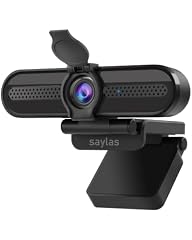
saylas 4K Webcam with Microphone
- Frame rate
- 60 fps or more
- Autofocus
- Yes
- Built-in microphone
- Yes
- Privacy cover
- Yes
$19.99 price as of 2026-10-01 05:40 UTC (Details)
The saylas webcam includes a privacy cover and a built-in microphone, and it does not list a resolution, but its name suggests 4K capability. This is a lightweight option for streamers who want privacy and a simple design.
Pros
- Built-in privacy cover for when you're off air
- Built-in microphone for basic audio capture
- Compact size that fits most monitors
- Autofocus and 60 fps output
Cons
- Resolution is not stated in the spec list, so 4K is not guaranteed
- No separate light or advanced tracking
- Microphone quality likely basic
Good fit if
- Streamers who want a simple, inexpensive webcam with a privacy shutter
- Users who don't need 4K and prefer a small footprint
Skip if
- You must have a confirmed 4K resolution
- You need advanced features like tracking or HDR
Verdict: A no-frills webcam with a privacy cover and mic, suitable for casual streaming.
9 Best 4K with dual mics and privacy

XFGsertXD 4K Webcam Streaming Web Camera 1080P 60FPS Autofocus USB
- Resolution
- 4K
- Frame rate
- 60 fps or more
- Autofocus
- Yes
- Built-in microphone
- Yes
$88.21 price as of 2026-10-01 05:43 UTC (Details)
This XFGsertXD model combines 4K output, 1080p at 60 fps, dual built-in microphones, and a 73-degree field of view. It also includes a privacy cover and autofocus, making it a complete package for streamers who want 4K and voice without extra gear.
Pros
- 4K resolution with 1080p60 output
- Dual built-in microphones for stereo sound
- Privacy cover included
- Autofocus for reliable focus
Cons
- No stated 4K at 60 fps
- Field of view is narrower than some other models
- Dual mics may not match external mic quality
Good fit if
- Streamers who want 4K and integrated audio in one device
- Users who need a privacy cover for day-to-day use
Skip if
- You need a wider field of view to capture more of your desk
- You already have a professional microphone and want a camera-only unit
Verdict: A well-equipped 4K webcam with dual mics and privacy, ideal for all-in-one streaming.
10 Best 1080p with software

NexiGo N960E 1080P 60FPS Webcam with Light
- Resolution
- 1080p
- Frame rate
- 60 fps or more
- Autofocus
- Yes
- Built-in microphone
- Yes
- Privacy cover
- Yes
$69.99 price as of 2026-10-01 05:38 UTC (Details)
The NexiGo N960E offers 1080p at 60 fps, a built-in light, and comes with companion software for adjusting exposure, white balance, and other settings. Its fast autofocus and privacy cover add convenience for streamers who want a smooth, adjustable full HD experience.
Pros
- 1080p at 60 fps with fast autofocus
- Built-in light for better visibility
- Software included for fine-tuning image settings
- Privacy cover for when you're not streaming
Cons
- Only 1080p, not 4K
- Software adds an extra layer to manage
- Microphone not present or not specified (pool does not list a mic)
Good fit if
- Streamers who want adjustable image settings without manual lens controls
- Users who need a privacy cover and a light in one device
Skip if
- You require 4K resolution
- You prefer a webcam with a built-in microphone
Verdict: A versatile 1080p webcam with software control and a light, great for tuning your stream's look.
11 Best 1080p with HDR
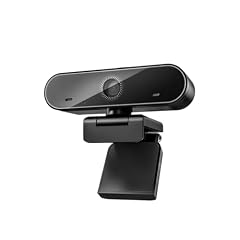
XFGsertXD 60FPS 1080P Live Streaming & Conference Webcam Dual
- Resolution
- 1080p
- Frame rate
- 60 fps or more
- Autofocus
- Yes
- Built-in microphone
- Yes
- Privacy cover
- Yes
$60.33 price as of 2026-10-01 05:43 UTC (Details)
This XFGsertXD model lists 1080p at 60 fps, HDR, dual noise-canceling microphones, and a privacy cover. The HDR support helps preserve details in high-contrast scenes, which is valuable for streamers with bright backlighting.
Pros
- 1080p at 60 fps with HDR for better dynamic range
- Dual noise-canceling microphones for clearer voice pickup
- Privacy cover included
- Autofocus for consistent focus
Cons
- No 4K option
- HDR may only work at 30 fps (not specified beyond name)
- Microphone quality depends on the noise-canceling implementation
Good fit if
- Streamers who face strong window light and need HDR
- Users who want a built-in mic with noise reduction
Skip if
- You need 4K resolution
- You prefer a webcam without a built-in mic
Verdict: A strong 1080p streaming webcam with HDR and dual mics, ideal for brightly lit rooms.
12 Best for conference-style streaming

XFGsertXD 60FPS Business Conference Webcam
- Frame rate
- 60 fps or more
- Autofocus
- Yes
- Built-in microphone
- Yes
- Privacy cover
- Yes
$56.68 price as of 2026-10-01 05:43 UTC (Details)
The XFGsertXD business webcam offers 60 fps, autofocus, HDR, dual noise-canceling mics, and a privacy cover. While it's labeled for conferences, it works well for streaming interviews or panel discussions where clear audio and a stable image are key.
Pros
- 60 fps output with HDR
- Dual noise-canceling microphones for clear speech
- Autofocus and privacy cover
- Wide compatibility with USB plug-and-play
Cons
- Resolution not specified (likely 1080p, but not stated)
- No 4K option
- May lack consumer streaming features like face tracking
Good fit if
- Streamers who host interviews or round-table sessions
- Users who need a reliable webcam for both streaming and video calls
Skip if
- You require 4K resolution
- You want advanced streaming features like PTZ or software overlays
Verdict: A dependable 60 fps webcam with strong audio and HDR, fitting for multi-purpose streaming.
Side by side
| # | Webcam | Resolution | Frame rate | Autofocus | Built-in microphone | Privacy cover | AI tracking |
|---|---|---|---|---|---|---|---|
| 1 | OBSBOT Tiny 2 Webcam 4K Voice Control PTZ | 4K | 60 fps or more | Yes | not stated | not stated | Yes |
| 2 | XFGsertXD 2K Web Camera 1080P 60FPS Streaming Autofocus C960 USB Webcam | 2K (1440p) | 60 fps or more | Yes | Yes | not stated | not stated |
| 3 | NexiGo N660P Pro 4K Webcam with Distortion-Free Lens | 4K | 60 fps or more | Yes | Yes | Yes | not stated |
| 4 | AOC 4K Webcam for PC with PDAF | 4K | 60 fps or more | Yes | not stated | not stated | not stated |
| 5 | N newline 4K Webcam for PC with PDAF Autofocus | 4K | 60 fps or more | Yes | Yes | Yes | not stated |
| 6 | OIEXEN 4K Ultra HD Webcam with Sony1/2.8" Sensor | 4K | 60 fps or more | Yes | not stated | not stated | not stated |
| 7 | NBPOWER 1080P 60FPS Streaming Camera Webcam | 1080p | 60 fps or more | Yes | Yes | not stated | not stated |
| 8 | saylas 4K Webcam with Microphone | not stated | 60 fps or more | Yes | Yes | Yes | not stated |
| 9 | XFGsertXD 4K Webcam Streaming Web Camera 1080P 60FPS Autofocus USB | 4K | 60 fps or more | Yes | Yes | not stated | not stated |
| 10 | NexiGo N960E 1080P 60FPS Webcam with Light | 1080p | 60 fps or more | Yes | Yes | Yes | not stated |
| 11 | XFGsertXD 60FPS 1080P Live Streaming & Conference Webcam Dual | 1080p | 60 fps or more | Yes | Yes | Yes | not stated |
| 12 | XFGsertXD 60FPS Business Conference Webcam | not stated | 60 fps or more | Yes | Yes | Yes | not stated |
How we picked
These picks come from a pool of 19 streaming webcams found in the catalog, reduced to 12 distinct models after removing near-duplicates. We shortlisted by checking that each unit lists at least 1080p resolution, a frame rate of 60 fps, and autofocus, then weighed extras like built-in microphones, privacy covers, and tracking. Since we could not test any camera, we rely only on the vendor-listed specifications and the manufacturers' official pages. Prices are displayed live on this page and may vary. Our goal is to help you compare features directly rather than guess which one looks better on paper.
How to choose
Resolution: is 4K worth it?
4K webcams capture more detail than 1080p, but streaming at 4K requires more bandwidth and encoding power. Many platforms still deliver 1080p to viewers, so a 4K camera mostly benefits recording and cropping flexibility. If you plan to punch in on the frame during editing, a 4K sensor gives you that freedom. Otherwise, 1080p at 60 fps might be enough for a clean, smooth stream.
Frame rate: 60 fps for motion clarity
A 60 fps webcam produces noticeably smoother motion, which is essential for games with fast panning or when you move quickly on camera. 30 fps can look choppy in these situations. Most picks here support 1080p at 60 fps, but only a few offer 4K at 60 fps. If you want 4K60, you'll need a high-bandwidth USB connection and a computer that can encode it, as discussed in the Microsoft UVC driver documentation.
Autofocus and lens quality
Autofocus keeps you sharp when you lean in or out of frame. Some models use PDAF (phase detection autofocus) for faster, more accurate focusing than standard contrast detection. Lens quality affects the image edge-to-edge; features like distortion-free lenses or large sensors (as seen in the website's Sony-based picks) can reduce blur and improve low-light performance. Always check the sensor size and aperture if those are listed.
Microphone and external audio
Built-in microphones are convenient, but they rarely match the clarity of a dedicated USB or XLR mic. If you already own a good microphone, you can choose a webcam without a built-in mic, such as the AOC 4K, to save money and reduce desk clutter. Conversely, the NBPOWER and XFGsertXD models include dual mics for out-of-the-box audio. For serious streaming, you'll likely want an external mic regardless.
Privacy covers and physical controls
A privacy cover is a simple shutter that blocks the lens when you're not streaming, providing peace of mind. Some webcams also offer physical toggles for mic muting or light control. These features are beneficial if you stream from a home office or share your space. The saylas and several XFGsertXD models include privacy covers, while the NexiGo N660P Pro adds a distortion-free lens with a cover.
Tracking and PTZ for dynamic shots
If you move around, consider a webcam with motorized PTZ (pan-tilt-zoom) or AI tracking. The OBSBOT Tiny 2 uses voice and gesture commands to follow you automatically, which is unique in this set. Such features require companion software and a bit more setup, but they turn your webcam into a hands-free camera operator. If you stay seated, a fixed camera with a wide field of view may be all you need.
Questions
Do I need a 4K webcam for streaming?
Not necessarily. Most streaming platforms cap the video at 1080p for the majority of viewers. A 4K webcam gives you extra detail for cropping, recording, and future-proofing, but it doesn't guarantee a sharper stream unless you have the bandwidth and encoder to handle 4K output. If you want a simpler setup, a 1080p at 60 fps webcam is often sufficient.
What does 60 fps do for my stream?
60 fps doubles the frame rate of a typical 30 fps camera, resulting in smoother motion and less visual stutter during fast movements like game action or when you gesture. It's important for content that involves rapid movement, but it does require more processing power for encoding. All picks here support at least 1080p at 60 fps, and a few support 4K at 60 fps if their specs indicate it.
Can I use an external microphone with these webcams?
Yes, all webcams connect to your computer via USB, so you can also plug in a separate USB microphone or interface. If you choose a webcam without a built-in mic, like the AOC 4K, you'll need an external audio source. Models with built-in mics still allow you to switch to an external mic in your streaming software. This gives you the flexibility to upgrade audio independently.
How important is a privacy cover?
A privacy cover physically blocks the lens when the camera is not in use, ensuring no one can remotely activate the camera to watch you. It's a simple but effective safeguard. Many webcams include one, or you can attach a separate lens cap. If you frequently step away from your desk, a privacy cover offers peace of mind without extra software setup.
Recent updates
- : First published.