
Best Angetube Webcams in 2026: 4 Picks Compared on Specs
The Angetube 4K Webcam with Microphone and Privacy Cover stands out as the best overall pick for most users: it combines 4K resolution, a built-in microphone, and a lens cover in a single device. To build this guide, we compared every Angetube webcam currently in our catalogue, looking at stated specifications such as resolution, microphone, autofocus, and extra features. No webcam was tested in-house; the comparison rests entirely on the specifications published by the seller and the maker.
4 picks from 5 webcams that match this guide with a price we can quote today. Every price below is live and carries the moment it was read.
The picks at a glance
| # | Pick | Webcam | Price |
|---|---|---|---|
| 1 | Best overall | Angetube 4K Webcam for PC w/Microphone | $44.95 price as of 2026-10-01 05:24 UTC (Details) |
| 2 | Best for streaming with ring light | Angetube Streaming Webcam with Microphone | $59.85 price as of 2026-10-01 05:24 UTC (Details) |
| 3 | Best 4K with ring light | Angetube 4K Webcam with Ring Light | $44.96 price as of 2026-10-01 05:24 UTC (Details) |
| 4 | Best for everyday meetings | Angetube 1080P Webcam with Microphone | $14.99 price as of 2026-10-01 05:24 UTC (Details) |
Which one should you buy?
- For esports streaming on a budget: If you want a ring light to even out harsh lighting and a microphone without spending extra, the Angetube Streaming Webcam with Microphone and Ring Light is a solid fit. See pick 2
- For remote meetings and classes: A simple 1080p webcam with autofocus and a built-in microphone, like the Angetube 1080P Webcam with Microphone and Autofocus, handles everyday video calls without fuss. See pick 4
- For 4K content creation with external audio: Content creators who already own a separate microphone can pair it with the Angetube 4K Webcam with Ring Light, which delivers 4K imagery and built-in lighting. See pick 3
- For privacy-conscious 4K users: If you need 4K, a microphone, and a way to block the lens when not in use, the Angetube 4K Webcam for PC with Microphone and Privacy Cover offers the most complete package. See pick 1
The 4 picks
1 Best overall

Angetube 4K Webcam for PC w/Microphone
- Resolution
- 4K
- Built-in microphone
- Yes
- Privacy cover
- Yes
$44.95 price as of 2026-10-01 05:24 UTC (Details)
This is the only Angetube webcam that combines 4K resolution, a built-in microphone, and a privacy cover. It delivers the highest video quality on this list while also covering the two most common needs: audio capture and lens security.
Pros
- 4K resolution, the highest available in this lineup
- Built-in microphone eliminates the need for a separate one
- Integrated privacy cover blocks the lens when not in use
- USB connection works with a wide range of computers
Cons
- No autofocus stated in the specifications
- No ring light for low-light conditions
- Microphone quality is not specified by the seller
Good fit if
- Users who want 4K video and do not want to buy a separate microphone
- People who value a physical privacy shutter for camera security
Skip if
- You need autofocus to track movement during video calls
- You require built-in lighting for dark environments
Verdict: The most complete Angetube webcam, balancing resolution, audio, and privacy in a single device.
2 Best for streaming with ring light

Angetube Streaming Webcam with Microphone
- Resolution
- 1080p
- Built-in microphone
- Yes
$59.85 price as of 2026-10-01 05:24 UTC (Details)
The integrated ring light provides even illumination, a common need for streamers, while the 1080p sensor and built-in microphone keep the setup simple. It is the only pick in this list that includes a lighting ring.
Pros
- Built-in ring light improves visibility in dim rooms
- 1080p resolution is sufficient for most streaming platforms
- Microphone is included, so no extra audio equipment is needed
- Simple USB plug-and-play design
Cons
- Not 4K, so it cannot match the detail of higher-end models
- No autofocus is stated, so focus may be fixed
- No privacy cover for the lens
Good fit if
- Streamers who need reliable lighting without extra equipment
- Users who want a single device for both video and audio
Skip if
- You require 4K video for professional content creation
- You need autofocus to stay sharp while moving
Verdict: A practical streaming webcam with built-in lighting and audio, ideal for beginners and casual streamers.
3 Best 4K with ring light
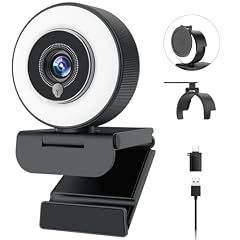
For users who already have a separate microphone, this webcam offers 4K resolution and a ring light in a clean package. It is the only 4K model here with built-in lighting, though it lacks a mic.
Pros
- 4K resolution provides sharp, detailed video
- Ring light helps correct poor lighting conditions
- USB connectivity works with desktop and laptop computers
- A compact design that blends into a desk setup
Cons
- No microphone, so external audio gear is required
- Autofocus is not specified
- No privacy cover for the lens
Good fit if
- Content creators who own a dedicated microphone
- Users who want 4K video and need extra lighting without adding a separate lamp
Skip if
- You expect a built-in microphone for calls
- You need autofocus to follow your movements
Verdict: A solid 4K webcam with lighting for those who keep their own audio setup.
4 Best for everyday meetings

Angetube 1080P Webcam with Microphone
- Resolution
- 1080p
- Autofocus
- Yes
- Built-in microphone
- Yes
$14.99 price as of 2026-10-01 05:24 UTC (Details)
This webcam handles the essentials for daily video calls: 1080p is enough for virtual meetings, the autofocus keeps you sharp when you shift position, and the built-in microphone saves you from buying one separately.
Pros
- Autofocus maintains focus as you move
- Built-in microphone is convenient for quick calls
- 1080p resolution meets standard video call needs
- Simple USB connection, no extra drivers required (UVC standard)
Cons
- No 4K option, limiting resolution for high-end use
- No ring light for low-light environments
- No privacy cover
Good fit if
- Remote workers and students who attend daily meetings
- Anyone who wants a fuss-free webcam with autofocus and audio
Skip if
- You need 4K video for professional recordings
- You require built-in lighting or a privacy shutter
Verdict: A reliable, feature-rich 1080p webcam that covers all the basics for remote communication.
Side by side
| # | Webcam | Resolution | Frame rate | Autofocus | Built-in microphone | Privacy cover | AI tracking |
|---|---|---|---|---|---|---|---|
| 1 | Angetube 4K Webcam for PC w/Microphone | 4K | not stated | not stated | Yes | Yes | not stated |
| 2 | Angetube Streaming Webcam with Microphone | 1080p | not stated | not stated | Yes | not stated | not stated |
| 3 | Angetube 4K Webcam with Ring Light | 4K | not stated | not stated | not stated | not stated | not stated |
| 4 | Angetube 1080P Webcam with Microphone | 1080p | not stated | Yes | Yes | not stated | not stated |
How we picked
We identified 4 Angetube webcams in our product catalogue, all listed with live prices that refresh on this page. From that pool we compared each model on the features that matter for video calls and streaming: maximum resolution, whether a microphone is built in, autofocus support, ring light inclusion, and a privacy cover for the lens. We also noted any use-case tags associated with a listing. We did not handle or test any of these units; our picks are based on the specifications stated in the catalogue and on the maker's published information. Prices are live, so none of our awards depend on price ranking.
How to choose
Resolution: 1080p vs 4K
The most obvious distinction between Angetube webcams is the maximum resolution. 1080p (Full HD) is sufficient for video conferencing, streaming at moderate bitrates, and most online classes. 4K offers four times the pixel count, which becomes useful if you crop into the image, record for later editing, or display on a 4K monitor. Remember that 4K streams consume more bandwidth and processing power, and some conferencing apps may still send 1080p or lower depending on your connection.
If you primarily talk to people in meetings and just need a clear, reliable image, 1080p is enough. If you create content where small details matter, a 4K model gives you more flexibility.
Microphone: Built-in or external
All Angetube webcams in this list except one include a built-in microphone. A webcam microphone is convenient for quick calls, but its quality is rarely specified by the seller. If you plan to record podcasts, stream music, or need studio-grade audio, you will likely want a separate USB or XLR microphone. For everyday use, the built-in mic on models with the 'Microphone' tag should be adequate for voice calls, but you should test it in your own environment.
If you already own a good microphone, you can save money by choosing the 4K model without a mic, but for most users a mic is a practical addition.
Autofocus and fixed focus
Autofocus automatically adjusts the lens to keep your face sharp when you move closer or farther from the camera. Only one Angetube webcam in this pool, the 1080p model, explicitly lists autofocus support. The others do not mention this feature, so they likely have a fixed focus set at a specific distance.
If you tend to lean back in your chair or stand up during calls, autofocus is worth having. If you stay at a consistent distance from the camera, a fixed-focus webcam can be perfectly fine and may even focus faster because it does not hunt.
Lighting: Ring lights and low-light performance
Two Angetube webcams come with a built-in ring light. This is a circular illumination ring around the lens that helps brighten your face in dim rooms, reducing shadows and improving clarity. Ring lights are especially useful if you stream in the evening or work in a space without controlled lighting.
However, a ring light is not a substitute for a high-quality sensor. Sensor quality and low-light performance are not specified in the catalogue, so if you frequently work in poorly lit rooms, you may still need a separate lamp. Webcams without a ring light rely on your existing lighting, so you might want to add a small desk light for better results.
Privacy: Lens covers and shutters
One Angetube model includes a built-in privacy cover, a physical sliding shutter that blocks the lens when you are not using the camera. This is a straightforward way to prevent accidental video transmission and gives peace of mind. Other models lack this feature, but you can always buy a separate lens cap or position the webcam to face a wall when idle.
Consider how often you want to physically cover the camera. If you are security-conscious, a model with an integrated cover avoids the hassle of remembering to attach an accessory.
USB connectivity and driver support
All Angetube webcams appear to use a standard USB connection. The vast majority of modern webcams conform to the USB Video Class (UVC) specification, which means they work with the operating system's built-in driver and require no additional software installation. For Windows users, Microsoft provides a system-supplied UVC driver that automatically handles video streaming. On Mac, the same standard allows plug-and-play.
Before buying, check that your computer has a free USB port and that your operating system supports UVC. In practice, almost any USB webcam works with Windows, macOS, and many Linux distributions without extra drivers. If you need to control camera settings like exposure or white balance, you might need the maker's software, but that is not specified for these models.
Questions
Do Angetube webcams work without installing drivers?
Most USB webcams follow the USB Video Class (UVC) standard, which allows Windows, macOS, and other operating systems to use them with a built-in driver. Microsoft provides a system-supplied UVC driver for Windows, so you typically just plug the webcam in and it appears as a camera. No Angetube model in this list explicitly mentions driver requirements, but given they are standard USB devices, they should work plug-and-play on modern systems.
Can I use an Angetube webcam for 4K video calls?
Yes, the two 4K models can capture 4K video, but the actual resolution you send during a call depends on the conferencing software and your internet connection. Many platforms like Zoom or Teams may negotiate a lower resolution, such as 1080p or 720p, to preserve bandwidth. For recorded content or streaming to a platform that supports 4K, you can output the full 4K signal if your computer and software handle it.
Which Angetube webcam is best for streaming on Twitch?
For Twitch, a 1080p webcam with a microphone and ring light, such as the Angetube Streaming Webcam with Microphone and Ring Light, is a very practical choice. The ring light ensures your face is well lit, and the built-in mic saves you from buying a separate one. If you want to shoot in higher resolution for YouTube or future editing, consider a 4K model, but remember that Twitch's maximum streaming quality is 1080p at 60 fps, so 4K is not required for that platform.
Does the Angetube 4K Webcam with Ring Light include a microphone?
No, the product name and specifications do not list a microphone for that model. You will need to use a separate microphone or rely on your computer's built-in microphone for audio. This can be a good choice if you already own a high-quality USB microphone and want to avoid paying for a webcam mic you will not use.
What does the privacy cover on the Angetube 4K Webcam do?
The built-in privacy cover is a physical shutter that slides over the lens to block it completely. This prevents the webcam from capturing any video when you are not using it, offering a simple hardware-based privacy feature. You can slide it open when you need to go on call, and close it when you are away from the desk.
Recent updates
- : First published.