
Best Diccik Webcams in 2026: 3 Picks Compared on Specs
The top pick among Diccik webcams is the 4K model, which offers the highest resolution in this small lineup along with a built-in microphone. The two 1080p models are simpler, with one adding a stated privacy cover. To choose between them, we compared the seller's listed specifications: resolution, mic, and privacy features. Prices are live from the catalog and update on the page. No one on our team has physically tested these units.
3 picks from 4 webcams that match this guide with a price we can quote today. Every price below is live and carries the moment it was read.
The picks at a glance
| # | Pick | Webcam | Price |
|---|---|---|---|
| 1 | Best overall | 4K Webcam with Microphone | $15.99 price as of 2026-10-01 05:23 UTC (Details) |
| 2 | Best 1080p with privacy cover | 1080P Webcam with Microphone | $18.99 price as of 2026-10-01 05:23 UTC (Details) Typical price: |
| 3 | Best entry-level 1080p | Diccik 1080P Webcam with Microphone | $9.99 price as of 2026-10-01 05:28 UTC (Details) |
Which one should you buy?
- For 4K streaming on a budget: If you want the highest resolution in this lineup, the 4K model gives you 4K video and a built-in mic in one unit. See pick 1
- For home office with privacy: The 1080p webcam with a stated privacy cover suits users who want a physical shutter for video calls. See pick 2
- For simple video calls: The entry-level 1080p model is a no-frills option for basic calls and virtual meetings. See pick 3
The 3 picks
1 Best overall

4K Webcam with Microphone
- Resolution
- 4K
- Built-in microphone
- Yes
$15.99 price as of 2026-10-01 05:23 UTC (Details)
The only 4K model in this selection, it offers the highest stated resolution of the three Diccik webcams. It also has a built-in microphone, so you can run video and audio with one cable. The other two models are 1080p, which makes this one the clear choice when detail matters.
Pros
- 4K resolution, the only 4K model in this list
- Built-in microphone
- No separate mic needed for basic calls
Cons
- Privacy cover not stated by the seller
- Frame rate not stated by the seller
- Field of view not stated by the seller
Good fit if
- Streamers who want 4K output for recording or live video
- Users who want a single-cable setup with a mic
Skip if
- People who need a physical privacy shutter
- Those who only require 1080p and prefer a simpler model
Verdict: The Diccik 4K webcam is the best choice here if sensor resolution matters most.
2 Best 1080p with privacy cover

1080P Webcam with Microphone
- Resolution
- 1080p
- Built-in microphone
- Yes
- Privacy cover
- Yes
$18.99 price as of 2026-10-01 05:23 UTC (Details) Typical price: $19.99, 5% off
The only Diccik model that states a privacy cover, this 1080p webcam also has a built-in microphone. Compared with the 4K pick, it trades resolution for a physical shutter, which is a practical feature for private video calls. The basic 1080p model lacks the cover, so this one is the better fit if privacy is a priority.
Pros
- 1080p resolution, enough for most meetings and streams
- Built-in microphone
- Stated privacy cover
Cons
- Not 4K
- Field of view not stated by the seller
- Frame rate not stated by the seller
Good fit if
- Home office users who want a lens cover
- Anyone who needs a straightforward 1080p camera with a mic
Skip if
- Streamers who want 4K resolution
- Users who prefer a camera without extra physical features
Verdict: This is the most secure Diccik webcam in the list, thanks to its stated privacy cover.
3 Best entry-level 1080p
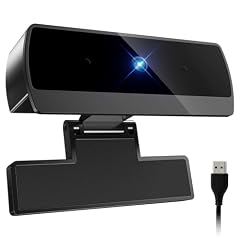
Diccik 1080P Webcam with Microphone
- Resolution
- 1080p
- Built-in microphone
- Yes
$9.99 price as of 2026-10-01 05:28 UTC (Details)
The simplest model here, this webcam offers 1080p video and a built-in microphone without extra features. It is the most basic Diccik option, so it is easy to set up for everyday video calls. The other 1080p model adds a privacy cover, but the price difference may not matter to you if you don't need the shutter.
Pros
- 1080p resolution
- Built-in microphone
- Minimal feature set that keeps setup simple
Cons
- Privacy cover not stated by the seller
- Frame rate not stated by the seller
- Field of view not stated by the seller
Good fit if
- Users who want a no-frills webcam for occasional calls
- People replacing a broken laptop camera with a simple USB option
Skip if
- Those who need a physical privacy shutter
- Those who want 4K or extra lighting options
Verdict: A straightforward 1080p webcam with a microphone for basic use.
Side by side
| # | Webcam | Resolution | Frame rate | Autofocus | Built-in microphone | Privacy cover | AI tracking |
|---|---|---|---|---|---|---|---|
| 1 | 4K Webcam with Microphone | 4K | not stated | not stated | Yes | not stated | not stated |
| 2 | 1080P Webcam with Microphone | 1080p | not stated | not stated | Yes | Yes | not stated |
| 3 | Diccik 1080P Webcam with Microphone | 1080p | not stated | not stated | Yes | not stated | not stated |
How we picked
The pool for this article contains the Diccik webcams currently listed in our catalog, matching the brand filter. That pool holds three models. We shortlisted all three because none is a near-duplicate. We compared them on the specifications the seller provides: resolution, built-in microphone, and privacy cover. Where a specification is not given, we say it is not stated by the seller. Prices are read live from the store listing and appear with their own time stamp on the page. No one on our team has tested these units; the guide is based only on the stated specifications and the linked technical references.
How to choose
Resolution: 1080p or 4K
1080p is the baseline for clear video calls and streaming. 4K gives you more detail if you record or crop, but it also requires more bandwidth and a display that can show it. Among the three Diccik models, one has a stated 4K sensor, while the other two are 1080p. For everyday meetings, 1080p is often enough; for content creation, 4K is a better match.
Built-in microphone and audio quality
All three Diccik webcams list a built-in microphone. That means you don't need a separate headset for basic calls. If you need noise cancellation or a boom arm, you'll want an external mic; the catalog does not state whether any of these models has noise cancellation. The 4K model's name includes 'Auto Light' but that is not a formal specification.
Privacy: lens covers and camera permissions
One Diccik model lists a privacy cover; the other two do not state one. If you want a physical shutter, choose the model with a stated cover. You can also control camera access through your operating system. Microsoft Windows lets you manage app permissions for the camera in Settings > Privacy & security > Camera. On Mac, you can revoke access for individual apps in the system privacy settings.
Compatibility and drivers
Webcams that follow the USB Video Class (UVC) standard need no proprietary driver; the OS detects them automatically. Microsoft's UVC driver works for devices that implement the specification. None of the Diccik listings states whether the camera is UVC-compliant, but most modern USB webcams are. You can confirm after plugging it in; if it appears as a video device without an installation disc, it's using the system driver.
Questions
Do Diccik webcams work with Windows and macOS?
The listings do not state operating system compatibility. Because most modern webcams follow the USB Video Class standard, they usually work with Windows, macOS, and ChromeOS without extra drivers. To be certain, check the product page's compatibility notes or test the camera after plugging it in. If a model is not UVC-compliant, you might need vendor software, which the listings do not mention.
What does the privacy cover on one model do?
The 1080p webcam with the RGB light in its name lists a privacy cover. A physical cover slides over the lens when you are not using the camera, blocking the image. The other two models do not state a privacy cover. If privacy is a priority, choose the model with the cover or use the operating system's camera permission settings to disable access when needed.
Can I use a Diccik webcam for streaming?
Yes, the 4K model has a higher resolution that can help in streaming. The 1080p models are also usable for streaming at 1080p. None of the listings states the frame rate, so you should verify the output frames per second before buying if you need smooth video for fast motion. Streaming software like OBS will detect the camera as a standard capture device if the driver is UVC-based.
Do these webcams need extra software?
The catalog does not mention any companion software. If a webcam uses the USB Video Class driver, Windows and macOS handle it without extra installation. Some advanced features like auto light or light correction may require vendor software, but that is not stated for these models. Without such software, you'll likely rely on the camera's automatic exposure and your system's video settings.
Recent updates
- : First published.